

Appendix A: Connection of the Data Logger to Ethernet
A.1 IP-addressing
Section titled “A.1 IP-addressing”At communication of the device via Ethernet network over TCP/IP protocol, in order to distinguish the data transmitter and recipient, every device uses a special setting of IP-addressing.
The device keeps in memory:
- Its own unique IP-address within one subnet (four bytes recorded as four integral numbers in range 0-255, separated by dots)
- Subnet mask, which is the same for all devices in the subnet (written similarly to IP-address)
- IP-address gateway, which is used for communication with other networks
Subnet Configuration Rules
Section titled “Subnet Configuration Rules”For correct communication of the devices in the subnet, observe the following provisions:
-
Subnet Mask: Should be the same for all devices in that sub network. As a rule, in small local sub networks, the mask 255.255.255.0 is used. The mask begins with a group of bits set in 1, followed by the group of bits set in 0.
-
Network Address: Group of bits in IP-addresses of devices which are set in mask to 1 are similar and represent the address of subnet. For mask 255.255.255.0 in local subnets, addresses beginning with 192.168.0.x are most commonly used.
-
Host Address: Group of bits in IP-addresses of devices which are set in mask to 0 is unique for every device within one sub network.
Gateway Configuration
Section titled “Gateway Configuration”In most cases, a new device (for example, a router) which is connected to network already has connection with other networks. Often the addresses 192.168.0.1, 192.168.0.100 or 192.168.0.101 are reserved for it. In this case, other devices in the network receive IP-Address of this device as a gateway address.
Indication of this address is not obligatory for communication between devices in the subnet and is used only for communication of devices of one subnet with devices in other subnets.
Factory Settings
Section titled “Factory Settings”Table A.1 - Factory IP Settings
| Parameter | Value |
|---|---|
| IP-address | 192.168.0.2 |
| Subnet mask | 255.255.255.0 |
| Gateway | 192.168.0.1 |
For the data logger communication with a client-device (and any other devices in the same subnet), the mask 255.255.255.0 and addresses starting with 192.168.0.x are used. The fourth byte of address can be any value in range 1–255, except 2.
In case of indirect connection (between RPM-416 and client-device), and in a network with several devices, the address cannot be equal to any of the addresses of other devices in the subnet.
A.2 Setting of Client-Device
Section titled “A.2 Setting of Client-Device”Setting of addressing of client-device should be performed according to the documentation of this device and the software used in it.
Example: Windows 7/8/10/11 Configuration
Section titled “Example: Windows 7/8/10/11 Configuration”To configure a personal computer (PC) with Windows for direct connection to RPM-416 with factory settings:
- Enter into OS with profile of administrator
- Select Start → Control Panel
- Select category Network and Internet
- Open item Network and Sharing Center
- In the list of tasks (on the left of panel) select Change adapter settings
In the opened screen of connections, select the adapter which addressing should be changed. Many computers have only one adapter, which will be shown in this screen.
- Right-click on the icon of the selected adapter, in the appeared menu select Properties
- In the opened screen, in the list of connection components select Internet Protocol Version 4 (TCP/IPv4)
- Make sure that component is activated (marked by checkbox in the list)
- Press the button Properties
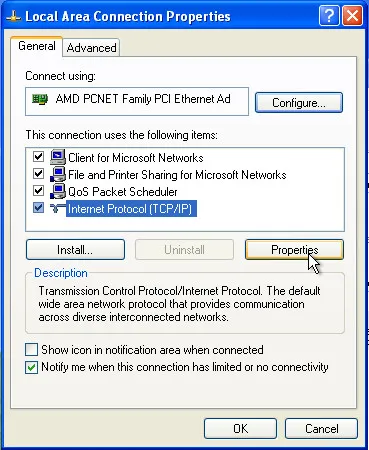
Fig. A.1 – Example of connection properties screen in Windows
- Select the option Use the following IP address
- In field IP-Address enter an address in range 192.168.0.1–192.168.0.255 (except 192.168.0.2, which is used by the data logger)
- In field Subnet mask enter 255.255.255.0
- Leave the fields Default gateway, Preferred DNS server, Alternate DNS server blank
- Press OK to close the window of protocol setting
- Press OK to close the window of adapter setting
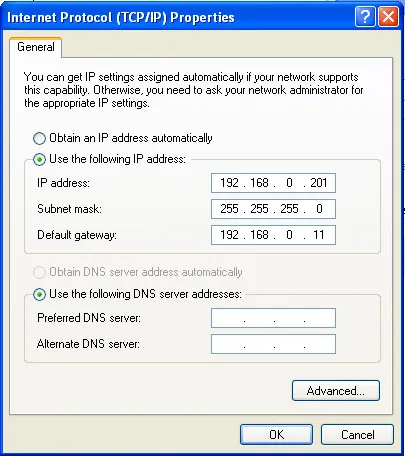
Fig. A.2 – Example of protocol TCP/IPv4 properties screen in Windows
After completing these steps, your PC should be able to communicate with the RPM-416 data logger.