

Additional Software
This page lists the software available for configuring and monitoring the Overvis OB-216 Digital Input/Output Module.
Control Panel OB-215/OB-216
Section titled “Control Panel OB-215/OB-216”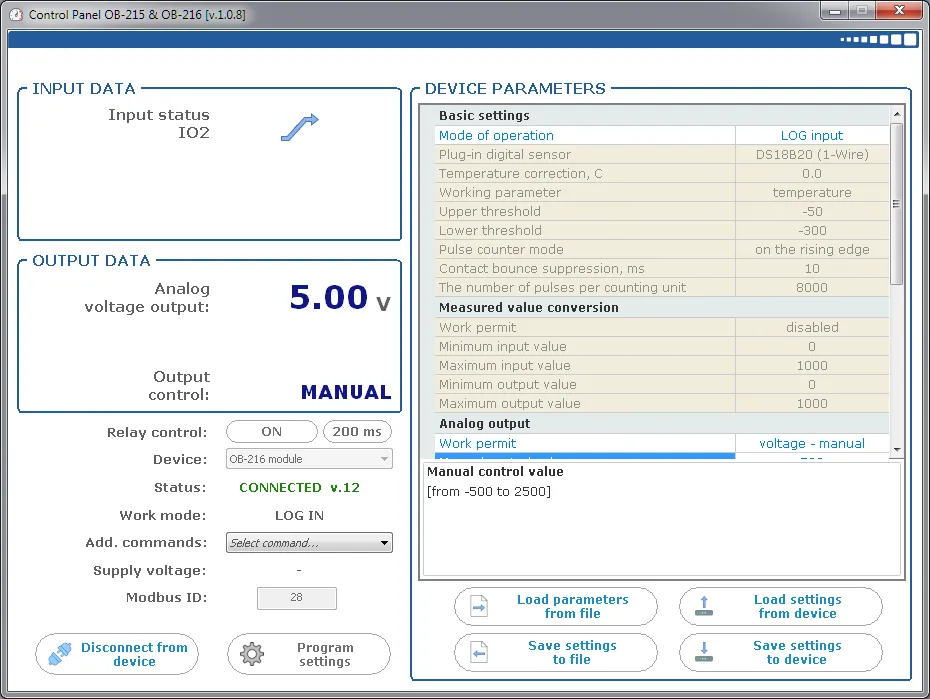
Control Panel OB-215/OB-216 is a Windows application for configuring the OB-215 and OB-216 through their Modbus communication interfaces.
Use the application to:
- Connect to the OB-216 through USB or RS-485.
- Read device status and measured values.
- Configure the operating mode, connected sensor, communication settings, thresholds, scaling, pulse counting, and analog output.
- Save settings to the device.
- Upgrade the device firmware.
For initial connection and configuration instructions, see Quick Start and Application Setup.
Download: setup_cpl_ob21x(ver1.0.8).exe