

RPM-416 Operating Manual
NOVATEK-ELECTRO LTD
Intelligent industrial electronic
MICROPROCESSOR-BASED DATA LOGGER RPM-416
OPERATING MANUAL
Quality control system on the development and production complies with requirements ISO 9001:2015
Dear customer,
Company NOVATEK-ELECTRO LTD. thanks you for purchasing our devices.
You will be able to use properly the device after carefully studying the Operating Manual.
Keep the Operating Manual throughout the service life of the device.
UKRAINE, Odesa — www.novatek-electro.com
IT IS NOT ALLOWED WATER PENETRATION ON TERMINALS AND INTERNAL ELEMENTS OF THE DEVICE.
During operation and maintenance the regulatory document requirements must be met, namely:
- Regulations for Operation of Consumer Electrical Installations
- Safety Rules for Operation of Consumer Electrical Installations
- Occupational Safety when in Operation of Electrical Installations
Installation, adjustment and maintenance of the device must be performed by qualified personnel having studied this Operating Manual.
The data logger connection, setting and maintenance should be made only by authorized personnel who have studied this operating manual.
While repair work, maintenance work, installation work it is necessary to disconnect the data logger and incoming measuring lines from the power supply.
The device is safe for operation under observing the rules of exploitation.
This operation manual is intended for description, principle of work, construction, mode of work and maintenance of the microprocessor-based data logger RPM-416 (further in text as «data logger», «RPM-416» or «device»).
The device meets the requirements of the following:
- EN 60947-1
- EN 60947-6-2
- EN 55011
- EN 61000-4-2
Harmful substances, in more than allowed concentration, are not available.
Terms and Abbreviations
Section titled “Terms and Abbreviations”- Twisted pair – a pair of isolated signal line wires in cable twisted between themselves for reduction of transmitted signals distortions
- THDr – total harmonic distortion, of a signal is a measurement of the harmonic distortion present and is defined as the ratio of the sum of the powers of all harmonic components to the power of the fundamental frequency. THD is used to characterize the linearity of power quality of electric power systems
- Display – a symbolic LCD display 4 lines of 20 symbols
- Cursor – a screen symbol ◄ ►, showing the current position to which the action will be used
- Memory card – a portable flash-memory card SD / MMC, which is used for multiple recording and storage of information in the portable electronic devices
- EM – Expansion Module (a device connected to the data logger for expansion of incoming signals range)
- MM – Measuring Module (is a part of data logger scheme)
- PC – Personal Computer
- OS – Operating System
- On default – preset parameters values which are used by the data logger until the user explicitly changes them
- Dry contact – a terminal which has no galvanic connection with power supply lines and “ground” (for example: mechanical button, hermetic contact, relay contacts, standard and limit switches)
- CT – Current Transformer intended for transmitting the signal of measuring information (for example: Т-0.66, TOP-066, TSHP-0.66 etc. with accuracy class index 0.5 or 0.5 S)
- Formatting – the process of recording in the memory card file system structure (FAT12, FAT16 or FAT32), which makes it possible to use the memory card in operational system for data storage
- Screen – full-scale (4 lines with 20 symbols) image output on the display
- 10Base-T – a standard Ethernet for linking up via twisted pairs with speed 10 Mbit/sec
- 100Base-T – a standard Ethernet for linking up via twisted pairs with speed 100 Mbit/sec
- DHCP – network protocol which enables the devices to receive automatically IP-addresses and other parameters necessary for work in TCP / IP networks
- Ethernet – package technology of data transmitting mainly used in computer local networks
- FTP – standard protocol of files transmitting in TCP / IP networks
- Modbus TCP – open communicational protocol based on “client-server” architecture. It is used for data transmitting in TCP / IP networks
- MAC – address used in transmitting via Ethernet for device identification. As a rule it has a global unique denotation
- RMS – root mean square value
- RJ-45 – unified connector used for connection in networks via standard 10Base-T/100Base-T
- RJ-11 – unified connector used for connection of telephone or communicational equipment
- Web-interface – system of user interaction with device via computer browser
1 Purpose
Section titled “1 Purpose”1.1 Device’s Purpose
Section titled “1.1 Device’s Purpose”Data logger RPM-416 is a microprocessor-based device intended for electrical parameters measuring and monitoring on the data logger display as well as data archiving.
The data archiving is made on the removable memory card (SD / MMC), which can be later analyzed by software program RPM-416 Data Analysis (the program can be found on website www.novatek-electro.com), installed on the standard or portable PC. Data files have extension “RDF”.
Data logger RPM-416 has an inbuilt real time clock with power from a lithium-type battery.
RPM-416 can be connected to Ethernet network via standard 10Base-T or 100Base-T. In this case simultaneously with data recording to memory card, the RPM-416 configuration and data transmitting to the PC is possible.
RPM-416 can connect to the system Overvis (monitoring and remote control www.overvis.com).
The main possibilities of the data logger:
- Multi-channeling – one data logger is sufficient for all working data receiving from the controlled device
- Versatility – the additional modules can be connected to the data logger which makes it possible to expand the range of incoming signals (voltage, current, temperature, discrete inputs, etc.)
- Galvanic separation – incoming signals of high voltage and current are galvanic separated from other inputs which ensures easiness of data logger connection
- High fidelity – self-control system and data saving algorithm protect against data loss in case of emergency situations (power supply failure)
- Servicing convenience – four-lined symbolic display with illuminating enables to adjust the data logger and monitor its work (the values of recorded incoming signals are shown on the display), the keyboard is used for setting and control of the data logger
- Remote monitoring and configuration – if the data logger is installed in a hard accessible place with Ethernet connection it can simultaneously with the data recording on the memory card make data transmitting to PC. It enables to make a remote monitoring of the object. The more detailed analysis can be made on the basis of the data stored on the memory card. Web-interface enables via PC browser to make a remote configuration of the data logger without installing any other additional programs. FTP provides remote access to the memory card to retrieve or delete files.
1.2 Controls, Overall and Installation Dimensions
Section titled “1.2 Controls, Overall and Installation Dimensions”1.2.1 Overall and Installation Dimensions
Section titled “1.2.1 Overall and Installation Dimensions”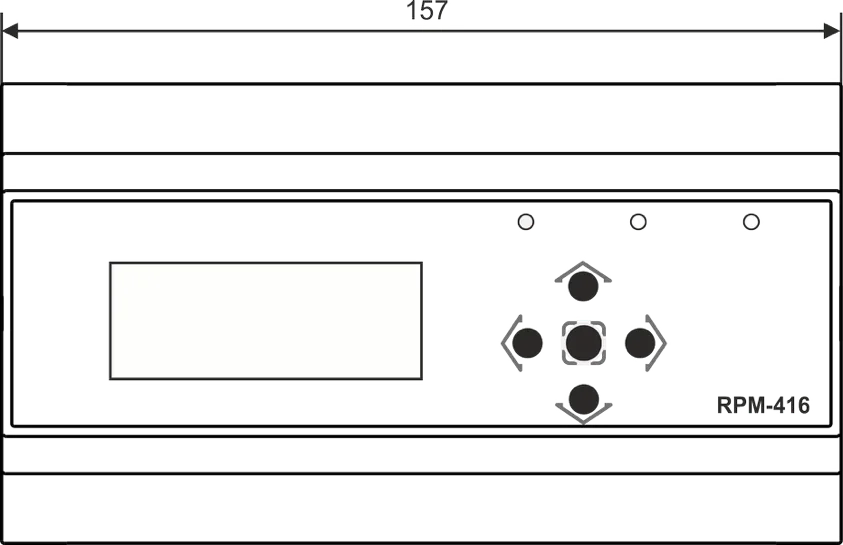
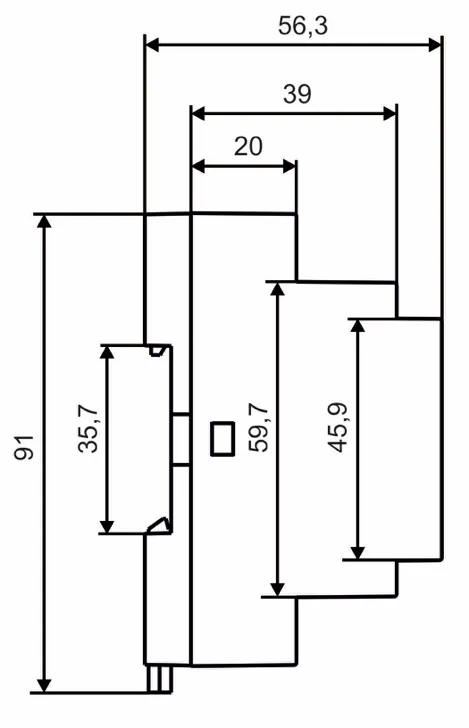
Figure 1.1 – Data logger design with overall and fixing dimensions
1.2.2 Controls
Section titled “1.2.2 Controls”On the data logger front panel there are located the elements of control (five-button keyboard) and indication (LED symbolic display), Fig. 1.2. With the help of the keyboard are made all the settings of the data logger operation parameters and initiation of incoming signals values recording to the memory card. The current values of the data logger operation, the values of incoming signals and data logger state information are shown on the display.
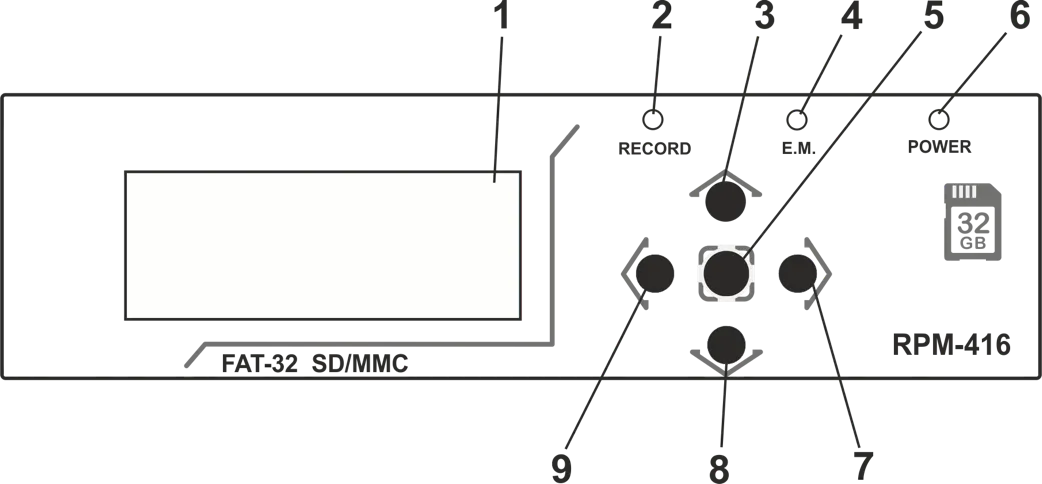
1 – Display (yellow-green indication)
2 – LED indicator RECORDING (light on – when the data recording on the memory card is initiated, light off – when the data recording on the memory card is finished, flare up – when the data recording on the memory card is paused, flickering – when there is at least one error in the data logger operation)
3 – Button ▲ (up) is used for moving the indicator upwards or for increasing parameter value
4 – LED indicator E.M. (E.M. light on – when at least one expansion module is connected, flickering – when there is data transmitting between expansion modules, light off – when the expansion modules are not connected)
5 – Button ◙ (enter) is used for value entry approval or menu item choice
6 – LED indicator POWER (light on – when the power is on, light off – when the power is off)
7 – Button ► (right) is used for moving the indicator to the right
8 – Button ▼ (down) is used for moving the indicator downwards or for decreasing the parameter value
9 – Button ◄ (left) is used for moving the indicator to the left
Figure 1.2 – The data logger controls
1.3 Working Conditions
Section titled “1.3 Working Conditions”The data logger RPM-416 is intended for working in the following conditions:
- Ambient temperature: from -20 to +45 ºС
- Atmospheric pressure: from 84 to 106.7 kPa
- Relative air humidity (at temperature +25 ºС): 30 … 80%
2 Completeness of Set
Section titled “2 Completeness of Set”Delivery set is given in Table 2.1.
Table 2.1 – Delivery Set
| Name | Quantity, pcs. |
|---|---|
| RPM-416 | 1 |
| External memory storage (memory card) | 1 |
| Connection cable with Ethernet network | 1 |
| Operating Manual | 1 |
| Package | 1 |
3 Technical Specification of RPM-416
Section titled “3 Technical Specification of RPM-416”3.1 Basic Technical Features
Section titled “3.1 Basic Technical Features”The basic technical features of RPM-416 are shown in Table 3.1.
Table 3.1 – Basic technical features
| Item | Value |
|---|---|
| Nominal operating supply voltage (Un) | 230/240 V |
| Performance capacity voltage (AC/DC) | 24 – 265 V |
| Power-line frequency | 45 – 65 Hz |
| Power consumption (from line ~230 V) | ≤ 6.0 W |
| Power consumption (from power source +24 V) | ≤ 2.2 W |
| Period of data recording to the memory card | 0.001 – 3600 s |
| External memory storage (memory card) | SD (v1.0, v1.1) / SDHC, Class 4, 6, 10 |
| Maximal capacity of external memory card | 32 GB |
| Supported file systems of external memory card | FAT12, FAT16, FAT32 |
| Minimal size of data file | 32 KB |
| Maximal size of data file | 512 MB |
| Size of one block of recorded data (20 parameters) | 88 bytes |
| Error of clock run, at temperature 25 ºС | ≤ 1 s/day |
| Connection to Ethernet or PC | 10Base-T / 100Base-T |
| Modbus TCP | yes |
| Web-interface | yes |
| FTP | yes |
| The intent of the device | Digital indication devices |
| Nominal working mode | continuous |
| Protection class rating (case / terminal block) | ІР40/IP20 |
| Protection class from electric shock | II |
| Climatic version | NF 3.1 (average and cold zone, indoor) |
| Pollution level | II |
| Overvoltage category | II |
| Isolation nominal voltage | 450 V |
| Nominal impulse withstand voltage | 2.5 kV |
| Cross-section area of connection terminals | 0.2 – 2.5 mm² |
| Terminal screw torque | 0.4 N*m |
| Weight | ≤ 0.5 kg |
| Overall dimensions | 91 × 157 × 56.3 mm |
| Mounting | DIN-rail 35 mm, orientation user-defined |
3.2 Input Characteristics
Section titled “3.2 Input Characteristics”Input characteristics of RPM-416 are shown in Table 3.2. Measurement error is shown in ± % of scale value.
Table 3.2 – Inputs characteristics
Voltage Input (3 channels)
Section titled “Voltage Input (3 channels)”| Item | Value |
|---|---|
| Voltage measuring range | 3 – 450 V |
| Voltage measuring error (for a sine signal) | to 300 V: ± 1%, exceed 300 V: ± 1.5% |
| Voltage measuring type | RMS / Instant / Peak |
| Voltage frequency measuring range | 25.00 – 70.00 Hz |
| Voltage frequency measuring error (for sine signal) | ± 0.05 Hz |
| THDr measuring range | 0 – 100% |
| THDr measuring error (if the signal level more than 14% of the range) | ± 2% |
Current Input (4 channels)
Section titled “Current Input (4 channels)”| Item | Value |
|---|---|
| Current measuring range | 0.05 – 10.00 A |
| Current measuring error (for a sine signal) | ± 2.5% |
| Current measuring type | RMS / Instant / Peak |
| Current sensor type | CT with output 5 A |
| Supported rating values CT | from 5 to 9999 A |
| Current frequency measuring range | 25.00 – 70.00 Hz |
| Current frequency measuring error (for sine signal) | ± 0.05% |
| Overload capability 50 A (not often than once a minute) | ≤ 0.3 s |
| THDr measuring range | 0 – 100% |
| THDr measuring error (if the signal level more than 14% of the range) | ± 2% |
Working Power Input* (3 channels)
Section titled “Working Power Input* (3 channels)”| Item | Value |
|---|---|
| Active power measuring range | 30 – 200,000,000 W |
| Reactive power measuring range | 30 – 200,000,000 VAr |
| Gross power measuring range | 30 – 200,000,000 VA |
| Power factor measuring range | 0.01 – 1.000 cos φ |
| Power measuring error (for a sine signal) | ± 3.5% |
| Maximum value of active energy scaler | 999,999,999 kW*h |
| Maximum value of reactive energy scaler | 999,999,999 kVAr*h |
* Power input has no physical connection terminals, the power parameters are calculated on basis of measured values of voltage and current.
Temperature Input (2 channels)
Section titled “Temperature Input (2 channels)”| Item | Value |
|---|---|
| Temperature sensor type | PTC1000 / PT1000 |
| Temperature measuring range for PTC1000 | from -50.0 to +120.0 ºС |
| Temperature measuring range for PT1000 | from -50.0 to +250.0 ºС |
| Temperature measuring error | ± 1.5 °C |
Analog Voltage Input 0–10 V (1 channel)
Section titled “Analog Voltage Input 0–10 V (1 channel)”| Item | Value |
|---|---|
| Voltage measuring range | 0.01 – 10.00 V |
| Voltage measuring error | ± 1.0% |
| Voltage sensor type | 0 – 10 V |
Analog Current Input 0–20 mA (1 channel)
Section titled “Analog Current Input 0–20 mA (1 channel)”| Item | Value |
|---|---|
| Current measuring range | 0 – 20 mA |
| Current measuring error | ± 1.0% |
| Current sensor type | 0 – 20 mA |
Digital Input (4 channels)
Section titled “Digital Input (4 channels)”| Item | Value |
|---|---|
| Measuring range | closed – opened |
| Digital signal sensor type | Dry contact |
| Pulse frequency measurement range | 1 – 15,000 pulse/min |
| Maximum value of pulse scaler | 999,999,999 |
4. Design and Operation Principle
Section titled “4. Design and Operation Principle”4.1 Design
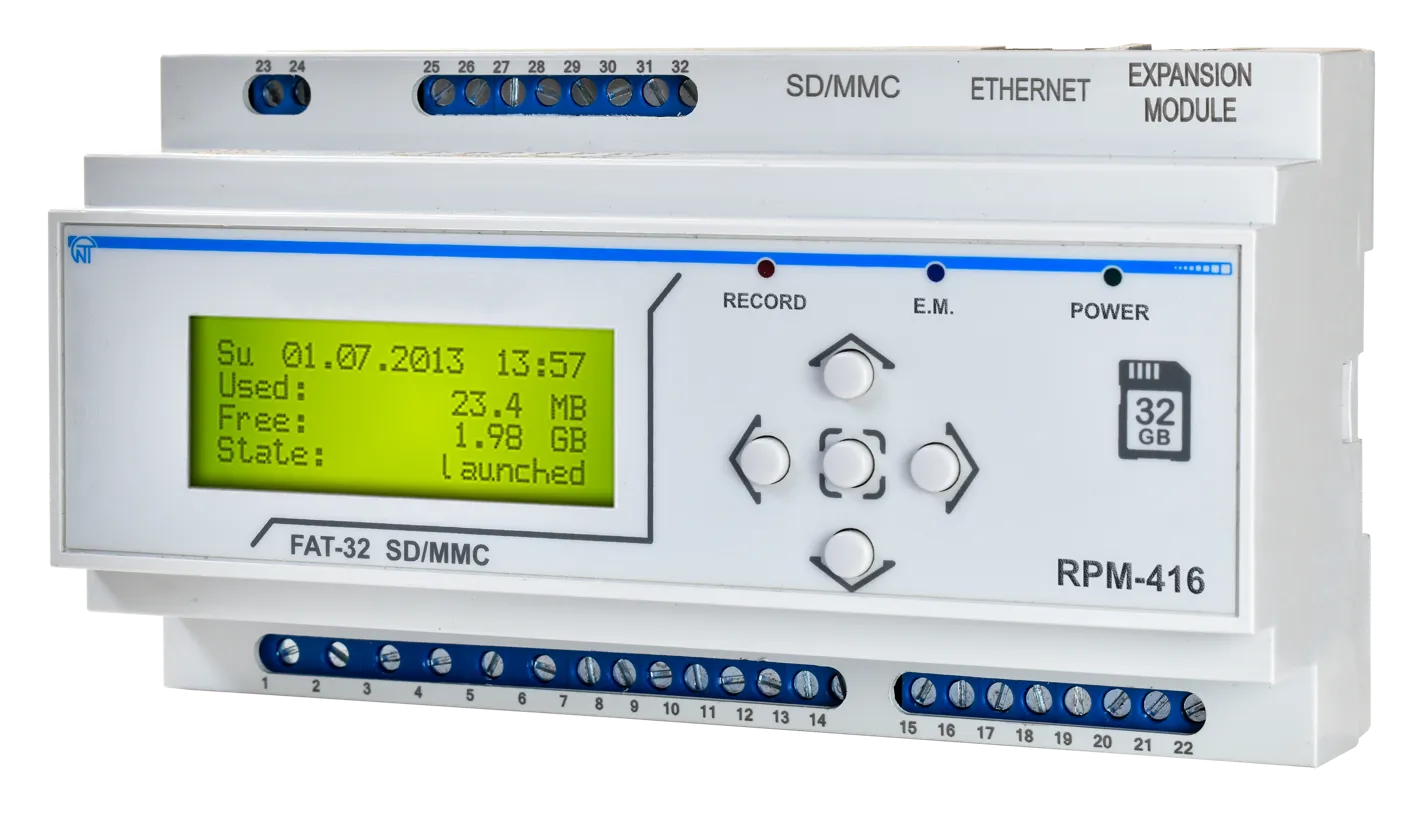
Section titled “4.1 Design”RPM-416 is constructively made in a plastic case intended for fixing on DIN-rack 35 mm, case dimensions (91×157×56.3 mm) 9 modules of S type. The case is made of crashworthy, self-extinguishing material.
4.2 Operation Principle
Section titled “4.2 Operation Principle”The data logger operation principle is based on measuring values from all sensors connected to the data logger inputs, accumulating the data in the data logger internal memory and data recording to the external memory storage – memory card (SD / MMC).
4.3 Real Time Clock
Section titled “4.3 Real Time Clock”The data logger is equipped with an inbuilt real time clock which is powered (in case of main power failure) from an inbuilt backup power cell – lithium type battery. The power from the backup supply is sufficient for continuous operation of the real time clock during 10 years (at temperature 25 ºС). In case of data logger operation at temperatures on the limits of the working range, the working period of the clock decreases.
5. Connection
Section titled “5. Connection”5.1 Preparing for Connection
Section titled “5.1 Preparing for Connection”- Unpacking the device (we recommend saving the original package throughout the guarantee life period of the device);
- Ensure that the device has no damages after transportation, in case of such refer to supplier or maker;
- Check the completeness of set (see section 2), in case of non-completeness refer to supplier or maker;
- Study User’s Manual carefully (special attention should be paid to the power supply connection diagram of the device);
- If there are issues concerning device’s installation, please refer to the maker by phone indicated in the end of this Manual.
5.2 General Instructions
Section titled “5.2 General Instructions”If the temperature of the device after transportation or storage differs from the environment temperature at which it is expected to operate, then before connection to electric mains keep the device under operating conditions within two hours (because the device elements may have moisture condensation).
To ensure the reliability of electrical connections, one should use flexible (stranded) wires with insulation for a voltage not less than 450 V. Recommended cable cross-sections to measure current is within 1.5 – 2.5 mm², for the rest of connections it is within 0.75 – 2.5 mm². The wire ends should be cleared from insulation for 5±0.5 mm and clamped by a sleeve lug. Fixation of wires should exclude mechanical damages, twisting and abrasion of wires’ insulation.
When reducing the tightening torque, the junction point is heated, terminal block may be melted and wire can burn. If you increase the tightening torque, it is possible to have thread failure of terminal block screws or the compression of the connected wires.
For reduction of electric field influence, the installation of “data logger-sensor” lines should be made as a separate route (or several routes). The routes should be located separately from power cables as well as away from cables which make high frequency and impulse noise. The routes should be planned in such a way that the length of signal lines is minimal.
The connection of expansion modules is made with the help of cable CEM-11-1 (see section 5.4, the cable is supplied along with every expansion module).
The connection of the data logger to Ethernet network is carried out by the cable made according to the standard ANSI EIA TIA 568B (see section 5.5, the cable is supplied along with the data logger).
During use of backup power supply, the connection is made to the same terminals as the main power source. It is necessary to have a scheme ABI (Automatic Backup Input) for switching from the main power source to the backup power supply.
For ensuring continuous data recording, ABI should switch power supply to backup source within a period not more than 0.5 sec.
5.3 Connection Diagram
Section titled “5.3 Connection Diagram”The connection of RPM-416 is made according to the scheme shown in Figure 5.1.
In order to improve safety in the power circuit, it is recommended to install a fuse with nominal value of 3.15 A.
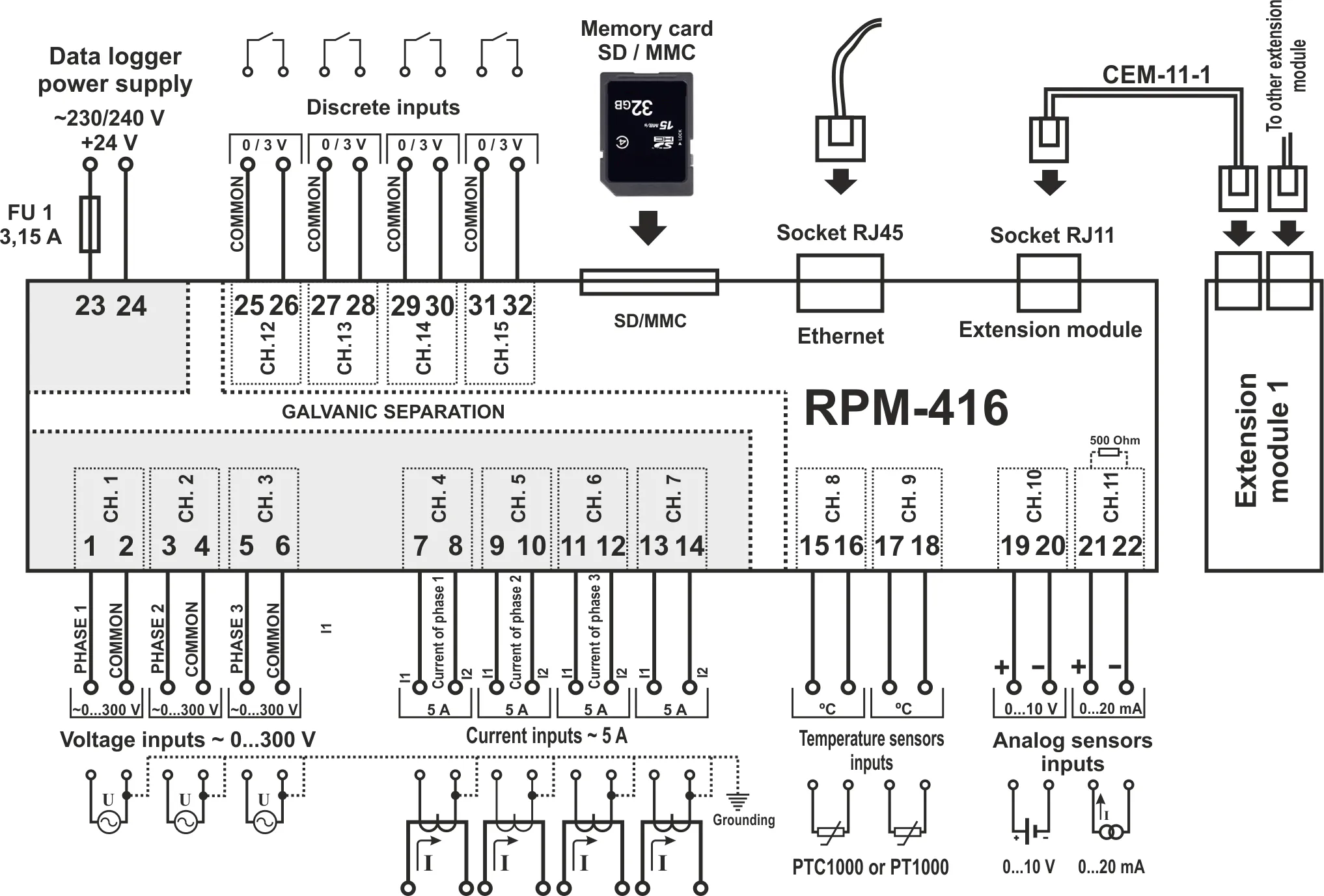
FU1 – The fuse (circuit breaker) for current 3.15 A
Figure 5.1 – Connection diagram of RPM-416
5.4 Connection of Expansion Modules
Section titled “5.4 Connection of Expansion Modules”Up to 4 expansion modules can be connected to the data logger at the same time. At attempt to add more than the specified quantity of modules, the RPM-416 stops perceiving all modules and switches them off.
The expansion modules installation should be carried out with the data logger power being switched off.
The module connection should be made with cable CEM-11-1 (not supplied with the data logger).
The number indication of cable CEM-11-1 terminals is shown in Figure 5.2.
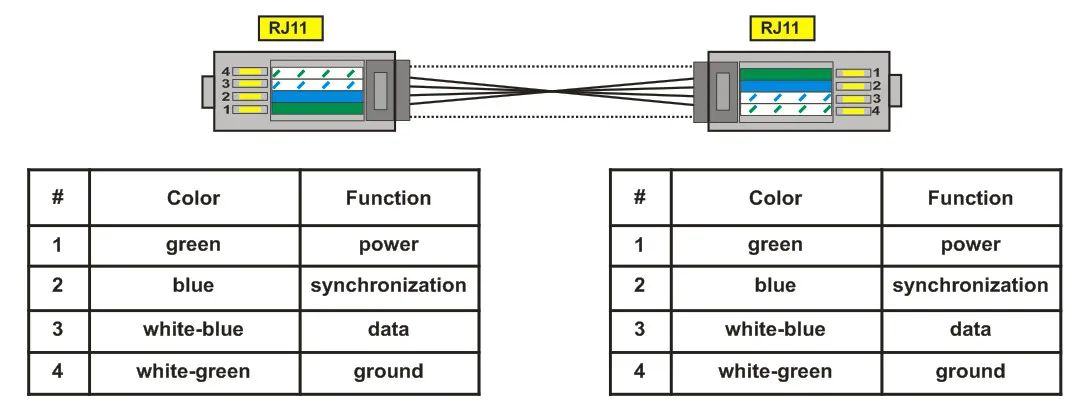
Figure 5.2 – Number indication of cable CEM-11-1
One end of the cable is connected to the socket RJ11 located in the data logger as shown in Figure 5.1, the other end of the cable is connected to the socket RJ11 located in the expansion module.
The connection linkage is made automatically after power input to the data logger.
The cable CEM-11-1 is supplied with every expansion module.
5.5 Connection to Ethernet Network
Section titled “5.5 Connection to Ethernet Network”Connection of the RPM-416 to Ethernet network is carried out via the cable made according to the standard ANSI EIA TIA 568B category Cat.3 and higher (supplied with the device).
The numeral indication of such cable is shown in Figure 5.3.
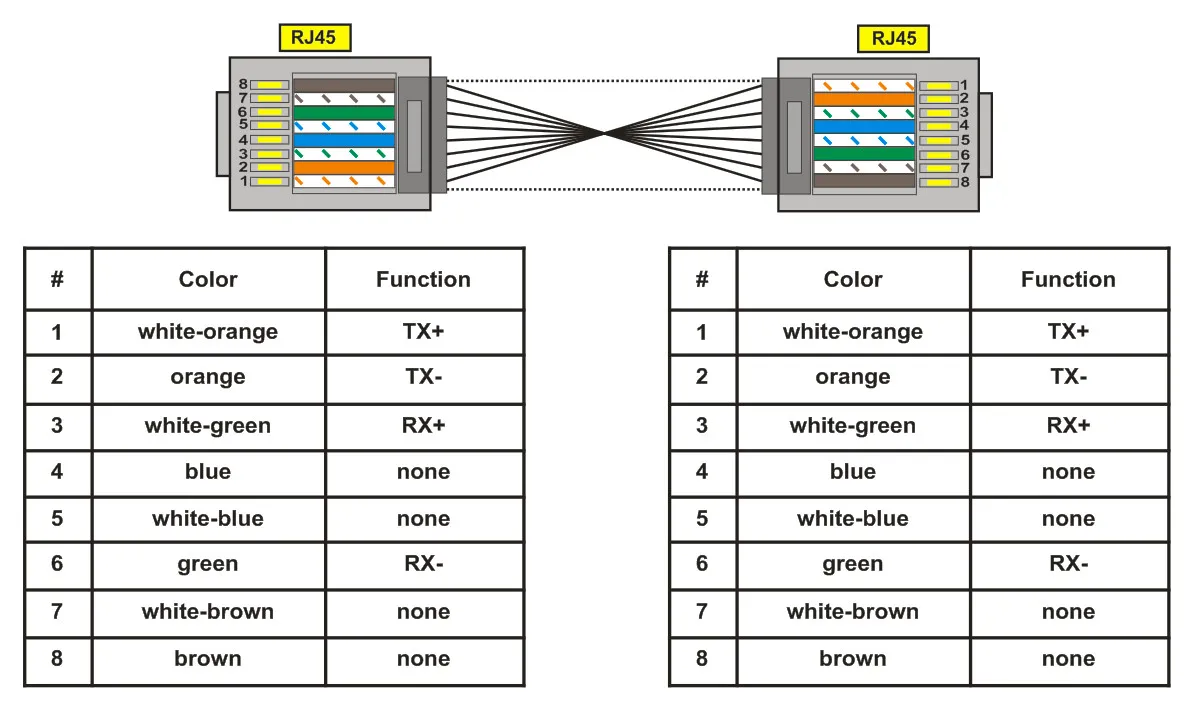
Figure 5.3 – Numeral indication of cable for connection to Ethernet
One end of the cable is connected to the socket RJ45 located in the data logger as shown in Figure 5.1, the other end of the cable is connected to the socket of network adapter located in the PC or other network device.
LED indicators, located near the socket RJ45 indicate:
- green – data interchange;
- yellow – communication.
For communication connection via Ethernet interface, the data logger and PC should be in the same IP-subnet.
Programming of the RPM-416 while connected to Ethernet network is described in Appendix A.
Programming of the RPM-416 while connected to Internet network is described in Appendix B.
6. Scope of Intended Use
Section titled “6. Scope of Intended Use”6.1 The Use of Data Logger RPM-416
Section titled “6.1 The Use of Data Logger RPM-416”6.1.1 Initialization
Section titled “6.1.1 Initialization”After supply of the power to the data logger, the process of initialization takes place. The LED indicator POWER (Fig. 1.2 item 6) lights up and on the display (Fig. 1.2 item 1) there is a message shown in Figure 6.1.
┌────────────────────┐│ RPM-416 ││ ││ ││ INITIALIZATION... │└────────────────────┘6.1.2 Main Screen
Section titled “6.1.2 Main Screen”After completion of initialization, the main screen will be shown on the display. The view depends on whether a memory card is installed or not. Figure 6.2 shows both variants of main screen views.
┌────────────────────┐│We 03.09.2014 16:01 ││Used: 0.00B ││Free: 0.00B ││◄ Menu Start<Meas.>│└────────────────────┘With memory card
┌────────────────────┐│We 03.09.2014 16:01 ││ The memory card ││ is not installed. ││# Menu Start<Meas.>│└────────────────────┘Without memory card
In the first line, the current date and time is shown in form of DD dd mm yyyy HH:MM, where:
| Symbol | Meaning | Symbol | Meaning |
|---|---|---|---|
| DD | Day of week (Mon, Tue, Wed, Thu, Fri, Sat, Sun) | dd | Date |
| mm | Month | yyyy | Year |
| HH | Hours | MM | Minutes |
In the second and third lines there is information of occupied and free space on the memory card (“Used” – Used space and “Free” – free space).
In case there is no memory card installed, the display shows the message “Memory card is not installed”.
In the fourth line, the main menu items of the data logger control are shown. The choice of the menu items is made by buttons ◄ (left) or ► (right) (the selected item is illuminated by indicator ”◄ ►”), confirmation is made by pressing the button ◙ (enter).
The main menu items of the Data logger:
- “Menu” – opens the menu of the data logger control;
- “Start” – starts the process of data recording to the memory card;
- “Stop” – stops the process of data recording to the memory card;
- “Pause” – pauses the process of data recording to the memory card;
- “Cont.” – resumes the process of data recording to the memory card;
- “Meas.” – opens the menu for measured values review.
6.1.3 Main Screen Menu Items Dissimulation
Section titled “6.1.3 Main Screen Menu Items Dissimulation”If during 10 seconds no button on the front panel was pressed, the menu items of data logger control will be dissimulated and instead of them there will be shown the current state of the data logger (Fig. 6.3).
┌────────────────────┐│We 03.09.2014 16:01 ││Used: 0.00B ││Free: 0.00B ││Status: stopped│└────────────────────┘With memory card and recording process stopped
┌────────────────────┐│We 03.09.2014 16:01 ││ The memory card ││ is not installed. ││Status: stopped│└────────────────────┘Without memory card and recording process stopped
┌────────────────────┐│We 03.09.2014 16:01 ││Used: 0.00B ││Free: 0.00B ││Status: running│└────────────────────┘With memory card and recording process started
In order to restore the indication of menu items of data logger control, it is enough to press any button on the front panel of the data logger. The indication of the data logger state will be dissimulated and the control menu items will be shown instead (Fig. 6.2).
6.1.4 Starting and Stopping Data Recording
Section titled “6.1.4 Starting and Stopping Data Recording”To start the process of data recording to the memory card, select with buttons ◄ (left) or ► (right) the menu item “Start”, then by pressing the button ◙ (enter) confirm the choice. The data logger display will show a message confirming the beginning of the recording process (Fig. 6.4) and LED indicator RECORDING will be on (Fig. 1.2 item 2). After 3 seconds the main screen (Fig. 6.4) will be shown on the data logger display.
On the main screen there will be alternatively shown information of the free and occupied space on the memory card (Fig. 6.4 – Main screen variant 1), as well as the name and size of the last recorded file (Fig. 6.4 – Main screen variant 2).
┌────────────────────┐│The recording ││process started! ││ ││ <3> │└────────────────────┘Message of data recording process start
┌────────────────────┐│We 03.09.2014 16:01 ││Used: 7.49GB ││Free: 25.63MB ││# Stop <Pause>Meas.│└────────────────────┘Main screen (variant 1)
┌────────────────────┐│We 03.09.2014 16:01 ││File: FILE0002.RDF ││Size: 5.06MB ││#<Stop >Pause Meas.│└────────────────────┘Main screen (variant 2)
If there are no mistakes in configuration, the data logger creates a new file in the following path “RPM-416\2014\JUL\03\FILE0001.RDF”, where:
- “RPM-416” – data logger core catalogue;
- “2014” – sub catalogue with indication of the current year (1980 - 2107);
- “JUL” – sub catalogue with indication of the current month (Jan, Feb, Mar, Apr, May, Jun, Jul, Aug, Sep, Oct, Nov, Dec);
- “03” – sub catalogue with indication of the current date (01 – 31);
- “FILE0001.RDF” – the file name with extension “RDF” (FILE0001 – FILE9999).
When the file size reaches the user defined limit (32 KB – 512 MB), the data logger automatically creates a new file with the following name “FILE0002.RDF”. When the file name reaches the maximum (“FILE9999.RDF”), the recording process will be terminated and on the data logger display there will be a message about an error shown in Figure 6.5. The LED indicator RECORDING (Fig. 1.2, item 2) will start flickering indicating that there is a mistake in the data logger operation.
┌────────────────────┐│ERROR #13! 1/1 ││Limit exceeded ││(9999), the file ││name! <OK> │└────────────────────┘For confirming the error, press the button ◙ (enter) (Fig. 1.2, item 5). The LED indicator RECORDING (Fig. 1.2, item 2) will start flickering indicating that the recording process is paused.
Depending on the recorded readings selected by user (the maximal number of recorded readings at the same time is 20), one data block size being recorded to the memory card for 20 readings is 88 bytes.
The stream of recorded data at discretion 1 ms for 20 readings is:
- 88 KB / sec, 5.28 MB / min or 316.8 MB / hour.
The stream of recorded data at discretion 1 s for 20 readings is:
- 88 byte / sec, 5.28 KB / min or 316.8 KB / hour.
To stop the recording process, on the main screen of the data logger (Fig. 6.6) by buttons ◄ (left) or ► (right) select menu item STOP, and by button ◙ (enter) confirm the selection. On the display there will be a message in which you need to confirm the stop of the recording process.
┌────────────────────┐│We 03.09.2014 16:01 ││File: FILE0002.RDF ││Size: 5.06MB ││#<Stop >Pause Meas.│└────────────────────┘Main screen
┌────────────────────┐│Really stop ││recording? ││ ││ YES <NO> │└────────────────────┘Screen of confirming the recording process stop “Yes” / “No”
For confirming the recording process stop, select by buttons ◄ (left) or ► (right) indicator position “YES”, and by button ◙ (enter) confirm the selection. The data logger will stop recording data to the memory card, the LED indicator RECORDING (Fig. 1.2, item 2) will light off and the display will look as shown in Figure 6.2 (with memory card).
After locating the indicator in position “NO”, the data logger will continue recording and there will be on the display the main screen resulted in Figure 6.6.
If during the recording the memory card is full and has no free space, then depending on the selected type of recording (“Until memory” or “The ring”):
“Until memory” – there will be a message about an error on the display (resulted in Figure 6.7), and the recording automatically stops.
┌────────────────────┐│ERROR #10! 1/1 ││Memory card is full!││ ││ <OK> │└────────────────────┘“The ring” – there will be a message on the display about the deleting of old files (resulted in Figure 6.8). The data logger makes searching and deleting the old files in order to free some space on the memory card for creating a new file.
┌────────────────────┐│We 03.09.2014 16:20 ││Removing old files ││Free: 20.15MB ││# Stop <Pause>Meas. │└────────────────────┘6.1.5 Data Recording at Event
Section titled “6.1.5 Data Recording at Event”RPM-416 can make data recording at event (this mode is described in the Setting of Event Recording Mode section).
If the data recording at event is switched on, the values measured by the data logger are continuously being recorded in temporary buffer storage with a user defined periodic sequence (parameter “Discreteness” at default is 1 ms). Maximal length of temporary buffer storage is 1480 recordings.
The buffer storage is sequential data, where the reading is performed from “beginning” and recording is made to “end”. When the buffer is full, the data deleting is performed from “beginning” and the new data is located in “end”.
In RPM-416 there are five available sources of events, every of which can be set individually to any of the data logger inputs.
Until the event happens, the data logger continuously checks the measured values with the up and down limits specified by the user during the event setting. If the measured value is higher (up limit) or lower (down limit), the event is generated.
After the event happens, the data recording is performed in three stages, as shown in Figure 6.9.
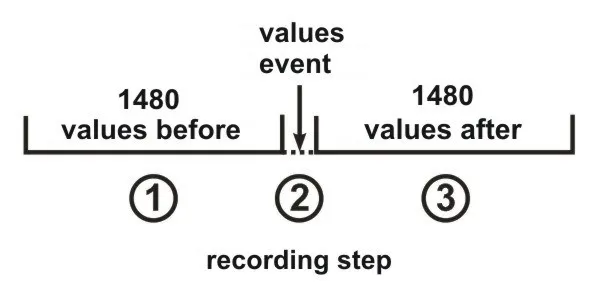
Figure 6.9 – Data recording at event (stages)
At the first stage, the values accumulated in the temporal buffer storage are recorded.
At the second stage, the value generated the event is recorded.
At the third stage, after event changed values are recorded.
After completion of all stages of recording, the data logger goes to stand-by mode waiting for a new event.
The number of values recorded before and after the event is set by parameters “Points before” and “Points after” in the menu of events setting (see Setting of Event Recording Time).
If the limit of the event is set for a single recording (“ONCE”, see Setting of Upper and Lower Thresholds), then there will be no generating of the next event if the measured value is lower (up level) or higher (down level) of specified limits.
If the event limit is set on continuous recording (“LONG”, see Setting of Upper and Lower Thresholds), then after the event happens the data recording will continue, until the measured value is higher (up level) or lower (down level) of specified limits.
6.1.6 The Main Menu of the Data Logger
Section titled “6.1.6 The Main Menu of the Data Logger”For entering the data logger main menu: on the main screen by buttons ◄ (left) or ► (right) select item “MENU/МЕНЮ”, and by button ◙ (enter) confirm the selection. If the password was set before, the data logger asks to enter the password (Fig. 6.10 Screen of password entering).
┌────────────────────┐│PASSWORD 7 8 9││---- 4<5>6││^ 1 2 3││ OK CANCEL 0 c│└────────────────────┘Screen of password entering
┌────────────────────┐│Password is not ││correct! ││ ││ <3> │└────────────────────┘Message about an error of password entering
The password entering is carried out in the following manner: by buttons ◄ (left), ► (right), ▲ (up) and ▼ (down) make the selection of one digit of password (the selected digit is illuminated by cursor), and by button ◙ (enter) confirm the selection.
Sign ”^” indicates the digit which is selected at the moment.
To delete one digit of the password, set a cursor in position “c” (for example in case of error selection).
After completion of password selection, set a cursor in position “ОК” and press the button ◙ (enter). If the password is not correct, there will be a message about the mistake on the display as shown in Fig. 6.10.
If the password is correct or if the password was deactivated by the user, there will be a list of main menu available items on the display of the data logger.
The screen of the data logger main menu is shown in Figure 6.11.
┌────────────────────┐│MAIN MENU: 1/11 ││< Date and Time > ││ Base channels ││ Extension module │└────────────────────┘The selection of the menu items is made by buttons ▲ (up) or ▼ (down), the confirmation of the selection is made by button ◙ (enter).
To escape from the main menu, press the button ◄ (left). If there were made changes in settings, the data logger asks to save them by the message on the display shown in Figure 6.12. Otherwise on the data logger display there will be the main screen (Fig. 6.2).
┌────────────────────┐│Save changes? ││ ││ ││ <YES> NO │└────────────────────┘To confirm the saving, by button ◄ (left) locate the cursor in position “YES” and press the button ◙ (enter). The data logger makes saving of the settings in nonvolatile memory and the display will show the main menu (Fig. 6.2).
To cancel the saving of the settings, by button ► (right) put the cursor in position “NO” and press the button ◙ (enter). The data logger will load the settings from the nonvolatile memory and the display will show the main menu (Fig. 6.2).
The full list of items of the main menu is described in Chapter 7 “The setting of the data logger RPM-416”.
6.1.7 The Review of Measured Values
Section titled “6.1.7 The Review of Measured Values”To review the measured values: on the main screen by buttons ◄ (left) or ► (right) select item “Measuring”, and by the button ◙ (enter) confirm the selection. The display shows the first of a list of available channels and the measured values.
The screen of measured values for channel 1 is shown in Figure 6.13.
┌────────────────────┐│Voltage: 0.0 V││Frequency: 0.00Hz││THDr: 0 %││<BACK> ↑,↓,←,→ CH01│└────────────────────┘The first three lines display measured values available for this channel.
The fourth line displays the menu item “BACK” navigation direction symbols and channel number (“CH01”).
Shifting to the next open channel is made by pressing the button ◄ (left) or ► (right), and by buttons ▲ (up) or ▼ (down) you can scroll through the list of available measuring.
To escape from the screen of measured values, press the button ◙ (enter). The display will go to initial view (Fig. 6.4 – Main screen).
Table 6.1 – The list of channels with corresponding names of measured values
| Ch. | Value 1 | Value 2 | Value 3 | Value 4 | Value 5 | Value 6 |
|---|---|---|---|---|---|---|
| 1 | Voltage RMS, V | Frequency, Hz | THDr, % | Peak + voltage, V | Peak - voltage, V | Instantaneous voltage, V |
| 2 | Voltage RMS, V | Frequency, Hz | THDr, % | Peak + voltage, V | Peak - voltage, V | Instantaneous voltage, V |
| 3 | Voltage RMS, V | Frequency, Hz | THDr, % | Peak + voltage, V | Peak - voltage, V | Instantaneous voltage, V |
| 4 | Current RMS, A | Frequency, Hz | THDr, % | Peak + current, A | Peak - current, A | Instantaneous current, A |
| 5 | Current RMS, A | Frequency, Hz | THDr, % | Peak + current, A | Peak - current, A | Instantaneous current, A |
| 6 | Current RMS, A | Frequency, Hz | THDr, % | Peak + current, A | Peak - current, A | Instantaneous current, A |
| 7 | Current RMS, A | Frequency, Hz | THDr, % | Peak + current, A | Peak - current, A | Instantaneous current, A |
| 8 | Temperature, ºС | — | — | — | — | — |
| 9 | Temperature, ºС | — | — | — | — | — |
| 10 | Analog voltage, V | User’s Value | — | — | — | — |
| 11 | Analog current, mA | User’s Value | — | — | — | — |
| 12 | Digital input | Frequency, Pulse×min | Pulse Scaler | — | — | — |
| 13 | Digital input | Frequency, Pulse×min | Pulse Scaler | — | — | — |
| 14 | Digital input | Frequency, Pulse×min | Pulse Scaler | — | — | — |
| 15 | Digital input | Frequency, Pulse×min | Pulse Scaler | — | — | — |
| 16 | Active power, W | Reactive power, var | Full power, VA | Power factor, cos φ | Active Energy Scaler, kW×h | Reactive Energy Scaler, kVAr×h |
| 17 | Active power, W | Reactive power, var | Full power, VA | Power factor, cos φ | Active Energy Scaler, kW×h | Reactive Energy Scaler, kVAr×h |
| 18 | Active power, W | Reactive power, var | Full power, VA | Power factor, cos φ | Active Energy Scaler, kW×h | Reactive Energy Scaler, kVAr×h |
| 19 | Line voltage AB, V | Line voltage BC, V | Line voltage CA, V | Negative sequence voltage, V | Positive sequence voltage, V | Zero sequence voltage, V |
| 20-40 | Values depend on connected expansion modules | — | — | — | — | — |
6.1.8 Error Message Confirmation
Section titled “6.1.8 Error Message Confirmation”In the process of the data logger work there can happen different errors (real time clock error, data exchange failure, settings failure etc.).
The total list of possible errors is presented in Table 6.2.
If an error takes place, it is shown on the display of the data logger. The LED indicator RECORD begins to blink.
The error message will be on the display until all errors are confirmed.
Screen with an error message is shown in Figure 6.14.
┌────────────────────┐│ERROR #6! 1/3 ││No disc is in the ││memory card slot! ││ <OK> │└────────────────────┘In the first line there is a description of error and its code “ERROR # 6!”. As well in the first line there is a current number of error and total quantity of errors “1/3”.
In the second, third and fourth lines there is an error text.
By buttons ▲ (up) and ▼ (down) you can scroll the list of errors and by button ◙ (enter) you can confirm the current error.
If all the errors are confirmed by user but the data logger continues to state the active errors, the LED indicator RECORD continues to flicker. After 20 seconds the data logger will again show the active errors on the display.
If there are no active errors and the user confirmed all the errors, LED indicator RECORD lights off – in case the recording is stopped, lights on – in case the recording continues, or flickers – in case the recording is paused.
Table 6.2 – Total list of possible errors of the data logger
| Error code | Error message | Troubleshooting method |
|---|---|---|
| #1 | Failure is detected real-time clock | Set the date and time. |
| #2 | No connection with ADC! | Switch off and switch on again the data logger. |
| #3 | No connection to MM! | Switch off and switch on again the data logger. |
| #4 | No connection with EM! | Switch off and switch on again the data logger. |
| #5 | No connection with ROM! | Switch off and switch on again the data logger. |
| #6 | No disc is in the memory card slot! | Insert the memory card in slot of the data logger. |
| #7 | Disk is write protected! | Deactivate the recording protection on the memory card. |
| #8 | Unable to initialize the disk! | Switch off and switch on again the data logger. Take out and insert the memory card. Replace the memory card. |
| #9 | Unable to connect to the disk! | Switch off and switch on again the data logger. Take out and insert the memory card. Replace the memory card. |
| #10 | Memory card is full! | Delete the files which are not used on the memory card. Use recording mode “Circling”. Replace the memory card. |
| #11 | Unable to read data from the disk! | Switch off and switch on again the data logger. Take out and insert the memory card. Format the memory card. Replace the memory card. |
| #12 | Unable to create or open a directory RDF! | Switch off and switch on again the data logger. Take out and insert the memory card. Format the memory card. Replace the memory card. |
| #13 | Limit exceeded (9999), the file name! | Delete the file from current directory. Replace the memory card. |
| #14 | Unable to get the list of files! | Switch off and switch on again the data logger. Take out and insert the memory card. Format the memory card. Replace the memory card. |
| #15 | Cannot create file! | Switch off and switch on again the data logger. Take out and insert the memory card. Format the memory card. Replace the memory card. |
| #16 | Unable to write to file! | Switch off and switch on again the data logger. Take out and insert the memory card. Format the memory card. Replace the memory card. |
| #17 | Damaged settings in the flash memory! | Reset the settings of the data logger to factory settings. Reset the data logger. |
| #18 | Unable to save settings to flash memory! | Switch off and switch on again the data logger. Reset the data logger. |
| #19 | Damage the calibration in flash memory! | The data logger should be calibrated. This procedure can be performed only at the manufacturer plant. |
| #20 | Memory overflow | Switch off and switch on again the data logger. |
| #21-#32 | Unknown error! | The reserved errors codes. Switch off and switch on again the data logger. |
Critical errors (require data logger restart):
NMI_HANDLER, HARDFAULT_HANDLER, MEMMANAGE_HANDLER, BUSFAULT_HANDLER, USAGEFAULT_HANDLER, STACK_OVERFLOW, LCD_Init, SETTINGS_Init, TIM2_Config, ETH_Config, SPI1_Config, SPI3_Config, ADC1_Config, USART2_Config, NVIC_Config, BUTTON_Init, DIGINP_Init, SD_Init, SRAM_Init, RTC_Init, ADCM_Init, USART2_Init, Modules_Init, TCPStack_Init, OVERVIS_Init, HTTP_Init, MODBUS_Init, FTP_Init, TWRITE_Create, TCOLL_Create, TGUI_Create, TGKeep_Create
6.2 Use of HTTP Server (Web-interface)
Section titled “6.2 Use of HTTP Server (Web-interface)”For access to Web-interface of the data logger, a PC with an installed Web-browser is required.
In the Web-browser, enter the IP-address of the data logger (factory setting 192.168.0.2) and press the button to access this address.
On the PC screen there will be a welcome page of the data logger RPM-416 with offer to enter the password (factory setting “admin”).
After the password entering and pressing the button “Enter”, if the password is correct, there will be the main screen of the data logger. If the password is not correct, there will be a password error message on the PC display.
On the main screen you can monitor the current state of the data logger, make settings, control and restart.
After resetting RPM-416, press the button “Save setting”. The entered settings will be checked. In case there are no errors in the setting parameters, they will be saved in nonvolatile memory of the data logger. In case there are some errors in the setting parameters, they will not be saved.
After the completion of the work with Web-interface, press the button “Exit”. The main page will be closed and the welcome and password page will be opened.
If there is no activity of the user during 5 minutes (this period is specified by the user, see Setting of HTTP Connection Timeout), the data logger automatically closes the communication. In this case it is necessary to enter IP-address of the data logger and password again.
6.3 Use of Modbus TCP Server
Section titled “6.3 Use of Modbus TCP Server”Connection protocol Modbus TCP enables connecting the data logger to the network organized by standard Ethernet. The use of the data logger in network enables to perform the following operations:
- data receiving in SCADA systems;
- programming the data logger via PC (by program RPM-416 Data Analysis);
- remote control of the data logger.
While connecting to the data logger, the access to the command registry and recording function is blocked (reading function is not blocked). To unblock the access to the command data logger and recording function, write in registries 51-63 the modbus password in ASCII symbols (factory default “admin”). In unused registries, there should be written zero values (0x0000).
In case the modbus password is correct, the data logger will unlock the access to the command registry and recording function.
The data logger control is carried out via the command registry (see Modbus Registers Reference).
After completing data logger resetting, carry out the command of recording in the nonvolatile memory (0x472C). For the changes to take place, the data logger should be restarted (0xF2C5).
If the functions of recording and register of commands are not used for a long period of time, block the access to them by writing in registries 51-63 values differing from the modbus password (for example, 0).
If there is no data exchange for 60 seconds (time is set by the user, see Setting of Modbus TCP Connection Timeout), the data logger automatically breaks the connection with the client.
In the data logger, all values with a decimal point are converted to whole numbers. That’s why while processing the data, it is necessary to use additional mathematic operations.
To the request of reading the value with a dot (for example, 1.000) the data logger will return the whole number value 1000, for adjusting to the correct format it is necessary to divide the number by 1000.
Before recording the value with a dot (for example, 1.000) it is necessary to bring the value to the whole number by multiplying by 1000, then make recording of the value in the data logger.
The coefficient of changing to whole number is defined by the number of digits after the dot (1.0 – 10; 1.00 – 100; 1.000 - 1000).
The types of parameters and their names are given in the Parameter Types table.
The list of supported Modbus functions is in the Supported Functions table.
The command registry address is in the Command Registry section.
Addresses of additional registries are in the System Registries section.
Addresses of the registers of the measured parameters of the base channels are given in the Base Channel Registers section.
Register addresses for expansion modules are in the Expansion Module Registers section.
Addresses of programmable parameters are in the Programmable Parameters section.
For the complete Modbus register map including supported functions, command codes, parameter types, system registries, and channel addresses, see Appendix E: Modbus Registers Reference.
6.4 Use of FTP Server
Section titled “6.4 Use of FTP Server”File transfer protocol FTP uses the double connection. One channel is a control channel through which the commands from the data logger come in and responses go out (default TCP-port 21), and via the second channel comes data communication (TCP-port is defined by the data logger by random choice).
Use of FTP protocol enables via TCP-networks to receive remote files recorded by the data logger on the memory card.
Files receiving is carried out with the help of program “RPM-416 Data Analysis” or any other software which supports file receiving via FTP.
In the data logger, server FTP operates in passive mode (waiting for the client’s connection).
At connection to the data logger via FTP it is necessary to write the name of the user “ftp” and password (factory default “admin”).
Supported FTP commands:
- ABOR – Abort the file transmitting
- CDUP – Change the directory upward
- CWD – Change the directory
- DELE – Delete file
- LIST – Restore the list of current directory files
- MKD – Make directory
- MODE – Sets the transfer mode (“S” – Stream)
- NLST – Restore the list of current directory files in brief format
- NOOP – No operation (is used for timeout reset)
- PASS – Password for the server
- PASV – Enter in passive mode and restore address of connection
- PORT – Specifies an address and port to which the server should connect
- PWD – Restore the current directory
- QUIT – Switch off
- REIN – Re-initialize the connection
- RETR – Download the file (before RETR operation there should be a command PASV)
- RMD – Remove a directory
- STOR – Accept data and store data as a file at the server site
- STRU – Set file transfer structure (“F” – file)
- SYST – Return the system type (UNIX)
- TYPE – Define the type of file transmitting (“I” – binary)
- USER – User’s name for input on the server
If there is no data exchange during 300 seconds (time period can be set by the user, see Setting of FTP Connection Timeout), the data logger automatically breaks the connection with a client.
6.5 Use of Overvis Client
Section titled “6.5 Use of Overvis Client”Overvis is a system for monitoring, visualization and remote control of technological processes.
Overvis enables:
- to read the data from the instruments, including with the recording system;
- to perform 24-hour cyclical readout of data;
- to save the data automatically in its own database;
- to display the data in the convenient form;
- to receive alarm reports in the form of SMS or E-Mail.
More detailed information can be found at the official website www.overvis.com.
Overvis system acts as a collection server of data from the recording system and other devices connected simultaneously, and it provides access to data in real time only with the permission of the owner of the recording system.
Factory settings of the recording system are prepared to connect to the server of Overvis, in this case the Overvis client in the recording system is disabled and should be enabled manually by the user.
To connect the recording system to the system of Overvis it is required:
- Configure the recording system to access the internet
- Enable Overvis Client
- In the Overvis settings, make sure that there is connection to the server and the activation code is received
- Using the instructions at Overvis website, connect to the recording system with the activation code
6.6 Inserting and Pulling Out of the Memory Card
Section titled “6.6 Inserting and Pulling Out of the Memory Card”Insert the memory card in the slot situated on the side wall of the data logger, as shown in Figure 5.1 and press it till there is a click.
In order to pull the memory card out, press it till a click and release it – the memory card will go out from the slot about 3-5 mm, after that you can pull it out.
During inserting and pulling out of the memory card do not use much effort.
6.7 RPM-416 Data Analysis Software Installation
Section titled “6.7 RPM-416 Data Analysis Software Installation”For proper work of the software on the computer there should be installed Operational System Windows Vista or Windows 7/8/10/11. The installation is initiated by starting the installation file “rpm416da_setup.exe” (not included in the supply scope). After starting of the installation, the program performs the installation guided by the instructions of installation master. If the previous version of the program has been already installed on the computer it should be deleted before a new installation.
The latest version of the program is available on the web site https://novatek-electro.com in section “Software”.
To delete the program, you should use Windows master of installation and deleting.
6.8 Installation and Connection of Software for Memory Card-Reader
Section titled “6.8 Installation and Connection of Software for Memory Card-Reader”The procedure and installation of software for memory cards reading depends on the model and manufacturer of the device. All installation instructions are provided in the card reader manual.
6.9 Review of the Recorded Data
Section titled “6.9 Review of the Recorded Data”Pull out the memory card from the data logger (pulling out of the memory card is described in item 6.6) and insert it in the card reader on the PC.
Review and analysis of the data is carried out with program software “RPM-416 Data Analysis” installed on the PC (installation of the software is described in item 6.7).
Program “RPM-416 Data Analysis” enables to make the analyses of data, to compare it (in form of numeral information or diagrams) and output the results of the analysis for printing. The program can also perform a remote configuration of the data logger and monitor its operation in real time mode via protocol Modbus TCP.
7. Setting of the Data Logger RPM-416
Section titled “7. Setting of the Data Logger RPM-416”The description of settings is based on the factory parameters settings.
The parameters are saved in the nonvolatile memory (period of storage is not less than 10 years).
For restoring the main menu of the RPM-416, perform the actions described in the Main Menu of the Data Logger section.
Main Menu Items
Section titled “Main Menu Items”| Menu Item | Description |
|---|---|
| Date and Time | For setting the date and time |
| Base Channels | For setting the base channels (inputs of the data logger) |
| Exp. modules | For setting the expansion modules |
| Display | For setting the display |
| Record of data | For setting the data recording to the memory card |
| Record of events | For setting the events |
| Memory card | For setting the memory card |
| Network | For setting Ethernet interface |
| Password | For setting the access restriction to the data logger |
| General settings | Allows you to perform additional actions with settings |
| Device version | For information about the version of the data logger |
The selection of the menu items is performed by buttons ▲ (up) or ▼ (down) (the selected item is underlined by the cursor), confirmation of the selection is made by pressing the button ◙ (enter).
For escape from the menu, press the button ◄ (left).
For detailed settings information, please see Appendix D: Settings Reference.
8. Maintenance
Section titled “8. Maintenance”8.1 Safety Precautions
Section titled “8.1 Safety Precautions”8.2 Qualified Personnel
Section titled “8.2 Qualified Personnel”Maintenance of the device must be performed by qualified service personnel.
8.3 Maintenance Frequency
Section titled “8.3 Maintenance Frequency”Recommended frequency of maintenance is every six months.
8.4 Maintenance Procedure
Section titled “8.4 Maintenance Procedure”- Check the connection reliability of the wires, if necessary, clamp with the force specified in Table 3.1.
- Visually check the integrity of the housing. In case of detection of cracks and damages, remove the device from service and send for repair.
- If necessary, wipe the front panel and the device housing with a cloth.
9. Service Life and Manufacturer Warranty
Section titled “9. Service Life and Manufacturer Warranty”9.1 Service Life
Section titled “9.1 Service Life”The lifetime of the data logger is 10 years. Upon expiration of the service life, contact the manufacturer.
9.2 Shelf Life
Section titled “9.2 Shelf Life”Shelf life is 3 years.
9.3 Warranty Period
Section titled “9.3 Warranty Period”Warranty period of the RPM-416 operation is 5 years from the date of sale.
During the warranty period of operation (in the case of failure of the data logger) the manufacturer is responsible for free repair of the device.
9.4 Warranty Service Location
Section titled “9.4 Warranty Service Location”Warranty service is performed at the place of purchase or by the manufacturer of the device.
9.5 Post-Warranty Service
Section titled “9.5 Post-Warranty Service”Post-warranty service of the data logger is performed by the manufacturer at current rates.
9.6 Repair Shipping
Section titled “9.6 Repair Shipping”Before sending for repair, the data logger should be packed in the original or other packaging excluding mechanical damage.
10. Transportation and Storage
Section titled “10. Transportation and Storage”The data logger in the original package is permitted to be transported and stored at the temperature from -45°C to +60°C and relative humidity of 80%.
Manufacturer Information
Section titled “Manufacturer Information”“Novatek-Electro” Ltd.
Website: www.novatek-electro.com
Address: 59, Mykhailo Boltenko (Admiral Lazarev) str., Odesa, Ukraine, 65007
Phone:
- +38 (067) 565 37 68
- +38 (050) 359 39 11
- +38 (063) 301 30 40
Appendices
Section titled “Appendices”- Appendix A: Ethernet Connection — Connection to Ethernet network
- Appendix B: Internet Connection — Connection to Internet
- Appendix C: Software Versions — Software version history
- Appendix D: Settings Reference — Detailed settings guide
- Appendix E: Modbus Registers — Complete Modbus register reference