

TR-101 Operating Manual
Ta treść nie jest jeszcze dostępna w Twoim języku.
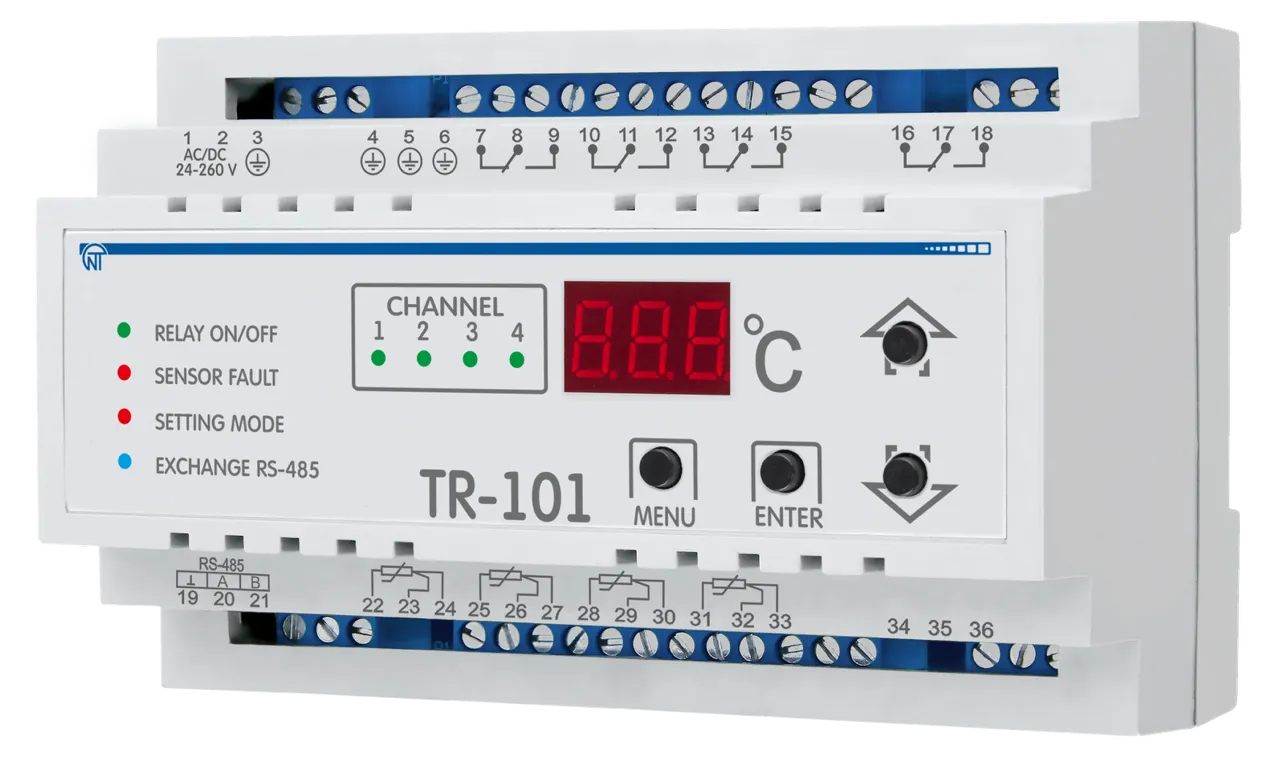
NOVATEK-ELECTRO LTD
Intelligent Industrial Electronics
DIGITAL TEMPERATURE RELAY TR-101
OPERATING MANUAL
Quality control system on the development and production complies with requirements ISO 9001:2015
Dear customer,
Company NOVATEK-ELECTRO LTD. thanks you for purchasing our devices.
You will be able to use properly the device after carefully studying the Operating Manual.
Keep the Operating Manual throughout the service life of the device.
UKRAINE, Odesa — www.novatek-electro.com
This unit is safe for use in case of compliance with operating rules.
This manual is provided in order to introduce the operating personnel with structure, operating principle, design, mode of operation and maintenance of TR-101 digital temperature relay (further referred to as “device”, “TR-101” or “TR-101 unit”).
TR-101 complies with requirements:
- EN 60947-1
- EN 60947-6-2
- EN 55011
- EN 61000-4-2
No harmful substances in excess of the maximum permissible concentration is available.
1 Application
Section titled “1 Application”TR-101 is designed for measuring and controlling a device temperature by means of four sensors connected according to a two- or three-wire diagram, with subsequent temperature display. The device can find various applications in industrial sector, in municipal utilities service, and agriculture.
The device allows for performing the following functions:
- taking temperature measurement on 4 channels with use of standard sensors;
- controlling temperature according to proportional-integral-differential (PID) principle;
- temperature on-off regulation;
- displaying currently measured temperature value on the integral LED digital display;
- transferring the measured values for the sensors monitored via Modbus RTU standard protocol;
- defining a break or a short circuit on the connected sensors lines;
- measured temperature digital filtering and correction;
- programming by the front panel keys and via PC; settings backup when de-energized;
- settings protection from unauthorized change.
TR-101 has a flexible power supply and can use any voltage from 24 to 260 V, regardless of polarity.
Supported Temperature Sensors
Section titled “Supported Temperature Sensors”TR-101 can use the following types of temperature sensors:
Table 1 – Supported Temperature Sensors
| Sensor type | Rated resistance at 0 °C, R0, Ohm | USC notation (national) | USC notation (international) W100=1.3850 | USC notation (international) W100=1.3910 | Temperature range |
|---|---|---|---|---|---|
| Platinum | 50 | 50П | Pt50 | Pt’50 | -50…+200 °C |
| Platinum | 100 | 100П | Pt100 | Pt’100 | -50…+200 °C |
| Platinum | 500 | 500П | Pt500 | Pt’500 | -50…+200 °C |
| Platinum | 1000 | 1000П | Pt1000 | Pt’1000 | -50…+200 °C |
| Copper | 50 | 50М | Cu50 | Cu’50 | -50…+200 °C |
| Copper | 100 | 100М | Cu100 | Cu’100 | -50…+200 °C |
| Nickel | 100 | 100Н | — | Ni100 | -50…+180 °C |
| Nickel | 120 | 120Н | — | Ni120 | -50…+180 °C |
| Nickel | 500 | 500Н | — | Ni500 | -50…+180 °C |
| Nickel | 1000 | 1000Н | — | Ni1000 | -50…+180 °C |
| Other | 990 at 25°C / 807 at 0°C | — | PTC1000 | EKS111 | -50…+100 °C |
2 Technical Specifications and Operating Conditions
Section titled “2 Technical Specifications and Operating Conditions”2.1 Basic Technical Parameters
Section titled “2.1 Basic Technical Parameters”Table 2 – Basic Technical Parameters
| Parameter | Value |
|---|---|
| Supply voltage | 24 – 260 V AC/DC |
| Recommended fuse | 1 A |
| Type of temperature measurement sensors | Pt50, Pt100, Pt500, Pt1000, Cu50, Cu100, Ni100, Ni120, Ni500, Ni1000, PTC1000 |
| Quantity of sensors connectable | 1 – 4 |
| Sensors wiring schematic | 2 / 3 wires |
| Sensor wire length (2-wire) | up to 5 m |
| Sensor wire length (3-wire) | up to 100 m |
| Quantity of output relays | 4 |
| Data memory | ≥ 10 years |
| Temperature measurement error | ± 2 °C |
| Measured temperature range | -50 to +200 °C |
| Output relay testing | available |
| RS-485 MODBUS RTU | available |
| PID regulation with key element (relay) | available |
| Two-position regulator | available |
| Channel measurement time | ≤ 0.6 sec |
| Protection degree: enclosure | IP30 |
| Protection degree: terminal block | IP20 |
| Power consumption (under load) | ≤ 4.0 VA |
| Weight | ≤ 0.370 kg |
| Dimensions (H × W × D) | 90 × 139 × 63 mm |
| Output contacts electrical life (10 A, 250 V AC) | ≥ 100,000 cycles |
| Output contacts electrical life (10 A, 24 V DC) | ≥ 100,000 cycles |
| Mounting | Standard 35 mm DIN-rail |
| Mounting position | Any |
Output Contacts Specification
Section titled “Output Contacts Specification”| Cos φ | Max. current at 250 V AC | Maximum power | Max. voltage AC | Max. current at 30 V DC |
|---|---|---|---|---|
| 1.0 | 10 A | 4000 VA | 440 V | 3 A |
2.2 Operating Conditions
Section titled “2.2 Operating Conditions”The device is designed for operating in the following environment:
- Ambient temperature: -35 to +55 °C
- Storage temperature: -45 to +60 °C
- Atmospheric pressure: 84 to 106.7 kPa
- Relative air humidity (at temperature 35 °C): 30…80%
3 Equipment Design and Operation
Section titled “3 Equipment Design and Operation”3.1 TR-101 Device Equipment
Section titled “3.1 TR-101 Device Equipment”Display Symbols
Section titled “Display Symbols”Trace of symbols at numeric display to letters of Roman alphabet is shown in Figure 3.

Figure 3 – Trace of symbols at numeric display to letters of Roman alphabet
3.1.1 Design
Section titled “3.1.1 Design”The device is manufactured in plastic casing (9 S-type modules) to be mounted onto standard DIN rail. The casing outline with overall and mounting dimensions is presented in Figure 3.1.
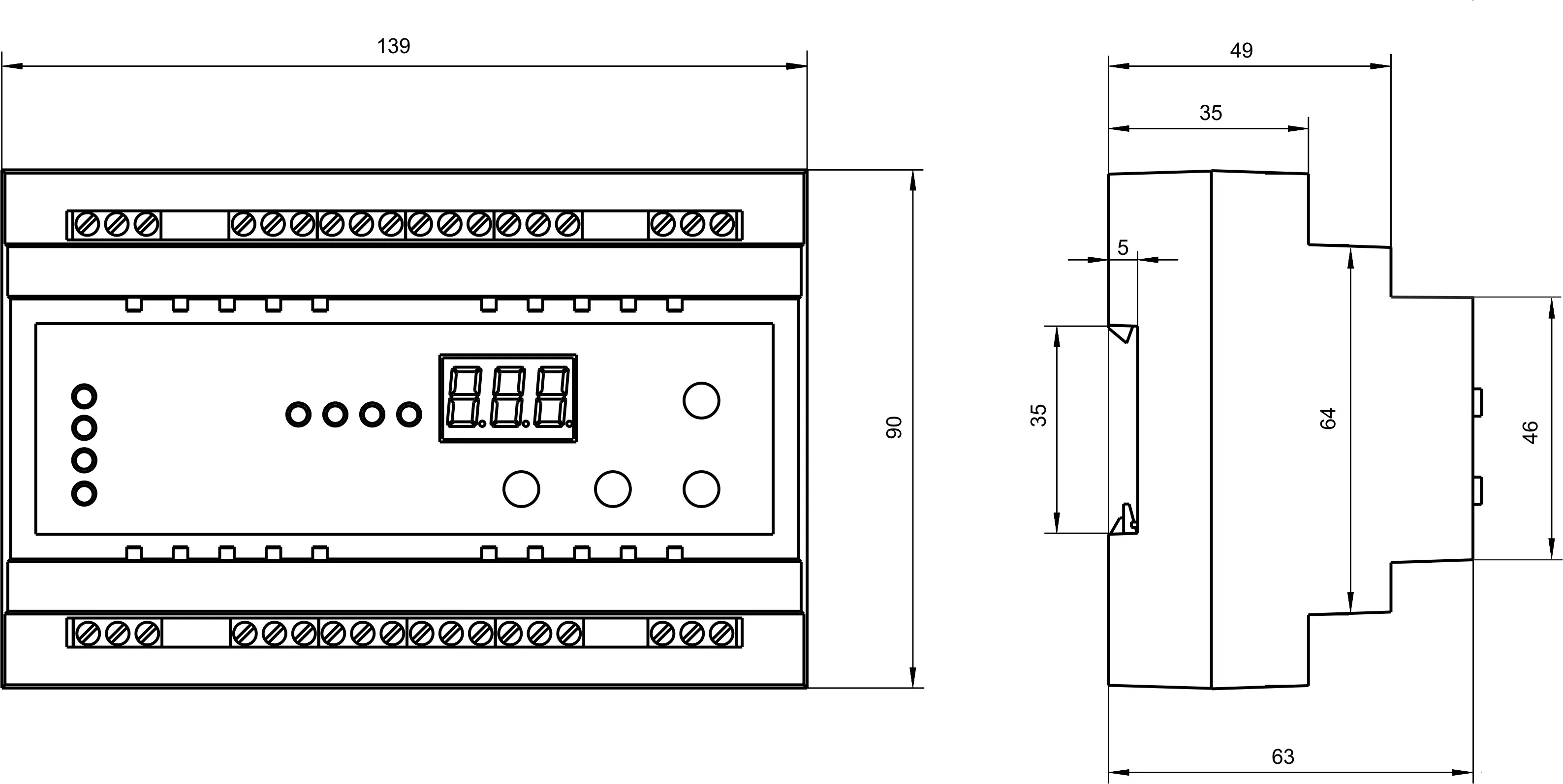
Figure 3.1 – TR-101 dimensions
3.1.2 Display and Control
Section titled “3.1.2 Display and Control”Figure 3.2 presents the TR-101 front panel Exterior.
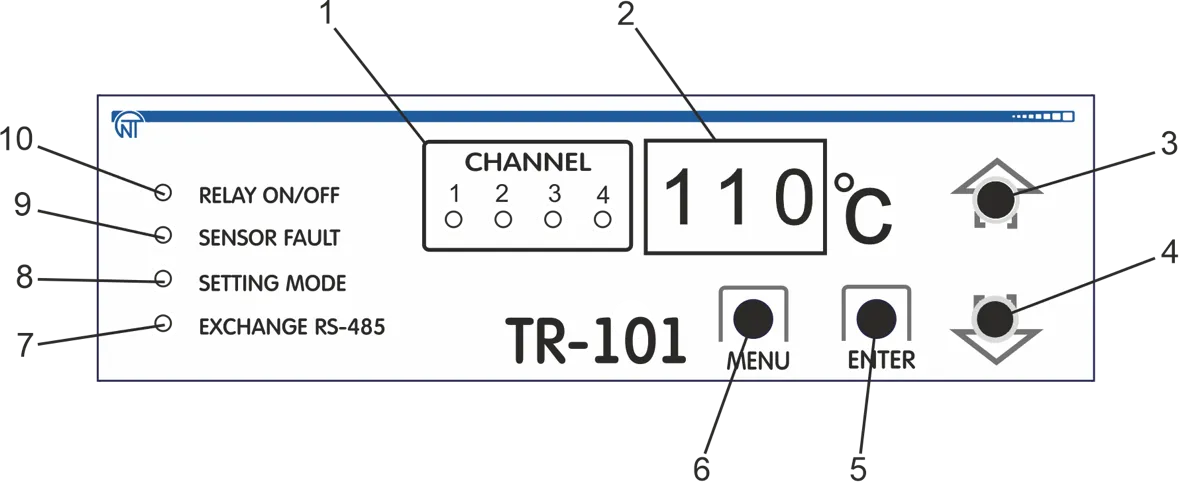
Front Panel Elements:
- Currently displayed channel number indicator
- Seven-digit numerical display
- Up key (▲)
- Down key (▼)
- Enter key (ENTER), used in the device programming mode
- View mode and device programming mode enter key (MENU)
- RS-485 connection and communication activity indicator
- Parameter programming mode indicator
- Sensors failure indicator
- Relay close (open) indicator
Figure 3.2 – TR-101 Front Panel
In the menu mode, indicators (1, 7) display the corresponding parameter (on/off): rSA, ch1, ch2, ch3, ch4 (see Table 7.1).
Device control:
- Use ▲▼ keys to toggle channels
- Use MENU key to enter the parameter view mode
- To enter the parameter edit mode – press MENU key and hold it within 7 seconds, the “setting” indicator (Fig. 3.2, item 8) shall light
- To save modified value – use ENTER key
- If no key has been pressed within 20 sec, TR-101 will display
Extsign (within 1 sec), and will switch to the initial state
3.2 Operating Principle and Input Signal Processing
Section titled “3.2 Operating Principle and Input Signal Processing”3.2.1 Operating Principle
Section titled “3.2.1 Operating Principle”In course of its operation, TR-101 performs input sensors scanning, then, based on the data obtained, calculates the current temperature value and outputs it on the digital display and sends control signals to the corresponding channel relay.
3.2.2 Input Signal Processing
Section titled “3.2.2 Input Signal Processing”The signal that is received from sensor is transformed into a temperature digital value.
In order to eliminate the initial input signal processing error, as well as errors that are produced by the connection wiring, the device measured value can be adjusted. TR-101 provides for two adjustment types, which allow performing a gain shift or sloping by a specified degree for each channel independently.
3.2.3 Measurements Adjustment
Section titled “3.2.3 Measurements Adjustment”3.2.3.1 Characteristic Shift
To provide for the error compensation ΔR = (R0 - R0.TC) produced by the input wiring resistance RTC, each measured temperature value (Tmeas) is added with a user specified value δ. Figure 3.3 shows an example of a characteristics shift for Pt100 sensor.
Programmable parameters: Sh1, Sh2, Sh3, Sh4
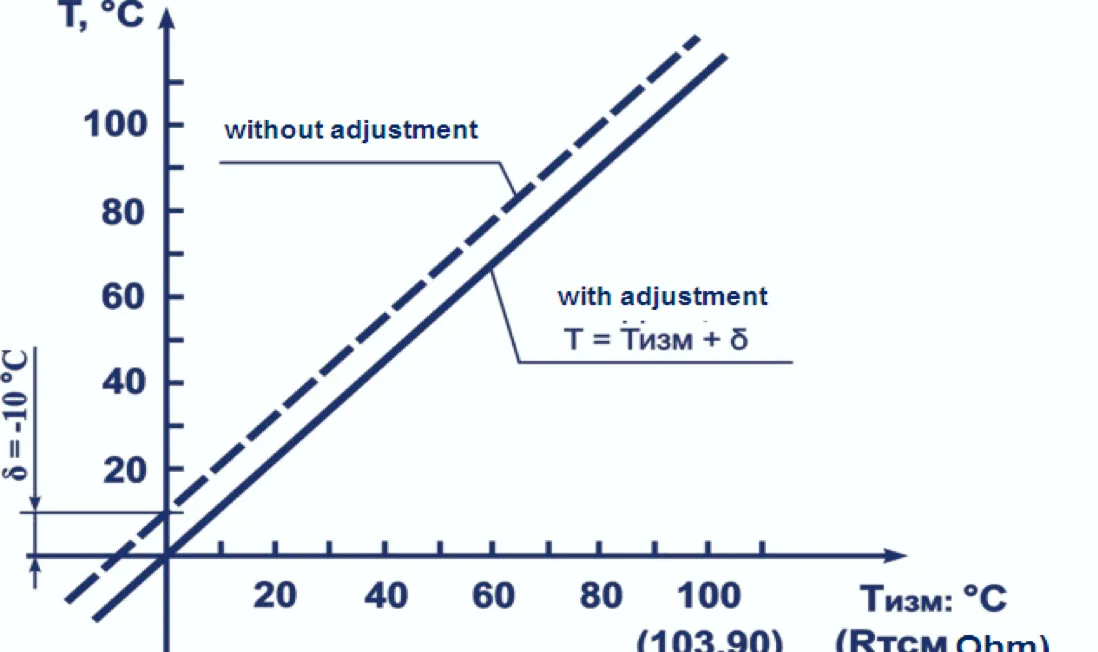
Figure 3.3 – Characteristic shift example for Pt100 sensor
3.2.3.2 Characteristic Slope
To provide for sensor error compensation upon W100 value deviation from the rated value, each Tmeas parameter measured value is multiplied by the user set adjustment parameter α.
The ratio boundaries are set within 0.50 to 2.00 limits. Figure 3.4 shows an example of the characteristic slant variation for Pt100 sensor.
Programmable parameters: KU1, KU2, KU3, KU4
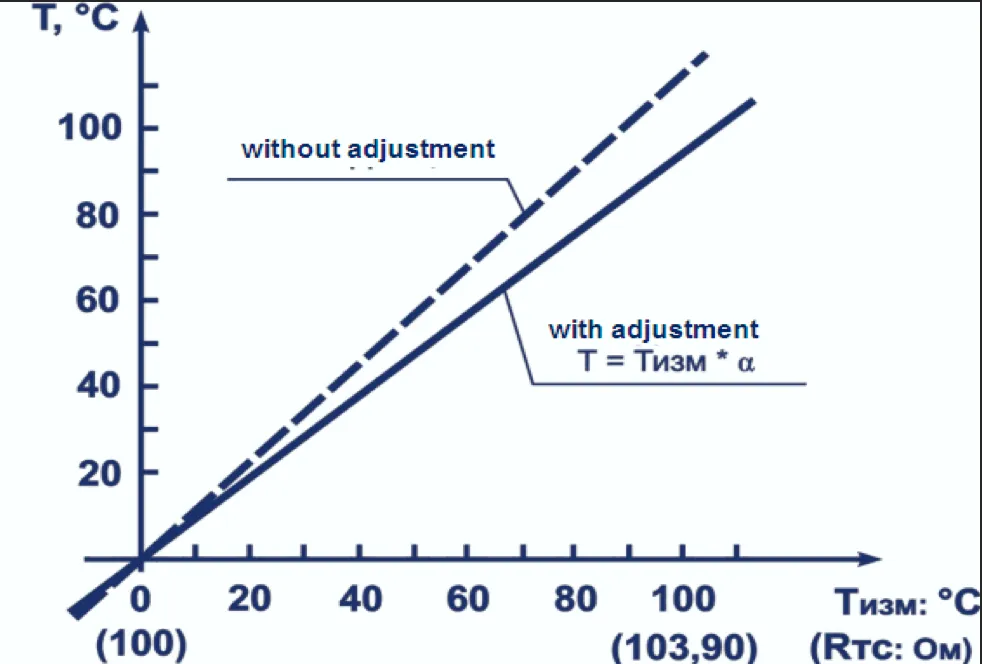
Figure 3.4 – Characteristic slope example for Pt100 sensor
3.2.4 Digital Filter
Section titled “3.2.4 Digital Filter”To provide for the input signal properties improvement the device employs digital filters that allow reducing the random interference effect on the temperature measurement.
Programmable parameters:
- Digital filter band:
Fb1,Fb2,Fb3,Fb4 - Digital filter time constant:
Ft1,Ft2,Ft3,Ft4
The filters are set for each input independently.
3.2.4.1 Digital Filter Band
The digital filter band allows protecting the measurement route from single interference and is set in °C. If the measured value Tmeas is different from the previous Tmeas–1 by the value larger than the Fb parameter value, the device assigns to it a value equal to (Tmeas + Fb). Thus the characteristic is smoothed out.
Smaller band width of the filter leads to slowing down the device reaction to temperature change. That is why in case of low interference level or during operation with discontinuous temperatures it is recommended to increase the parameter value or switch off the filter band action by setting the Fb1 (Fb2, Fb3, Fb4) parameter value to 0.
When working under strong interference, in order to eliminate its impact onto the device operation, it is necessary to reduce the parameter value.
3.2.4.2 Digital Filter Time Constant
The digital filter eliminates the noise signal components by smoothing it exponentially. The main characteristic of the exponential filter is τf – the digital filter time constant, Ft1 (Ft2, Ft3, Ft4) interval, within which the temperature reaches the 63.2% from measured value Tmeas.
Reducing τf will lead to a faster device reaction onto discontinuous temperature variations, but also will reduce its protection against interference. Increasing τf value increases the device response rate, while noise is significantly suppressed.
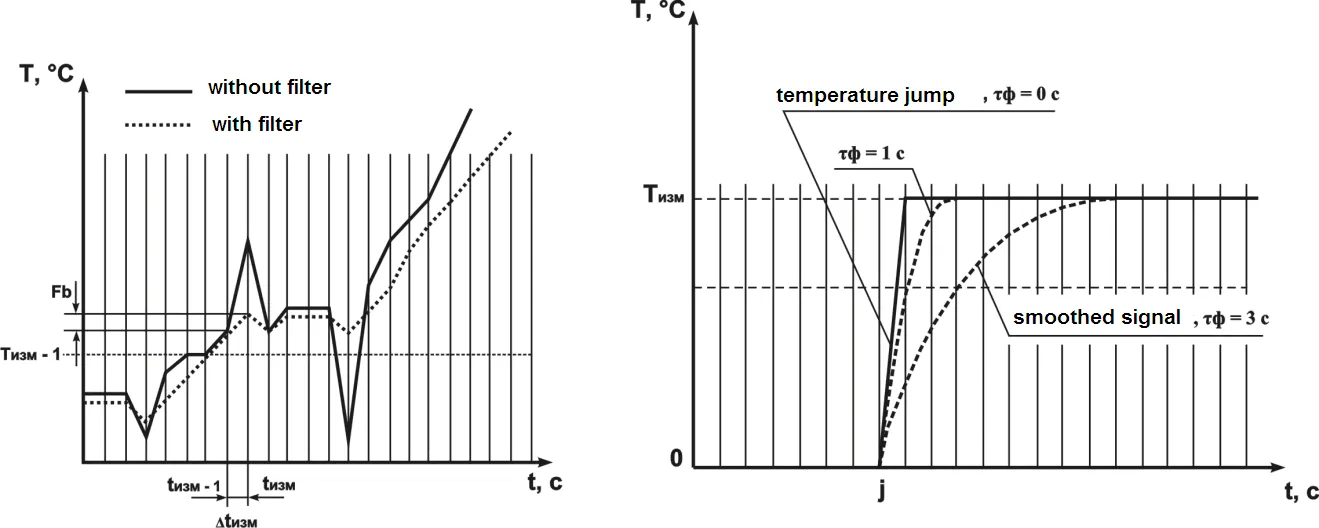
Figure 3.5 – Filter band characteristic Figure 3.6 – Filter time constant characteristic
3.2.5 Two-Position Regulator (Two-Position Control)
Section titled “3.2.5 Two-Position Regulator (Two-Position Control)”In the two-position control mode the device works according to one of the two logic types:
Logic №1 (Heater) – used to control a heater operation (tubular electric heaters, for instance), or to produce warning that the current temperature value (Tcurr) is less than the setting value (Tset).
- The output relay initially closes at values of Tcurr < Tset – HS
- Then opens at Tcurr > Tset + HS
- And closes again at Tcurr < Tset – HS
This effects the two-position control by Tset setting with the HS hysteresis.
Logic №2 (Cooler) – used to control a cooler operation (a fan, for instance), or a warning of exceeding Tset setting value.
- The output relay initially is ON at values of Tcurr > Tset + HS
- Then is OFF at Tcurr < Tset
- And ON again at Tcurr > Tset + HS
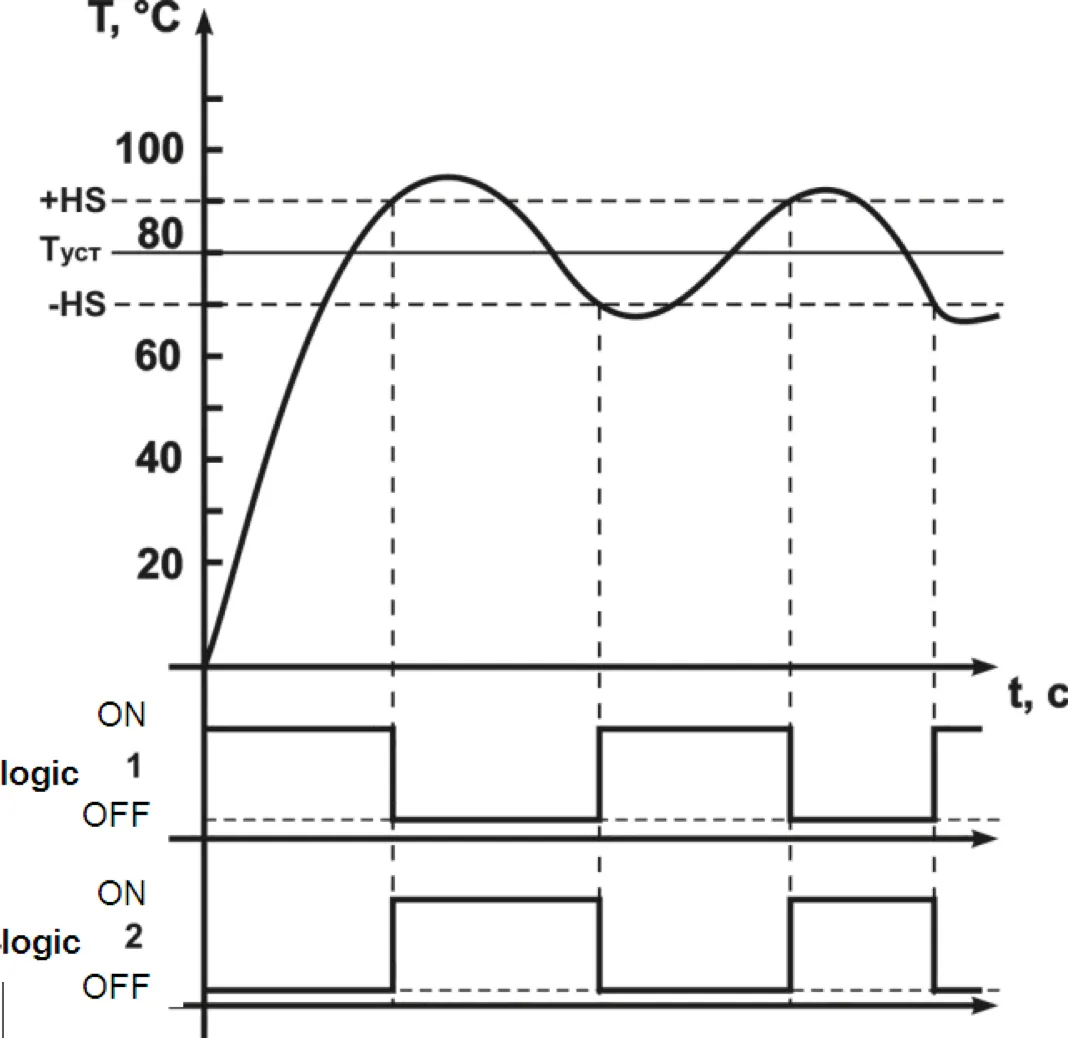
Figure 3.7 – Diagram of output relay function based on the logic type
Programmable parameters:
- Tset – temperature setting:
SP1(SP2,SP3,SP4) - HS – hysteresis:
HS1(HS2,HS3,HS4) - Relay function logic:
rt1(rt2,rt3,rt4)
3.2.6 PID-Controller (Proportional-Plus-Integral-Plus-Derivative Control)
Section titled “3.2.6 PID-Controller (Proportional-Plus-Integral-Plus-Derivative Control)”3.2.6.1 PID Control General Principles
Section titled “3.2.6.1 PID Control General Principles”On the control relay the “controlling” signal Yi is generated; its action is directed at reducing the Ei deviation.

Where:
- Xp – proportionality band (programmable parameter
P) - Ei – is the difference between the set Tset and current Tcurr temperature value, or unbalance
- τd – response speed derivation (programmable parameter “PID-controller derivative constant” -
d) - ΔEi – difference between two adjacent measurements Ei and Ei-1
- Δtmeas – difference between two adjacent measurements Tcurr and Tcurr-1
- τi – integration response time (programmable parameter “PID controller integral constant”
i) - Σ – derivation cumulative sum
To provide for the efficient PID controller operation it is important that proper values of Xp, τd and τi ratios for the given controlled object be set.
Programmable parameters:
- [Xp] –
P1(P2,P3,P4) - [τd] –
d1(d2,d3,d4) - [τi] –
i1(i2,i3,i4)
3.2.6.2 Proportional Regulator
Section titled “3.2.6.2 Proportional Regulator”Proportional regulator is the main where the task of temperature is directly proportional to error. Using only proportional regulator leads to error. The low values of proportional regulator lead to lack of stability and vibration in system but too high lead to low operation.
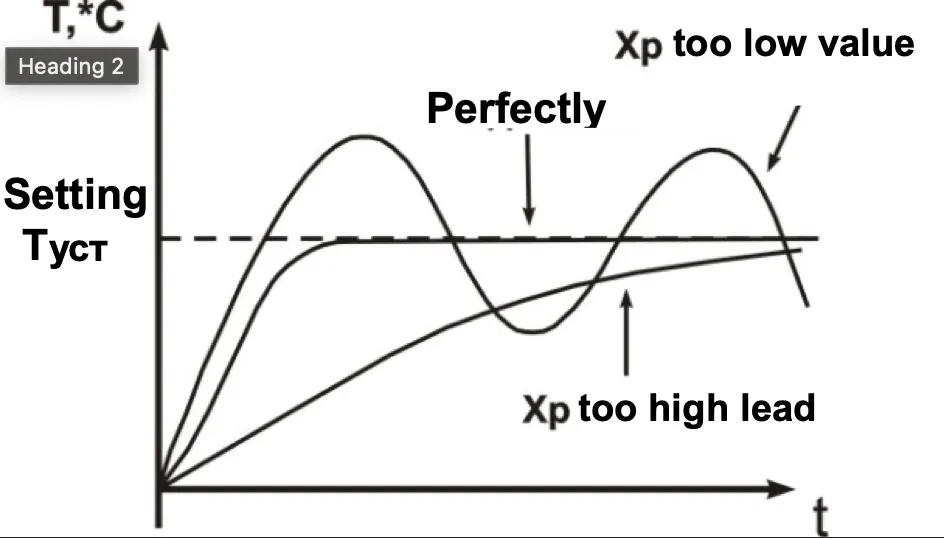
Figure 3.8 – Working diagram of proportional regulator
3.2.6.3 Integral Regulator
Section titled “3.2.6.3 Integral Regulator”It’s used for compensation of errors. The temperature will grow to the moment compensation of errors (or diminish by negative error). The minor constituents of integral element influence the regulator job much.
If the value fixed very high it means the system doesn’t recognize it and will work with overshoot.
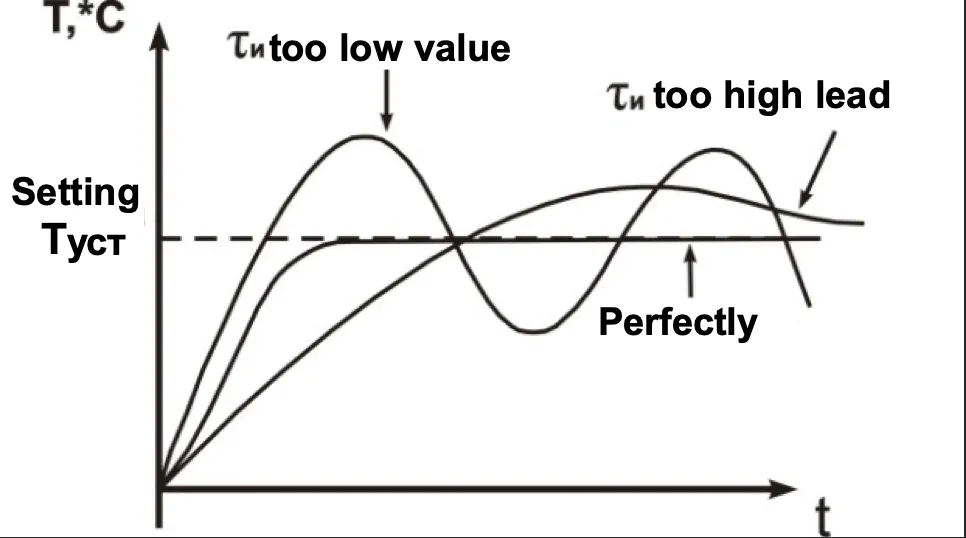
Figure 3.9 – Working diagram of integral regulator
3.2.6.4 Differential Regulator
Section titled “3.2.6.4 Differential Regulator”It’s used for increasing system performance rating the error change.
The regulator speeding leads to increasing overshoot and as a result is lack of stability the system.
Most cases derivative term is fixed neutral or low value to avoid this lack of stability.
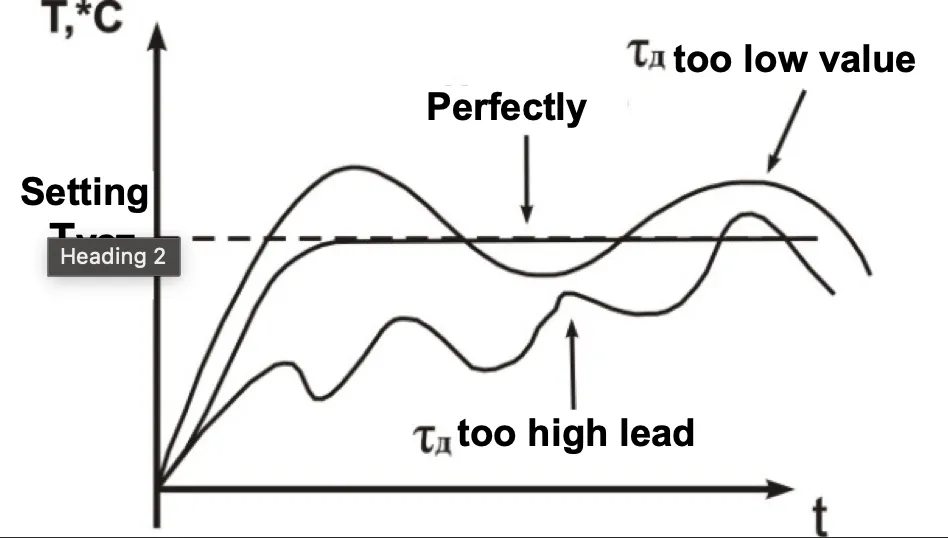
Figure 3.10 – Working diagram of differential regulator
3.2.6.5 Methods of PID Controlling
Section titled “3.2.6.5 Methods of PID Controlling”During the controlling, one of the control methods is selected: “Heater” or “Cooler”.
- Heater – the output signal value decreases while the controlled temperature grows
- Cooler – the output signal value increases while the controlled temperature grows
Programmable parameters: rt1 (rt2, rt3, rt4)
3.2.6.6 Action in PID-Regulator Mode with Output Key Element (Pulse-Length Modulation)
Section titled “3.2.6.6 Action in PID-Regulator Mode with Output Key Element (Pulse-Length Modulation)”Command current from PID regulator (Yi) is transforming to multiple pulses according to the following formula:
D = Tcycle × Yi / 100
Where:
- D – impulse duration (seconds):
L1,L2,L3,L4 - Tcycle – pulse repetition period (seconds):
t1,t2,t3,t4 - Yi – command current of PID regulator (%)
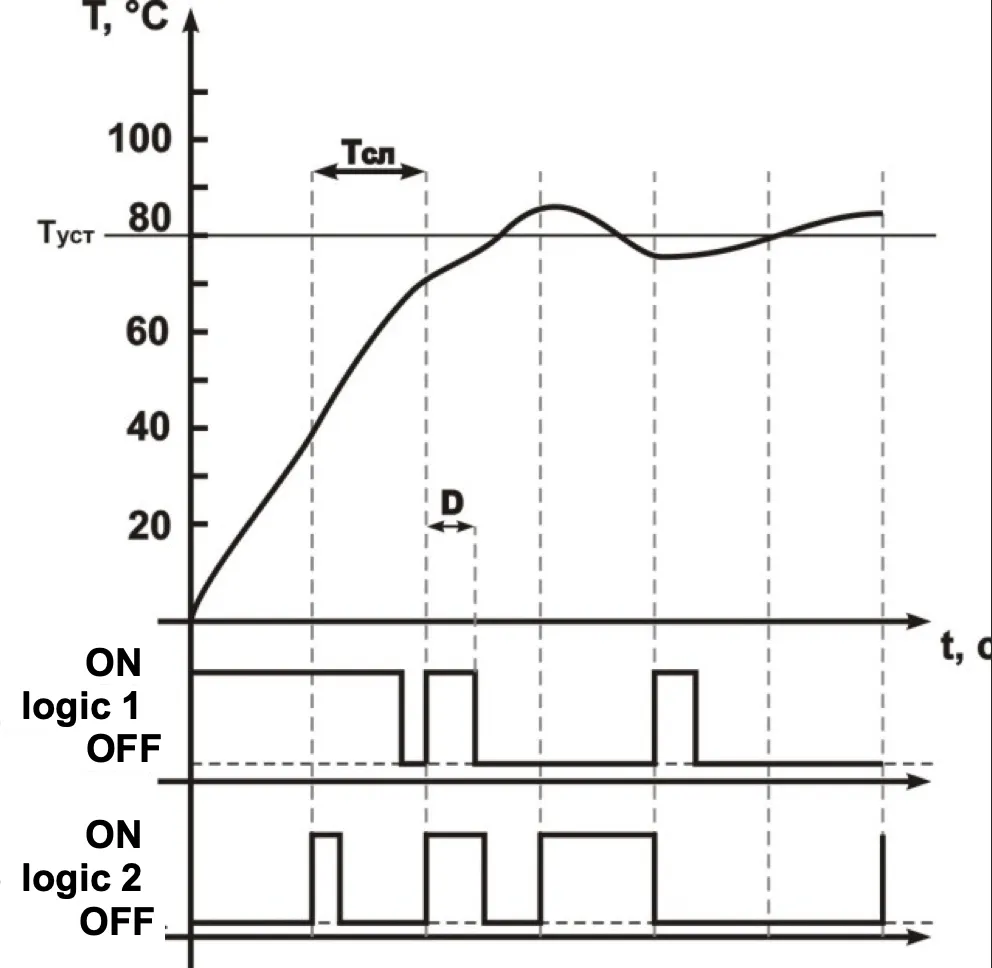
Figure 3.11 – Diagram of output relay action in PID regulation mode
3.2.7 RS-485 Communication Interface
Section titled “3.2.7 RS-485 Communication Interface”Using of interface is described in Appendix A.
4 Maintenance and Safety
Section titled “4 Maintenance and Safety”4.1 Safety
Section titled “4.1 Safety”Open terminals of the device carry dangerous voltage of up to 250 V. Any connections to the device and its maintenance operations must be performed only on de-energized device and executive units.
Ingress of moisture to the output terminals and the device inside electronic elements is not allowed. The use of the device in aggressive environments containing acids, alkali, oils, etc. is prohibited.
The device connection, adjustment and maintenance must be performed only by authorized personnel that is familiar with this manual.
4.2 Maintenance Schedule
Section titled “4.2 Maintenance Schedule”Recommended maintenance schedule – semiannually.
Maintenance scheduled operations consist of visual observation, during which wiring connection to terminals is checked, frame and casing integrity check for cracking and chipping.
During maintenance operations, the safety precautions listed in chapter 4.1 must be followed.
5 Device Connection
Section titled “5 Device Connection”5.1 Periphery Connections
Section titled “5.1 Periphery Connections”5.1.1 General Instructions
Section titled “5.1.1 General Instructions”Prepare cables for connecting the device to sensors, execution mechanisms and peripheral equipment, as well as to the power supply. To provide for the electric connections reliability it is recommended to use cables with copper stranded wires, the ends of which should be carefully cleaned and soldered prior to connecting. The wire core shall be cleared in such way, that its bare ends would not project beyond the terminals after connection to the device. The cable section must not exceed 2.5 mm².
5.1.2 Mounting Instructions Aimed at Electromagnetic Interference Reduction
Section titled “5.1.2 Mounting Instructions Aimed at Electromagnetic Interference Reduction”When laying the “device-sensor” lines, they should be separated into an individual tract (or several tracts). The tracts shall be placed separately from the power cables, as well as from cables that produce high frequency and pulse interference.
5.1.3 Mounting Instructions Aimed at Reduction of the Power Circuit Interference
Section titled “5.1.3 Mounting Instructions Aimed at Reduction of the Power Circuit Interference”The device shall be connected to 220V 50Hz circuit feeder that is not connected with supplying power to heavy-duty industrial equipment. It is recommended to install in the peripheral supply line a feed switch providing disconnecting the device from the circuit, as well as 1A fuses.
5.2 Device Connection
Section titled “5.2 Device Connection”The device shall be connected in accordance with the diagram on Figure 5.1, observing the listed below sequence:
A) Connect the device to power supply and execution units; B) Connect the “device-sensor” communication lines to the device inputs.
5.3 Connecting Sensors (RTDs)
Section titled “5.3 Connecting Sensors (RTDs)”TR-101 devices employ a three-wire diagram for connecting RTDs (resistance temperature detectors). Two wires are connected to one of the RTD outputs, and the third wire is connected to the other RTD output (see Figure 5.1). Such diagram, provided that impedance of all three wires is equal, allows to compensate its impact onto the temperature measurement.
The resistance temperature detectors can be connected to the device under a two-wire diagram as well, but such arrangement does not provide for the connecting wiring impedance compensation which may lead to certain dependence of the device measurement from the wires temperature variation.
5.3.1 Connecting Sensors (RTDs) According to a Two-Wire Diagram
Section titled “5.3.1 Connecting Sensors (RTDs) According to a Two-Wire Diagram”5.3.1.1 The RTDs (resistance temperature detectors) are connected to the device according to a two-wire diagram in case when a three-wire diagram cannot be used, for example, when TR-101 is installed within units equipped with earlier laid two-wire connection lines.
5.3.1.2 Please, mind that the device readings will depend on the “device-sensor” communication line wires impedance change, that takes place under influence of the outside air temperature. To compensate for the wires parasitic resistance, perform the following:
-
Before the operation start install a jumper between contacts 23 and 24 ((26 and 27), (29 and 30), (32 and 33)) of the terminal block, and connect the two-wire line immediately to contacts 22 and 23 ((25 and 26), (28 and 29), (31 and 32)).
-
Then connect a resistor box with accuracy rating not less than 0.05 (P321, for example) to the opposite ends of the “device-sensor” communication line, instead of the thermal element.
-
On the resistor box, set the value equal to the RTD resistance at temperature of 0 °C (50, 100, 500, 1000 Ohms, depending on the sensor type).
-
Energize the device and after 20-30 sec, by the digital display readings, define the value of the temperature deviation from 0 °C.
-
Set the
Sh1(Sh2,Sh3,Sh4) parameter value equal to the temperature deviation value, taken with the opposite sign. -
Check the accuracy of the value assigned; to do it, without changing the resistance value on the resistor box, switch the device to the temperature measurement mode, and verify that its reading is equal to 0±1 °C.
-
De-energize the device, disconnect the communication line from the resistor box and connect it to RTD.
-
After all these actions, the device is ready for further operation.
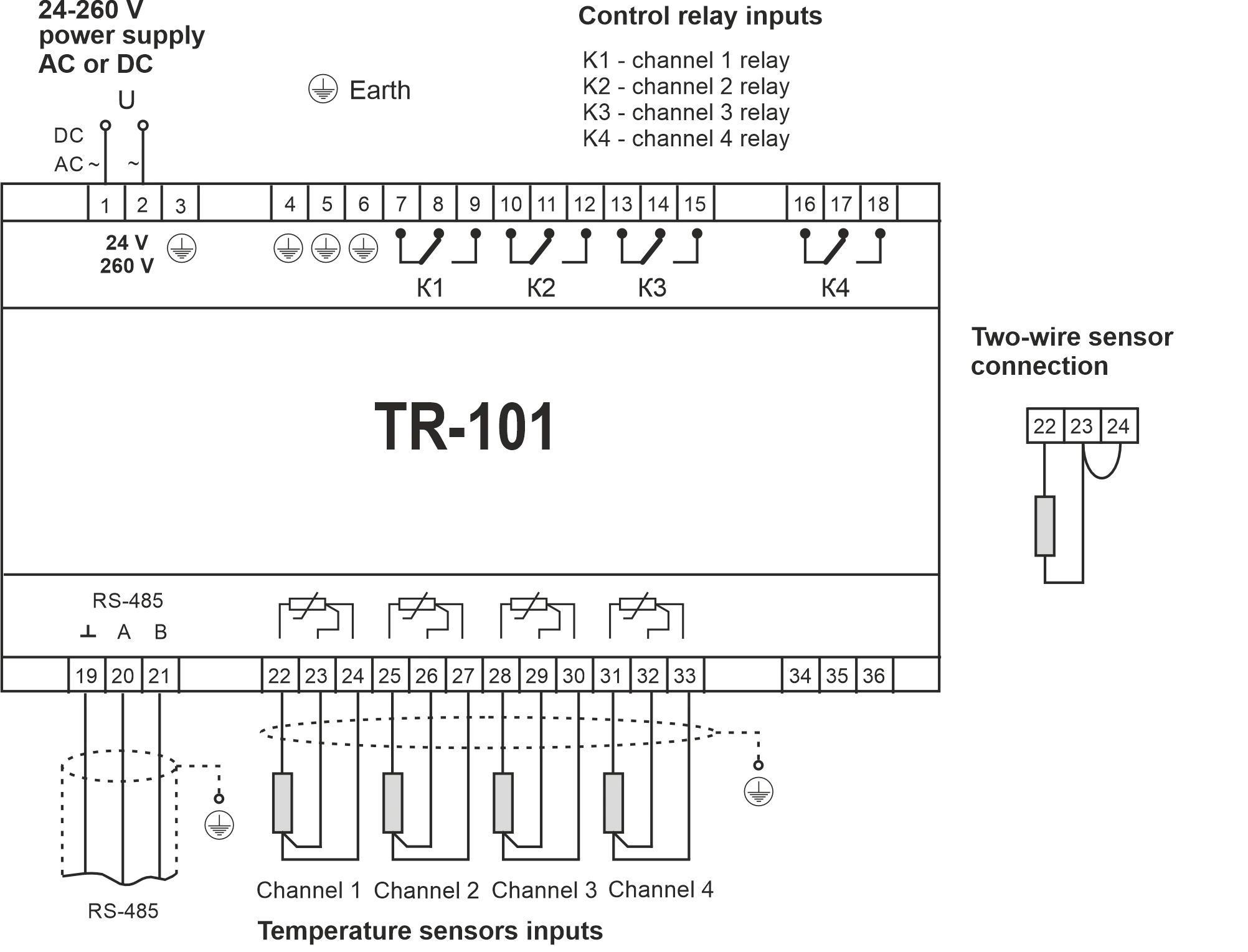
Figure 5.1 – TR-101 Connection Diagram
6 TR-101 Operation
Section titled “6 TR-101 Operation”6.1 General Information
Section titled “6.1 General Information”6.1.1 When the device is powered on, all displays light up for 2 seconds. After that on the digital display the measured temperature for Channel 1 is shown. The device sequentially displays the temperature of the active channels with 4 sec interval.
6.1.2 In case of certain faults presence, the device displays the error code (Table 6.1).
Table 6.1 – Error Codes
| Failure | Display | Description |
|---|---|---|
| Parameter error | ErP | Instead of the faulty parameter TR-101 loads the default value and continues to function normally |
| EEPROM failure | EEP | All relays are open |
| Sensor short circuit | FCC | The corresponding channel relay opens and “sensor failure” and “relay” lights begin to flicker |
| Sensor disconnection | FOC | The corresponding channel relay opens and “sensor failure” and “relay” lights begin to flicker |
6.2 Output Relay Testing
Section titled “6.2 Output Relay Testing”The device gives an opportunity to test both all relays at once, or each relay independently; to test, perform the following:
-
When in parameter edit mode, set the
tStparameter value according to Table 7.1 and press ENTER key; upon that, the display will showOFFmessage (which means that all relays that are being tested are currently in the normally open (de-energized) state), all LED lights will go off. -
Single pressing of ENTER key changes the status of the relays under testing:
OFF– the relays are in normally open (de-energized) stateOn– the relays are in normally closed (energized) state
-
To switch back to the menu press the MENU key. If no key is pressed during 20 sec the TR-101 device goes into the initial state.
7 Programming
Section titled “7 Programming”7.1 General Information
Section titled “7.1 General Information”7.1.1 Programmable parameters are set by the user during programming session and are stored in device’s nonvolatile memory.
The complete list of programmable parameter registers is given in Table 7.1.
Table 7.1 – Programmable Parameters
General Parameters
Section titled “General Parameters”| Address | Parameter | Mnemonic | Min/Max | Factory | Description |
|---|---|---|---|---|---|
| 21 | Sensor fault | Act | 0/1 | 0 | Loading relay state on sensor fault: 0 – OFF; 1 – ON |
System Parameters
Section titled “System Parameters”| Address | Parameter | Mnemonic | Min/Max | Factory | Description |
|---|---|---|---|---|---|
| 22 | Indication mode | dSP | 0/1 | 0 | 0 – sequential display (4 sec); 1 – manual view |
| 23 | Password | PAS** | 000/999 | 000 | 000 – password off; any other value activates password prompt |
| 24 | Reset | rSt* | 0/1 | 0 | 0 – do not reset; 1 – reset all to factory values |
| 25 | Relay Testing | tSt* | 0/4 | 0 | 0 – all relays; 1-4 – test relay 1-4 |
| 26 | Version | vEr* | — | 53 | Device version |
RS-485 Parameters
Section titled “RS-485 Parameters”| Address | Parameter | Mnemonic | Min/Max | Factory | Description |
|---|---|---|---|---|---|
| 27 | Switching | rSA | 0/2 | 0 | 0 – OFF; 1 – ON; 2 – Remote Control for Power Relays |
| 28 | Identifier | rSn | 1/247 | 1 | Device number (network address) |
| 29 | Bit rate | rSS | 0/2 | 2 | 0 – 2400 bps; 1 – 4800 bps; 2 – 9600 bps |
| 30 | Timing | rSL | 0/999 | 0 | Delay time of response (×100 µs) |
Channel 1 Parameters
Section titled “Channel 1 Parameters”| Address | Parameter | Mnemonic | Min/Max | Factory | Description |
|---|---|---|---|---|---|
| 31 | Switching channel | ch1 | 0/3 | 1 | 0 – off; 1 – two-position; 2 – PID; 3 – PID auto tuning |
| 32 | Setting | SP1 | -50/200 °C | 100 | Temperature setting (Tset) |
| 33 | Hysteresis | HS1 | 0/50 °C | 1 | Temperature hysteresis (HS) |
| 34 | Relay | rt1 | 0/1 | 0 | 0 – logic 1 (heater); 1 – logic 2 (cooler) |
| 35 | Proportional PID | P1 | 1/999 °C | 40 | PID Proportionality band (Xp) |
| 36 | Integral PID | i1 | 0/999 min | 130 | PID integral constant (τi) |
| 37 | Differential PID | d1 | 0/999 min | 4 | PID differential constant (τd) |
| 38 | Period | t1 | 60/999 s | 60 | Pulse-repetition interval of PLM (Tcycle) |
| 39 | Interval | L1 | 1/999 s | 1 | Minimal length of PLM |
| 40 | Characteristic shift | Sh1 | -50/50 °C | 0 | Sensor characteristic shift (0 – disabled) |
| 41 | Characteristic slope | KU1 | 0.50/2.00 | 1.00 | Sensor characteristic slope (Modbus: value ×100) |
| 42 | Filter band | Fb1 | 0/50 °C | 0 | Digital filter band (0 – disabled) |
| 43 | Filter time | Ft1 | 0/60 s | 2 | Digital filter time constant (0 – disabled) |
| 44 | Sensor type | Ct1 | 0/16 | 1 | See sensor type codes below |
Channel 2 Parameters
Section titled “Channel 2 Parameters”| Address | Parameter | Mnemonic | Min/Max | Factory | Description |
|---|---|---|---|---|---|
| 45 | Switching channel | ch2 | 0/3 | 1 | 0 – off; 1 – two-position; 2 – PID; 3 – PID auto tuning |
| 46 | Setting | SP2 | -50/200 °C | 100 | Temperature setting (Tset) |
| 47 | Hysteresis | HS2 | 0/50 °C | 1 | Temperature hysteresis (HS) |
| 48 | Relay | rt2 | 0/1 | 0 | 0 – logic 1 (heater); 1 – logic 2 (cooler) |
| 49 | Proportional PID | P2 | 1/999 °C | 40 | PID Proportionality band (Xp) |
| 50 | Integral PID | i2 | 0/999 min | 130 | PID integral constant (τi) |
| 51 | Differential PID | d2 | 0/999 min | 4 | PID differential constant (τd) |
| 52 | Period | t2 | 60/999 s | 60 | Pulse-repetition interval of PLM (Tcycle) |
| 53 | Interval | L2 | 1/999 s | 1 | Minimal length of PLM |
| 54 | Characteristic shift | Sh2 | -50/50 °C | 0 | Sensor characteristic shift (0 – disabled) |
| 55 | Characteristic slope | KU2 | 0.50/2.00 | 1.00 | Sensor characteristic slope (Modbus: value ×100) |
| 56 | Filter band | Fb2 | 0/50 °C | 0 | Digital filter band (0 – disabled) |
| 57 | Filter time | Ft2 | 0/60 s | 2 | Digital filter time constant (0 – disabled) |
| 58 | Sensor type | Ct2 | 0/16 | 1 | See sensor type codes below |
Channel 3 Parameters
Section titled “Channel 3 Parameters”| Address | Parameter | Mnemonic | Min/Max | Factory | Description |
|---|---|---|---|---|---|
| 59 | Switching channel | ch3 | 0/3 | 1 | 0 – off; 1 – two-position; 2 – PID; 3 – PID auto tuning |
| 60 | Setting | SP3 | -50/200 °C | 100 | Temperature setting (Tset) |
| 61 | Hysteresis | HS3 | 0/50 °C | 1 | Temperature hysteresis (HS) |
| 62 | Relay | rt3 | 0/1 | 0 | 0 – logic 1 (heater); 1 – logic 2 (cooler) |
| 63 | Proportional PID | P3 | 1/999 °C | 40 | PID Proportionality band (Xp) |
| 64 | Integral PID | i3 | 0/999 min | 130 | PID integral constant (τi) |
| 65 | Differential PID | d3 | 0/999 min | 4 | PID differential constant (τd) |
| 66 | Period | t3 | 60/999 s | 60 | Pulse-repetition interval of PLM (Tcycle) |
| 67 | Interval | L3 | 1/999 s | 1 | Minimal length of PLM |
| 68 | Characteristic shift | Sh3 | -50/50 °C | 0 | Sensor characteristic shift (0 – disabled) |
| 69 | Characteristic slope | KU3 | 0.50/2.00 | 1.00 | Sensor characteristic slope (Modbus: value ×100) |
| 70 | Filter band | Fb3 | 0/50 °C | 0 | Digital filter band (0 – disabled) |
| 71 | Filter time | Ft3 | 0/60 s | 2 | Digital filter time constant (0 – disabled) |
| 72 | Sensor type | Ct3 | 0/16 | 1 | See sensor type codes below |
Channel 4 Parameters
Section titled “Channel 4 Parameters”| Address | Parameter | Mnemonic | Min/Max | Factory | Description |
|---|---|---|---|---|---|
| 73 | Switching channel | ch4 | 0/3 | 1 | 0 – off; 1 – two-position; 2 – PID; 3 – PID auto tuning |
| 74 | Setting | SP4 | -50/200 °C | 100 | Temperature setting (Tset) |
| 75 | Hysteresis | HS4 | 0/50 °C | 1 | Temperature hysteresis (HS) |
| 76 | Relay | rt4 | 0/1 | 0 | 0 – logic 1 (heater); 1 – logic 2 (cooler) |
| 77 | Proportional PID | P4 | 1/999 °C | 40 | PID Proportionality band (Xp) |
| 78 | Integral PID | i4 | 0/999 min | 130 | PID integral constant (τi) |
| 79 | Differential PID | d4 | 0/999 min | 4 | PID differential constant (τd) |
| 80 | Period | t4 | 60/999 s | 60 | Pulse-repetition interval of PLM (Tcycle) |
| 81 | Interval | L4 | 1/999 s | 1 | Minimal length of PLM |
| 82 | Characteristic shift | Sh4 | -50/50 °C | 0 | Sensor characteristic shift (0 – disabled) |
| 83 | Characteristic slope | KU4 | 0.50/2.00 | 1.00 | Sensor characteristic slope (Modbus: value ×100) |
| 84 | Filter band | Fb4 | 0/50 °C | 0 | Digital filter band (0 – disabled) |
| 85 | Filter time | Ft4 | 0/60 s | 2 | Digital filter time constant (0 – disabled) |
| 86 | Sensor type | Ct4 | 0/16 | 1 | See sensor type codes below |
Notes:
- * Parameter available only for reading
- ** Remote access to computer is forbidden
Sensor Type Codes
Section titled “Sensor Type Codes”| Code | Sensor | Code | Sensor | Code | Sensor |
|---|---|---|---|---|---|
| 0 | Pt50 | 6 | Ni100 | 12 | Pt’500 |
| 1 | Pt100 | 7 | Ni120 | 13 | Pt’1000 |
| 2 | Pt500 | 8 | Ni500 | 14 | Cu’50 |
| 3 | Pt1000 | 9 | Ni1000 | 15 | Cu’100 |
| 4 | Cu50 | 10 | Pt’50 | 16 | PTC1000 |
| 5 | Cu100 | 11 | Pt’100 |
7.1.2 Viewing Parameters
Section titled “7.1.2 Viewing Parameters”To view parameters, press MENU key once, the display will show parameter 1 from Table 7.1. Scroll parameters with ▲▼, parameter view – press key ENTER, passage back to menu – press key MENU.
7.1.3 Editing Parameters
Section titled “7.1.3 Editing Parameters”To edit parameters, press and hold MENU key for 7 seconds, at that:
-
If a password had been set up, enter it. Use ▲▼ keys to change current position, use ENTER key to move to nExt position, use MENU key to confirm the password. Cancel password prompt – if no key has been pressed during 20 sec the TR-101 device returns to the initial state.
-
If the entered password is correct, the “Setting mode” LED will light (Figure 3.2, item 8), and the display will present the first parameter from Table 7.1.
-
If the password entered is incorrect, the TR-101 will return to its initial state.
-
If
PAShas been set to “0”, password prompt will not be activated. “Setting mode” LED will light (Figure 3.2, item 8), and the display will present the first parameter from Table 7.1.
Use ▲▼ keys to toggle parameters, use ENTER key to store parameter and return to menu, to return to menu without storing parameter, press MENU key. If no key is pressed during 20 sec the device goes into the initial state.
7.1.4 Reset to Factory Settings
Section titled “7.1.4 Reset to Factory Settings”Method 1:
In the parameter edit mode (p. 7.1.3) set rSt parameter to 1 and press ENTER key, after that, the device will perform resetting to default factory set parameters. Password will not be reset in this case.
Method 2:
Energize the device while pressing down ▲▼ keys and hold them pressed for over 2 seconds, at that the display will show nAU message; release the keys. De-energize the device. All factory settings including the password have been restored (password is off).
7.2 Programming Sequence
Section titled “7.2 Programming Sequence”7.2.1 Setting Up Measurement Entry Parameters
Section titled “7.2.1 Setting Up Measurement Entry Parameters”7.2.1.1 Enter the Ct1 (Ct2, Ct3, Ct4) parameter value in accordance with the sensor type (Table 1, Table 7.1).
7.2.1.2 Measurement Characteristic Adjustment
The measurement adjustment procedure performed by the device is described in paragraph 3.2.3. The device performs measurement adjustment after the necessary values for parameters Sh – sensor measurement characteristic shift and KU – sensor measurement characteristic slope, have been set.
Shparameter can be modified within boundaries from -50 to +50 °CKUparameter can be modified within boundaries from 0.50 to 2.00
7.2.2 Setting Up Digital Filter Parameters
Section titled “7.2.2 Setting Up Digital Filter Parameters”The digital filter operation is described in paragraph 3.2.4.
The measurement digital filter setting up is performed by specifying two parameters values:
Fb– digital filter bandFt– digital filter time constant
The Ft value can be set within limits from 0 to 60 sec; when Ft = 0 filtration by way of exponential smoothing is unavailable.
The Fb value is set within range from 0 to 200 °C; when Fb = 0 the “single interference termination” is off.
7.2.3 Setting Up Relay Control Method Parameters
Section titled “7.2.3 Setting Up Relay Control Method Parameters”For a specific regulation system, the control method has to be selected by means of setting corresponding values to rt1 (rt2, rt3, rt4) parameter:
- 0 – logic 1 (heater)
- 1 – logic 2 (cooler)
7.2.4 Setting Control Modes
Section titled “7.2.4 Setting Control Modes”The device can function in one of the two modes: the two-position control and PID-control.
The proper mode is set by specifying a proper value for ch1 (ch2, ch3, ch4) parameter:
- 0 – OFF
- 1 – two-position control
- 2 – PID control
- 3 – Automatic adjustment of PID regulator
The two-position control and PID control operation is described in paragraphs 3.2.5 and 3.2.6.
The two-position controller hysteresis HS (°C) is set under HS1 (HS2, HS3, HS4) parameter, see 3.2.5; the parameter may be modified within range from 0 to +50 °C.
7.2.5 PID Regulator Adjustment
Section titled “7.2.5 PID Regulator Adjustment”7.2.5.1 General Concept
PID regulator operation is described at p. 3.2.6.
For adjustment of PID regulator needed attend following actions:
- Set value of regulator setting
SP1(SP2,SP3,SP4) - Set parameters of pulse-length modulation (PLM) regulation:
t– pulse repetition period TcycleL– minimal pulse length
- Set parameters of PID regulation:
P– Proportionality band of regulator Xpi– Reaction time of integration τid– Reaction time of differentiator τd
Option setting t1 (t2, t3, t4) set in seconds from 60 to 999.
Option setting L1 (L2, L3, L4) set in seconds from 1 to 999.
Option setting P1 (P2, P3, P4) set in °C from 1 to 999.
Option setting i1 (i2, i3, i4) set in minutes from 0 to 999. For i = 0 device works as PD regulator.
Option setting d1 (d2, d3, d4) set in minutes from 0 to 999. For d = 0 device works as PI regulator.
For i = 0 and d = 0 device works as P regulator.
Considering that at each individual scheme there are non-periodic External actions of different characters, all coefficients in above shown formulas can change for getting optimal behavior in positive conditions.
Selected parameters for superfine temperature maintenance in steady-state may happen totally unacceptable for suppression transient phenomena for External action or on-exit onto mode.
As well as alternatively.
For another thing in the course of operation controlled plant characteristic regulation can change very much. Like for operational changes and in time.
Usually calculated values require repeated correcting and selection. And changing single parameter involves necessity correcting other.
7.2.5.2 Automatic Adjustment of PID Regulator
This mode designed to autodetection initial approximate values of PID coefficients τi, τd and Xp when operated at concrete scheme.
Automatic tuning is recommended to lead by start and system debugging.
7.2.5.2.1 Enter to program mode (see p. 7.1.3).
7.2.5.2.2 Define SP (Tset) like setting value which in future will be supported by device.
If necessary fix PLM pulses repetition period and minimal PLM pulse length, parameters t1 and L1.
Factory settings are t1 = 60 seconds, L1 = 1 second.
7.2.5.2.3 Define parameter ch1 = 3 (ch2, ch3, ch4).
After pressing key ENTER, at display device will appear blinking caption Pid with number display device for 10 seconds (the time can change depending on fixed time filter Ft1, Ft2, Ft3, Ft4).
On the morrow of time regulator will give continuous output limit and at display device will appear current temperature dotted in low order position “xxx.”.
Whereby output relay of loading will be power on till will not be reach the volume of temperature like SP (Tset).
After switching off loading relay (period I, point B) sometime the temperature mechanically will increase further.
As soon as the control temperature will come down below SP (Tset), process automatic tuning will finish (point G at Figure 7.1) and display device will show continuous lettering Pid.
TR-101 calculates coefficient of PID regulator: band proportionality, characteristic time of integration, characteristic time of differentiator.
After finishing automatic tuning needed press key MENU and switch device to program mode in which is possible to look and correct received coefficients value.
The coefficients were received as a result of “Automatic tuning PID” are not optimal and work for preliminary analysis.
7.2.5.3 PID Regulator Manual Setting
Below mentioned method allows defining approximate generic parameters of regulator.
7.2.5.3.1 Enter to program mode.
7.2.5.3.2 If necessary, fix PLM pulses repetition period and minimal PLM pulse length, parameters t and L.
Factory settings are t = 60 seconds, L = 1 second.
7.2.5.3.3 Fix the value equal to zero for i (τi), d (τd) and P (Xp). Fix SP (Tset) value equal to temperature setting value which will be supported by device in future.
After passage to mode regulation (at the end of 20 seconds the device automatically passes into mode regulation) output relay of loading will be power on till fail to reach regulation temperature (setting limit) Tset (period I, point B at Figure 7.1).
7.2.5.3.4 Take measure t₁ – time from the moment of temperature increase to 10% (point A at Figure 7.1) and to the moment of temperature increase to 63% from the range Tset − Tmax (point B at Figure 7.1).
7.2.5.3.6 Take measure of maximum value overshoot between points B and G (Emax, Figure 7.1).
7.2.5.3.7 Fix the value Xp = 2 × Emax (period II at Figure 7.1).
Make sure that for datum value Xp does not absent achievement of setting value Tset. Otherwise necessary increase the value Xp.
If the value of Xp = 2 × Emax and the difference between steady-state temperature and setting value is too much, then need to diminish Xp.
7.2.5.3.8 Fix the value τi = 2.4 × t₁. Make sure that given value τi not appear temperature vibration around setting value (period III). For decreasing vibration is necessary increase value τi, for increasing delivery speed necessary diminish value τi.
7.2.5.3.9 Fix the value τd equal to [0.1; 0.2; 0.3; 0.4] × τobj.
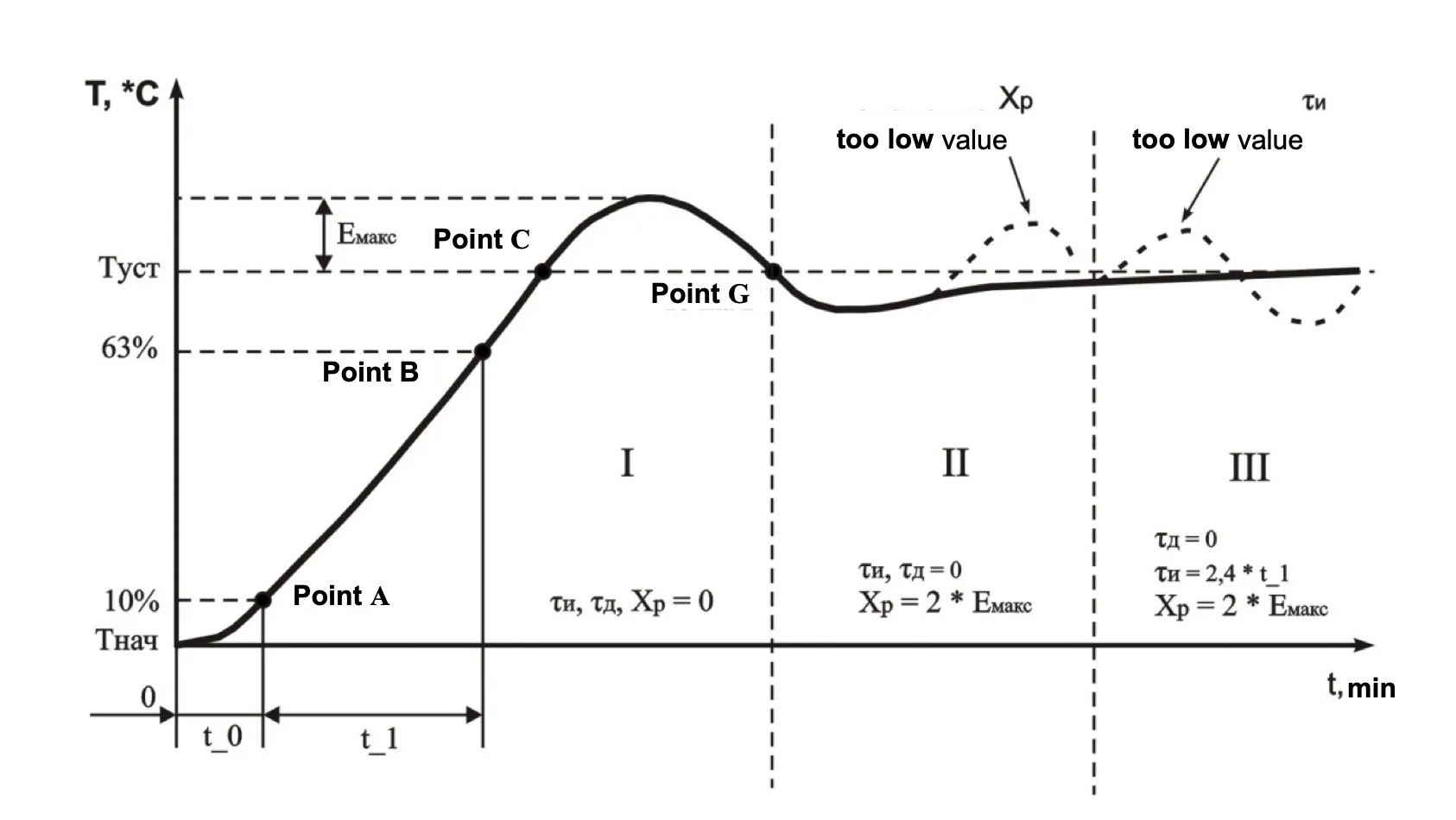
Figure 7.1 – PID regulator manual tuning diagram
8 Service Life, Shelf Life and Manufacturer Warranty
Section titled “8 Service Life, Shelf Life and Manufacturer Warranty”8.1 The unit service life is 10 years. Upon expiration of the service life you should contact the Manufacturer.
8.2 Shelf life is 3 years.
8.3 Warranty period of the unit operation is 5 years from the date of sale.
During the warranty period the Manufacturer is responsible for free repair of the unit, if the Consumer has complied with the requirements of this Operating Manual.
8.4 Warranty service is performed at the place of purchase or by the Manufacturer of the product.
8.5 Post-warranty service is performed by the Manufacturer at current rates.
8.6 Before sending for repair, the unit should be packed in the original or other packaging excluding mechanical damage.
9 Storage and Shipping Conditions
Section titled “9 Storage and Shipping Conditions”The device in manufacturer package should be stored in enclosed rooms at -45 to +60 °C and exposed to no more than 80% of relative humidity when there are no fumes in the air that exert a deleterious effect on package and the device material. The Buyer must provide the protection of the device against mechanical damages in transit.
For all questions, please contact the Manufacturer:
“Novatek-Electro” Ltd.
59, Mykhailo Boltenko (Admiral Lazarev) str., Odesa, Ukraine, 65007
Tel: +38 (067) 565 37 68 +38 (050) 359 39 11 +38 (063) 301 30 40
VN251029