

EM-483 Operating Manual
Ta treść nie jest jeszcze dostępna w Twoim języku.
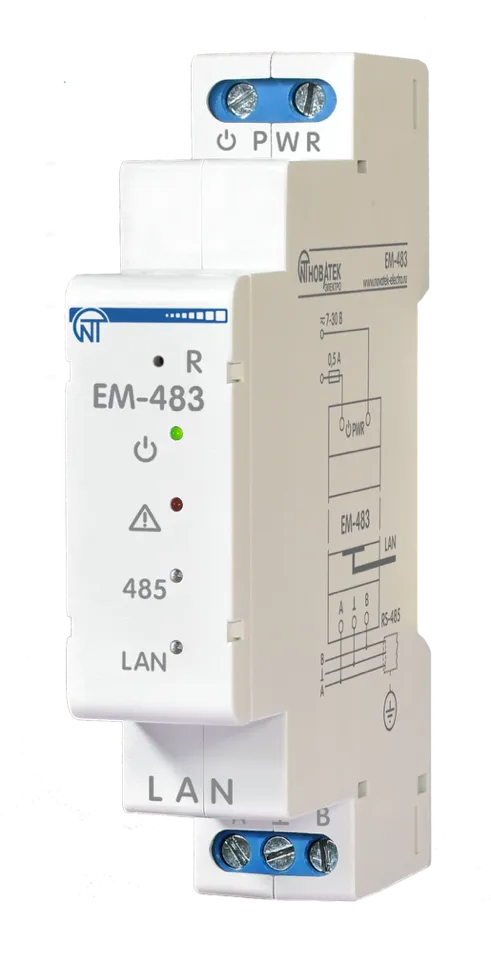
The Protocol Converter EM-483 (hereinafter referred to as “Product”, “EM-483”) is a microprocessor device manufactured by NOVATEK-ELECTRO LTD.
The product is designed for data exchange over a 10BASE-T and 100BASE-T Ethernet network with equipment supplied with an RS-485 interface.
The EM-483 provides for MODBUS server functions to connect MODBUS clients over an Ethernet network. The product redirects MODBUS requests from clients to devices on the MODBUS network and returns responses from the devices to the clients.
EM-483 can also be used in tunnel mode for direct data transmission between clients and RS-485 devices using protocols other than MODBUS.
The EM-483 provides for:
- Flexible Ethernet addressing (MAC address override, and static or dynamic IP address);
- Protection of access via the Ethernet network (configuration mode password, IP address filter for configuration or for connection to the MODBUS network);
- Various modes of exchange over the MODBUS network (RTU or ASCII, with parity checking for even and odd or without checking, a wide range of transmission rates, and configurable delay).
Overall and Mounting Dimensions
Section titled “Overall and Mounting Dimensions”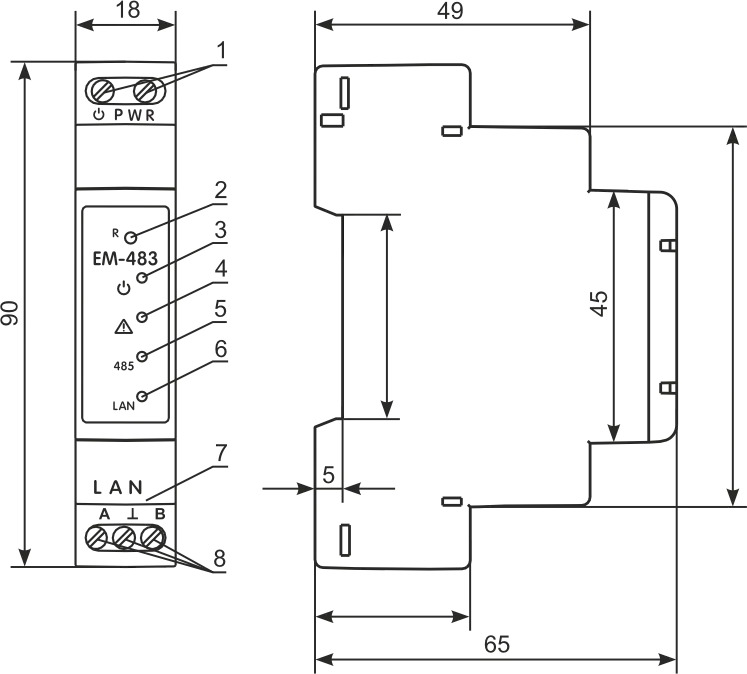
Figure 1 – Overall and mounting dimensions and controls
- The «⎓ PWR» terminals are designed to connect a power supply from 7 to 30 V DC or AC.
- The reset button «R» is used to restart the product or to reset the parameters to the factory values.
- The Indicator «⎓» lights up when there is power supply voltage.
- The Indicator «⚠» warns about errors (including those in the format of received data packets).
- The Indicator «485» is On when RS-485 transmission is pending, blinking when RS-485 communication is in progress.
- The Indicator «LAN» lights up when connecting with the Ethernet network; it blinks in the course of exchange over the Ethernet network.
- Connector for Ethernet connection.
- Terminals «A», «⊥» and «B» are used for connecting to the RS-485 bus.
Firmware Versions
Section titled “Firmware Versions”| Version | Date Issued | Remarks |
|---|---|---|
| 3 | 14.07.2020 | Demo version |
| 4 | 09.02.2021 | The number of remote MODBUS TCP servers is increased to 5; RS-485 communication stability at minimum speeds improved |
| 6 | 09.04.2024 | Added ability to remotely update firmware; Added tunnel mode for non-MODBUS transmissions |
Terms and Abbreviations
Section titled “Terms and Abbreviations”- Firmware – the firmware of the product that gets started up when the power is applied
- Indicator – single LED indicator
- Client – a device that accesses another device (server) with a request to perform certain functions
- Packet – a block of data for transmission between devices
- Server – a device that performs certain functions at the request of other devices
- Ethernet – a standard for packet-based network communication between devices (such as personal computers) used for wired local area networks
- HTTP – a protocol for transmitting Web pages and other data using the “client-server” technology
- IPv4 (address) – a four-byte node address, that is unique within a single network that operates over the IP protocol
- MAC-48 (address) – a six-byte address used in network transmissions to identify devices. As a rule, it has a globally unique value
- RS-485/EIA-485 – a physical layer standard for an asynchronous interface used for transmission over a twisted pair of wires
- TCP/IP – a standard, a set of protocols for data transmission on networks with delivery control
Operation Conditions
Section titled “Operation Conditions”The product is intended for operation in the following conditions:
- Ambient temperature: from minus 35 to +55 °С
- Atmospheric pressure: from 84 to 106.7 kPa
- Relative humidity (at temperature of +25 °С): 30 … 80 %
Technical Specifications
Section titled “Technical Specifications”| Parameter | Value |
|---|---|
| DC power supply voltage | 7 – 30 V |
| Ethernet communication interface | 10BASE-T/100BASE-T (twisted pair) |
| Supported Ethernet network protocols | MODBUS TCP, HTTP |
| Maximum number of connections via MODBUS TCP protocol | 4 |
| Embedded servers | MODBUS-server, HTTP-server |
| MODBUS network exchange standard | RS-485 |
| Supported MODBUS network protocols | MODBUS RTU, MODBUS ASCII |
| Maximum number of devices connected to RS-485 (with input current of 1 mA) | 32 |
| Maximum number of devices connected to RS-485 (with input current of 0.125 mA) | 256 |
| Indication | LED |
| Power-on standby time | ≤ 1 s |
| Output short-circuit current of the RS-485 driver (limit at the bus voltage of 12 V) | 200 mA |
| Power consumption | 1.5 W |
| Weight | ≤ 0.08 kg |
| Overall dimensions, H×B×L | 90 × 65 × 18 mm |
| The Product designation | Switchgear and control equipment |
| Rated operating condition | Continuous |
| Conductor cross-section for connecting to terminals | 0.3 – 2.5 mm² |
| Tightening torque of the terminal screws of input contacts | 0.4 N·m |
| Protection class rating of the product | IP 20 |
| Electric shock protection class | III |
| Climatic design version | NF 3.1 |
| Overvoltage category | II |
| Permissible degree of contamination | II |
| Insulation rated voltage | 450 V |
| Rated pulse withstand voltage | 2.5 kV |
| Rated galvanic isolation voltage between power supply terminals and RS-485 terminals | 1.5 kV |
| Rated galvanic isolation voltage between power supply terminals and Ethernet terminals | 1.5 kV |
| Installation (mounting) | DIN rail 35 mm |
The Product remains functional at any position in space.
Case material: self-extinguishing plastic.
The product meets the requirements of the following: EN 60947-1; EN 60947-6-2; EN 55011; EN 61000-4-2.
Harmful substances in an amount exceeding the maximum permissible concentrations are absent.
Connection
Section titled “Connection”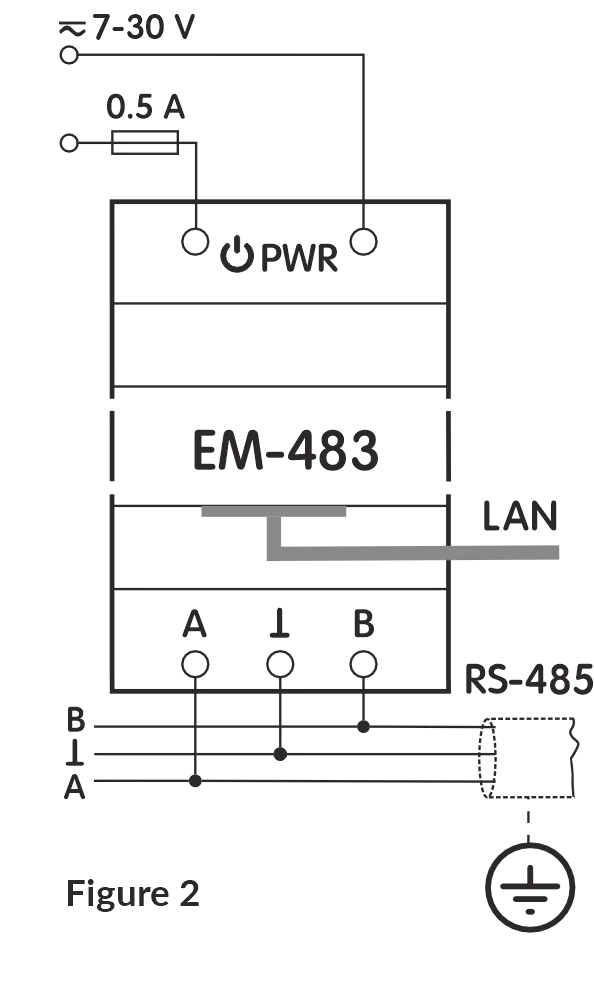
Figure 2 – Connection diagram
For a reliable contact, tighten the terminal screws with the force 0.4 N·m.
To ensure the reliability of electrical connections, use flexible (stranded) wires, the ends of which must be stripped of insulation by 5±0.5 mm and compressed with bushing tips. It is recommended to use a wire with a cross section of at least 1 mm².
When connecting to the RS-485 bus, use a twisted pair cable. Cat. 1 or higher. A shielded grounded cable is recommended.
When fixing the wires, avoid mechanical damage, twisting or wearing down the insulation of the wires.
The connection of EM-483 is made according to the scheme shown in Figure 2, in the following order:
-
Connect the connection cable to the RS-485 bus (Cat 1 twisted pair cable) to terminals «A», «⊥», «B» and to the RS-485 bus (or directly to the device with the RS-485 interface).
-
Connect the Ethernet connection cable (Cat.5 or higher twisted pair cable with 8P8C/RJ45 connector) to the «LAN» connector and Ethernet network.
-
Connect the power supply to the «⎓ PWR» power connector.
Operation
Section titled “Operation”A 32-bit RISC processor with ARM architecture routes data between a MODBUS RTU/ASCII network (RS-485) and the Ethernet network (10BASE-T/100BASE-T). The speed and availability of direct memory access channels allow you to operate with high-speed data streams. The indicators indicate the status of the connections and the data flow over the MODBUS and Ethernet networks. The «R» button allows you to restart the EM-483 without disconnecting it from the network, or reset the settings to factory values.
The product is equipped with a memory for storing settings. Each product receives a globally unique MAC address during manufacturing and can connect to local networks that have a secure Internet connection.
Using the Product
Section titled “Using the Product”After power is applied, the «⚠» and «485» indicators light up, and EM-483 initializes the transceivers. After that, both lights go out for 0.5 seconds, and the product starts performing server functions (the connection to the Ethernet network may take longer depending on the settings of the product and other devices connected to the network).
The EM-483 is waiting for an Ethernet connection. If the «LAN» indicator lights up, the network connection has been successful. The flashing «LAN» indicator shows that data is passing through the network.
Operation of EM-483 over the HTTP Protocol
Section titled “Operation of EM-483 over the HTTP Protocol”EM-483 is waiting for an HTTP Ethernet connection to port 80. Connection from a PC can be made using a WEB browser.
When the client is connected to port 80, the product expects requests from the client to receive HTML pages. Parameters can be specified in the request. In response to the correct request, the parameters are processed, and the text of the selected page is transmitted to the client in HTML format (or in JSON or XML format for API requests, see Appendix B - WEB Interfaces). If the request does not specify an existing page, the title page will be returned. After the page is passed, the product disconnects the client and waits for the connection again.
Operation of EM-483 via the MODBUS Protocol
Section titled “Operation of EM-483 via the MODBUS Protocol”During operation, EM-483 is waiting for an Ethernet connection over the MODBUS TCP protocol to port 502. The MODBUS TCP connection port can be changed by the user. The connection from a PC can be made using any programs – MODBUS TCP clients. The application «MODBUS TCP client» is available for download on the manufacturer’s website www.novatek-electro.com in the section «Software». An additional port for MODBUS RTU or MODBUS ASCII connections over TCP can also be specified in the settings.
When requesting a client connection to a MODBUS port, EM-483 checks the list of available connections. If all connections are busy, the connection is rejected; otherwise, it is added to the internal list of serviced clients (no more than four clients).
EM-483 is waiting for a MODBUS request:
- from the client, if the connection is established from the latter;
- from the master device via the MODBUS network, in the mode of the slave via the RS-485-interface;
- from the data collection server, when connected to it (see Appendix A - Connecting to the Server).
When a request is received from a client, it is analyzed and, depending on the code of the requested function and the current rights of the client, it is either processed or blocked. When blocking a request, EM-483 can generate and transmit to the client a user-specified MODBUS exception code (by default, code 1). The client’s rights are determined by the passwords entered after the connection.
If the request is addressed to EM-483, the product does not redirect the request, but processes it and transmits the response to the client.
In the master mode via the RS-485 interface, requests to other devices are redirected to the MODBUS network, and a response is expected from the device in the MODBUS network – the «485» indicator lights up. If the data is received or the waiting time has expired, the «485» indicator goes out.
In the remote server redirection mode, if a connection is established with a remote MODBUS TCP server, requests to other devices are also sent to this server, and a response is expected from it.
If the request could not be redirected (for example, in the slave mode, if the connection to the remote MODBUS TCP server was terminated), EM-483 can generate and transmit to the client the user-specified MODBUS exception code (by default, code 10).
If there is no response, EM-483 can generate and transmit the user-specified MODBUS exception code (by default, code 11) to the client.
If a response to the request has been received, EM-483 transmits it to the client that sent the request.
EM-483 Operation in Tunnel Mode
Section titled “EM-483 Operation in Tunnel Mode”In tunnel mode EM-483 receives data “as is”, without protocol check, and sends them to all other directions, for which this mode is selected. This allows transmitting data in a format other than MODBUS protocol. For example, arbitrary data received via RS-485 can be forwarded to a remote server, and vice versa.
The tunnel can be selected separately for each connection to the remote server and for the RS-485 interface. In the latter case, since the data format for incoming connections to the optional TCP port is the same as for RS-485, the tunnel mode will be enabled for these connections as well.
A data packet from one direction is received in its entirety (for Ethernet TCP it is the content of one TCP packet, for RS-485 the packet length is determined by the MODBUS RTU maximum pause rules), then sent to the other tunnel directions in turn. The maximum length of a data packet is 254 bytes.
Setting Up
Section titled “Setting Up”The configurable parameters are described in Appendix C - MODBUS Registers. The parameters are saved when the power is turned off.
There are two ways to configure the product:
- Via the WEB-interface;
- Via the MODBUS-interface.
Restarting the product or resetting the settings to make them comply with the factory values is performed using the «R» button accessible through the hole on the front panel. The button must be pressed by a thin non-conductive object.
Reset to Manufacturer’s Defaults
Section titled “Reset to Manufacturer’s Defaults”- Press and hold the reset button «R» for at least 8 seconds (after 2 seconds of holding the button, the indicator «⚠» will light up), after 8 seconds, the product will get restarted, the indicators will flash and go out.
- Release the «R» button.
Restart with Saved Settings
Section titled “Restart with Saved Settings”- Press and hold the reset button «R» for 2 to 8 seconds.
- After the «⚠» indicator lights up, release the «R» button.
Configuring EM-483 via the MODBUS Interface
Section titled “Configuring EM-483 via the MODBUS Interface”Configuration via the MODBUS interface is performed when connecting to the product using a MODBUS client IP address (factory value – 192.168.0.111) specifying the MODBUS identifier EM-483 (factory value – 111).
To configure the parameters, write the password string into the password input parameter (see Current Mode Parameters). The factory password value is «11111», i.e. to write the factory password into registers 0 to 4, write the number 49 – the ASCII code of the unit. If the password is specified correctly, the mode register (see Current State Parameters) will take the value «1» – the setting mode.
In the setup mode, the control command parameter is available for recording, as well as the setup parameters (listed in Settings). After writing the desired values into the configuration parameters registers, write the value «2» – the «Save» command to the control command parameter. The correctness of the saved parameters values can be checked by comparing the sets of configurable parameters and the saved parameters. If the sets match, the new settings have been accepted and saved.
To apply parameters without restarting the product, write the value «4» into the control command parameter – the «Save and Apply» command. Only MODBUS and custom parameters can be applied without restarting the product. The correctness of the saved parameters values can be checked by comparing the sets of configurable parameters and the current parameters. If the sets match, the new settings have been accepted and saved.
To cancel changes in the parameters before saving them, write the value «9» in the control command parameter – the «Cancel» command. In this case, the configurable parameters take the values of the saved ones.
To reset the saved parameters to the factory values in the setup mode, write the value «444» in the control command parameter – the «Return to Factory» command.
In order for the stored parameter values to take effect, the product must be restarted. Via the MODBUS interface, the restart is performed by writing the value «1» to the control command parameter – the «Restart» command.
To exit the setup mode, write 0 to the first register of the password input parameter. In this case, all the password input registers and the control command register are cleared (they take the value «0»).
Configuring EM-483 via the WEB Interface
Section titled “Configuring EM-483 via the WEB Interface”The configuration via the WEB-interface is performed using a WEB-browser. Write the IP address of the product in the address bar of the browser (the factory value is 192.168.0.111) and select the transition to the specified address.
The main page will be displayed with the tab titles for switching over to other modes.
To configure the product parameters, select the «Settings» tab.
You will be prompted for a password to access the settings (the factory value is «11111»).
After entering the password and pressing the «Login» button, if the password is specified correctly, access to the configuration mode must be allowed. The settings page appears. If the password is incorrect, you will be prompted for the password again.
The settings on the settings page are grouped by purpose and divided into bookmarks. Non-configurable parameters and measurements are available on the «Status» tab. The settings on the other tabs are listed in the Settings.
After making changes to the parameters, click the «Save» button. In this case, the entered parameters will be checked. If there are no errors in the parameter values, the parameters will be stored in the EM-483 memory (the new parameters will take effect after the next parameter application or restart). If errors are found in the parameters when clicking the «Save» button, none of the parameters are saved, and the names of the erroneous parameters are highlighted in red.
To apply the parameters without restarting the product, click the «Apply» button at the bottom of the page. In this case, the entered parameters will be checked. If there are no errors in the parameter values, the parameters will be stored in the EM-483 memory and will take effect. Only MODBUS and custom parameters can be applied without restarting.
When you click on the «Return to Factory» button, all parameters take their factory values.
When the «Restart» button is clicked, all connections and incoming/outgoing operations are interrupted, and the EM-483 is restarted. If changes in the parameters have been made and stored in the product’s memory before, these changes will take effect.
When you click on the «Exit» button, the setup mode is closed, and the password request is displayed again.
Firmware Update
Section titled “Firmware Update”EM-483 stores two update files in its memory:
- The file «EM483FW1.FUS» can be downloaded via the WEB-interface;
- The file «EM483FW0.FUS» is downloaded by the manufacturer and cannot be replaced; in case of a failure during the update process (for example, power supply loss), the file is used for automatic recovery.
Any of these files can be obtained from the EM-483 memory (for loading into another EM-483 product). The installed firmware can be updated from these files remotely via MODBUS or WEB-interface.
Transfer of EM-483 Update Files
Section titled “Transfer of EM-483 Update Files”Remote download via MODBUS:
- Connect to configure the product via MODBUS (see section Configuring EM-483 via the MODBUS Interface).
- To check the version of the downloaded update file, read the header line in registers 2030-2061.
- To start downloading the new version from the cloud server into the downloaded update file, write the value «64893» into the control command parameter.
- Control the downloading of the file by reading registers 2004-2005.
- After downloading, check the version of the downloaded file again.
Upload via WEB-interface:
- Enter the EM-483 configuration mode via WEB-interface.
- Go to the «Files» tab.
- Select the file «EM483FW0.FUS» or «EM483FW1.FUS».
To upload a file to EM-483:
- Click the file selection button.
- In the window that opens, select the update file (for example, «EM-483-5-2-6.FUS»).
- Click the «Send» button.
To get a file from EM-483:
- Click the «Receive» button.
- Select the file name and the location where the file will be placed.
To erase the contents of the EM-483 file, click the «Erase» button.
Firmware Update by External Command
Section titled “Firmware Update by External Command”Remote software update via MODBUS:
- Connect to configure the product via MODBUS (see section Configuring EM-483 via the MODBUS Interface).
- Read the header line in registers 2030-2061 to check the version of the downloaded update file.
- If the required file is loaded, write the value «65397» to the control command parameter to start the update.
Update via WEB-interface:
- Enter EM-483 configuration mode via WEB-interface.
- Go to the «Files» tab. Select the file «EM483FW0.FUS» or «EM483FW1.FUS».
- Press the «Program» button.
The product will automatically restart and enter the update mode. Wait for the software update, the process may take from 1 to 3 minutes. Then connect to the EM-483 (via WEB-interface or MODBUS-interface). Check the version number and make sure that the update was successful.
Complete Set
Section titled “Complete Set”| Item | Quantity |
|---|---|
| Protocol converter EM-483 | 1 pcs. |
| Ethernet connection cable | 1 pcs. |
| Operating manual | 1 pcs. |
| Packaging | 1 pcs. |
Maintenance
Section titled “Maintenance”Recommended frequency of maintenance is every six months.
Maintenance Procedure:
- Check the connection reliability of the wires, if necessary, clamp.
- Visually check the integrity of the housing, in case of detection of cracks and damages take the product out of service and send for repair.
- If necessary, wipe the front panel and the housing of the product with cloth.
Safety Precautions
Section titled “Safety Precautions”It is not allowed water penetration on terminals and internal elements of the product.
During operation and maintenance, the regulatory document requirements must be met, namely:
- Regulations for Operation of Consumer Electrical Installations
- Safety Rules for Operation of Consumer Electrical Installations
- Occupational Safety in Operation of Electrical Installations
Transportation and Storage
Section titled “Transportation and Storage”The product in the original package is permitted to be transported and stored at the temperature from minus 45 to +60 °C and relative humidity of no more than 80 %.
Service Life and Manufacturer Warranty
Section titled “Service Life and Manufacturer Warranty”- Lifetime: 10 years. Upon expiration of the service life, contact the manufacturer.
- Shelf life: 3 years.
- Warranty period: 5 years from the date of sale.
During the warranty period of operation (in the case of failure of the product) the manufacturer is responsible for free repair of the device.
Warranty service is performed at the place of purchase or by the manufacturer of the product.
Post-warranty service of the product is performed by the manufacturer at current rates.
Before sending for repair, the product should be packed in the original or other packing which prevents mechanical damage.
Manufacturer Contact
Section titled “Manufacturer Contact”“Novatek-Electro” Ltd.
- Website: www.novatek-electro.com
- Address: 59, Mykhailo Boltenko (Admiral Lazarev) str., Odesa, Ukraine, 65007
- Tel: +38 (067) 565 37 68; +38 (050) 359 39 11; +38 (063) 301 30 40