

OB-215 Operating Manual
Ta treść nie jest jeszcze dostępna w Twoim języku.
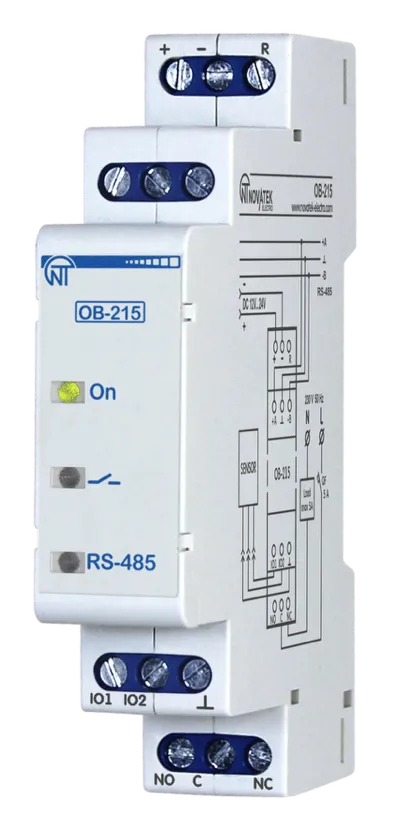
NOVATEK-ELECTRO LTD
Intelligent industrial electronic
DIGITAL I/O MODULE OB-215
OPERATING MANUAL
Quality control system on the development and production complies with requirements ISO 9001:2015
Dear customer,
Company NOVATEK-ELECTRO LTD. thanks you for purchasing our devices.
You will be able to use properly the device after carefully studying the Operating Manual.
Keep the Operating Manual throughout the service life of the device.
UKRAINE, Odesa — www.novatek-electro.com
1 Purpose
Section titled “1 Purpose”Digital I/O module OB-215 (hereinafter referred to as the device or OB-215) can be used as the following:
- remote DC voltage meter (0 – 10 V);
- remote DC meter (0 – 20 mA);
- remote temperature meter with the ability to connect sensors NTC (10 KB), PTC 1000, PT 1000 or digital temperature sensor DS/DHT/BMP;
- temperature regulator for cooling and heating plants;
- pulse counter with saving the result in memory;
- pulse relay with switching current up to 8 A;
- interface converter for RS-485 – UART (TTL).
OB-215 provides:
- equipment control using relay output with switching capacity up to 1.84 kVA;
- tracking the state (closed/open) of the contact at the dry contact input.
RS-485 interface provides control of the connected devices and reading of the sensors readings via the ModBus protocol.
Parameter setting is set by the user from the Control Panel using the ModBus RTU/ASCII protocol or any other program that allows working with the ModBus RTU/ASCII protocol.
The status of the relay output, the presence of the power supply and the data exchange are displayed using indicators located on the front panel (Fig. 1, it. 1, 2, 3).
The overall dimensions and layout of the device are shown in Fig. 1.
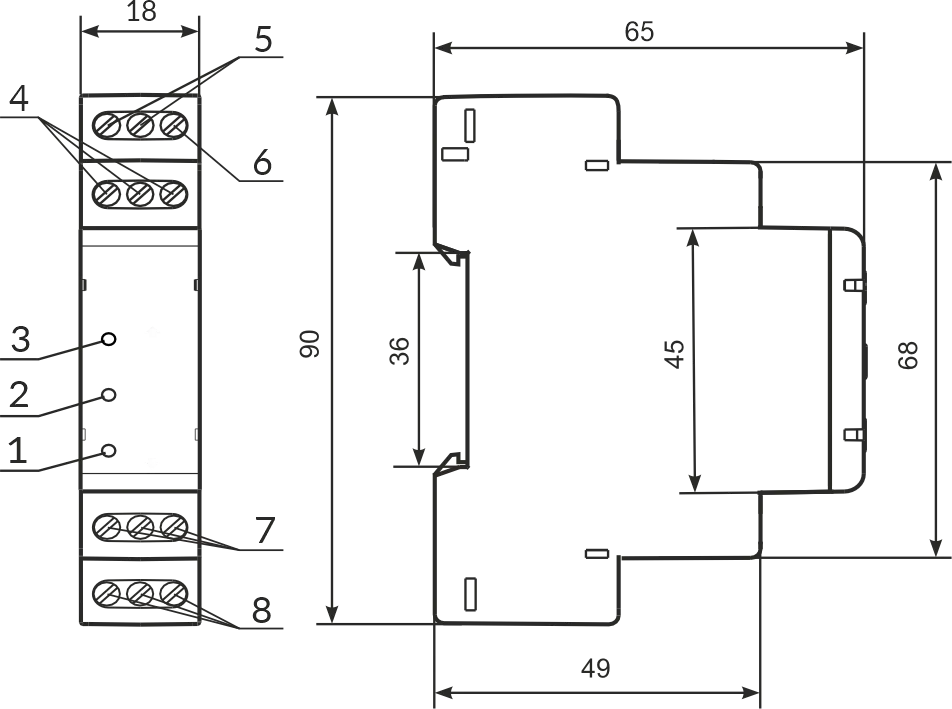
1 – indicator of data exchange via RS-485 interface (it is on when data is being exchanged);
2 – indicator of the status of the relay output (it is on with closed relay contacts);
3 – indicator « ⏻ » is on when there is supply voltage;
4 – terminals for connecting RS-485 communication;
5 – device power supply terminals;
6 – terminal for reloading (resetting) the device;
7 – terminals for connecting sensors;
8 – output terminals of relay contacts (8 А).
Figure 1 – OB-215 front panel and overall dimensions
2 Technical Specifications
Section titled “2 Technical Specifications”Table 1 – Basic Technical Specifications
| Parameter | Value |
|---|---|
| Rated power supply voltage | 12 – 24 V |
| The error of measuring DC voltage in the range of 0-10 V, min | 1% |
| The error of measuring DC in the range of 0-20 mA, min | 1% |
| Temperature measurement range (NTC 10 KB) | -25…+125 °C |
| Temperature measurement error (NTC 10 KB) from -25 to +70 | ±1°C |
| Temperature measurement error (NTC 10 KB) from +70 to +125 | ±2 °C |
| Temperature measurement range (PTC 1000) | -50…+120 °C |
| Temperature measurement error (PTC 1000) | ±1°C |
| Temperature measurement range (PT 1000) | -50…+250 °C |
| Temperature measurement error (PT 1000) | ±1 °C |
| Max. pulses frequency in “Pulse Counter/Logic Input” mode | 200 Hz |
| Max. voltage given on an «IO1» input | 12 V |
| Max. voltage given on an «IO2» input | 5 V |
| Readiness time, max | ≤ 2 s |
| Max. switched current with active load | 8 А |
| Maximal power consumption | ≤ 1 W |
| Quantity and type of relay contact (switching contact) | 1 |
| Communication Interface | RS (EIA/TIA)-485 |
| ModBus data exchange protocol | RTU / ASCII |
| Rated operating condition | Continuous |
| Climatic design version | NF 3.1 |
| Protection rating of the device | IP20 |
| Permissible contamination level | II |
| Electric shock protection class | III |
| Wire cross-section for connection | 0.5 – 1.0 mm² |
| Tightening torque of screws | 0.4 N·m |
| Weight | ≤ 0.07 kg |
| Overall dimensions, H×W×L | 90×65×18 mm |
The device meets the requirements of the following: EN 60947-1; EN 60947-6-2; EN 55011; EN 61000-4-2
- Installation is on standard 35 mm DIN-rail
- The device remains functional at any position in space
- Housing material is self-extinguishing plastic
- Harmful substances in amounts exceeding maximum permissible concentrations are not available
Settings
Section titled “Settings”Table 2 – Settings for OB-215
| Description | Range | Factory setting | Type | W/R | Address (DEC) |
|---|---|---|---|---|---|
| Operation mode: | 0…8 | 1 | UINT | W/R | 100 |
Operation mode values:
- Digital signals measurement:
- 0 – pulse counter
- 1 – logic input/pulse relay
- Analog signals measurement:
- 2 – voltage measurement
- 3 – current measurement
- Temperature measurement:
- 4 – NTC (10KB) sensor
- 5 – PTC1000 sensor
- 6 – PT 1000 sensor
- Interface transformation mode:
- 7 – RS-485 – UART (TTL)
- 8 – digital sensor (1-Wire, I2C)*
Connected digital sensor (Address 101)
| Description | Range | Factory setting | Type | W/R | Address (DEC) |
|---|---|---|---|---|---|
| 0 – DS18B20 (1-Wire); 1 – DHT11 (1-Wire); 2 – DHT21/AM2301 (1-Wire); 3 – DHT22 (1-Wire); 4 – BMP180 (I2C) | 0…4 | 0 | UINT | W/R | 101 |
| Temperature correction | -99…99 | 0 | INT | W/R | 102 |
Relay control (Address 103)
| Description | Range | Factory setting | Type | W/R | Address (DEC) |
|---|---|---|---|---|---|
| Relay control mode | 0…7 | 0 | UINT | W/R | 103 |
Relay control values:
- 0 – control is disabled
- 1 – relay contacts are opened at a value above the upper threshold, they are closed at a value below the lower threshold
- 2 – relay contacts are closed at a value above the upper threshold, they are opened at a value below the lower threshold
- 3 – relay contacts are opened at a value above the upper threshold or below the lower threshold and are closed at a value below the upper threshold and above the lower threshold
- 4…7 – similarly 0…3 respectively, for the secondary parameter of the digital sensor
Thresholds (Addresses 104–105)
| Description | Range | Factory setting | Type | W/R | Address (DEC) |
|---|---|---|---|---|---|
| Upper threshold | 500…2500 | 250 | UINT | W/R | 104 |
| Lower threshold | -500…2500 | 0 | UINT | W/R | 105 |
Pulse counter mode (Address 106)
| Description | Range | Factory setting | Type | W/R | Address (DEC) |
|---|---|---|---|---|---|
| Pulse counter mode | 0…2 | 0 | UINT | W/R | 106 |
Pulse counter mode values:
- 0 – counter on the leading edge of the pulse
- 1 – counter on the trailing edge of the pulse
- 2 – counter on both edges of the pulse
Additional settings
| Description | Range | Factory setting | Type | W/R | Address (DEC) |
|---|---|---|---|---|---|
| Switch debouncing delay** | 1…250 | 100 | UINT | W/R | 107 |
| Number of pulses per counting unit*** | 1…65534 | 8000 | UINT | W/R | 108 |
RS-485 settings
| Description | Range | Factory setting | Type | W/R | Address (DEC) |
|---|---|---|---|---|---|
| RS-485: 0 – ModBus RTU; 1 – ModBus ASCII | 0…1 | 0 | UINT | W/R | 109 |
| ModBus UID | 1…127 | 1 | UINT | W/R | 110 |
| Rate of exchange | 0…5 | 3 | UINT | W/R | 111 |
Rate of exchange values:
- 0 – 1200
- 1 – 2400
- 2 – 4800
- 3 – 9600
- 4 – 14400
- 5 – 19200
| Description | Range | Factory setting | Type | W/R | Address (DEC) |
|---|---|---|---|---|---|
| Parity check and stop bits | 0…2 | 0 | UINT | W/R | 112 |
Parity check and stop bits values:
- 0 – no, 2 stop bits
- 1 – even, 1 stop bit
- 2 – odd, 1 stop bit
UART(TTL)→RS-485 settings
| Description | Range | Factory setting | Type | W/R | Address (DEC) |
|---|---|---|---|---|---|
| Rate of exchange UART(TTL)→RS-485 | 0…5 | 3 | UINT | W/R | 113 |
Rate of exchange UART(TTL)→RS-485 values:
- 0 – 1200
- 1 – 2400
- 2 – 4800
- 3 – 9600
- 4 – 14400
- 5 – 19200
| Description | Range | Factory setting | Type | W/R | Address (DEC) |
|---|---|---|---|---|---|
| Stop bits for UART(TTL)→RS-485 | 0…2 | 0 | UINT | W/R | 114 |
Stop bits for UART(TTL)→RS-485 values:
- 0 – 1 stop bit
- 1 – 1.5 stop bits
- 2 – 2 stop bits
| Description | Range | Factory setting | Type | W/R | Address (DEC) |
|---|---|---|---|---|---|
| Parity check for UART(TTL)→RS-485 | 0…2 | 0 | UINT | W/R | 115 |
Parity check for UART(TTL)→RS-485 values:
- 0 – None
- 1 – Even
- 2 – Odd
Password protection
| Description | Range | Factory setting | Type | W/R | Address (DEC) |
|---|---|---|---|---|---|
| ModBus password protection****: 0 – disabled; 1 – enabled | 0…1 | 0 | UINT | W/R | 116 |
| ModBus password value | A-Z, a-z, 0-9 | admin | STRING | W/R | 117-124 |
Relay control settings
| Description | Range | Factory setting | Type | W/R | Address (DEC) |
|---|---|---|---|---|---|
| Timeout of communication before relay disconnection, s (Used when relay control is disconnected) | 0…36000 | 0 | UINT | W/R | 128 |
| Relay pulse period, ms (Used when relay control is disabled) | 20…20000 | 200 | UINT | W/R | 129 |
Value conversion settings
| Description | Range | Factory setting | Type | W/R | Address (DEC) |
|---|---|---|---|---|---|
| Value Conversion: 0 – disabled; 1 – enabled | 0…1 | 0 | UINT | W/R | 130 |
| Minimum Input Value | 0…2000 | 0 | UINT | W/R | 131 |
| Maximum Input Value | 0…2000 | 2000 | UINT | W/R | 132 |
| Minimum Converted Value | -32767…32767 | 0 | INT | W/R | 133 |
| Maximum Converted Value | -32767…32767 | 2000 | INT | W/R | 134 |
Notes:
- W/R – type of access to the register as write/read.
- * The sensor to be connected is selected at address 101.
- ** The delay used in switch debouncing in the Logic Input/Pulse Relay mode; the dimension is in milliseconds.
- *** Only used if the pulses counter is on. The column “Value” indicates the number of pulses at the input, after registration of which, the counter is incremented by one. Recording to memory is performed with a periodicity of 1 minute.
- **** If ModBus Password Protection is enabled (address 116, value “1”), then to access the recording functions, you must write the correct password value to addresses 51-59.
Output Contact Specifications
Section titled “Output Contact Specifications”Table 3 – Output Contact Specifications
| Operation mode | Max. current at U~250 V | Max. switching power at U~250 V | Max. continuous permissible AC / DC voltage | Max. current at Ucon = 30 V DC |
|---|---|---|---|---|
| cos φ=1 | 8 А | 2000 VA | 275/30 V | 0.6 А |
3 Operating Conditions
Section titled “3 Operating Conditions”The product is intended for operation in the following conditions:
- Ambient temperature: from minus 35 to +45 °С
- Atmospheric pressure: from 84 to 106.7 kPa
- Relative humidity (at temperature of +25 °С): 30 … 80 %
If the temperature of the product after transportation or storage differs from the ambient temperature at which it is supposed to be operated, then before connecting to the mains keep the product under the operating conditions within two hours (because of condensation may be on the product elements).
4 Device Connection
Section titled “4 Device Connection”It is not allowed to leave exposed portions of wire protruding beyond the terminal block.
Error when performing the installation works may damage the device and connected devices.
For a reliable contact, tighten the terminal screws with the force indicated in Table 1.
When reducing the tightening torque, the junction point is heated, the terminal block may be melted and wire can burn. If you increase the tightening torque, it is possible to have thread failure of the terminal block screws or the compression of the connected wire.
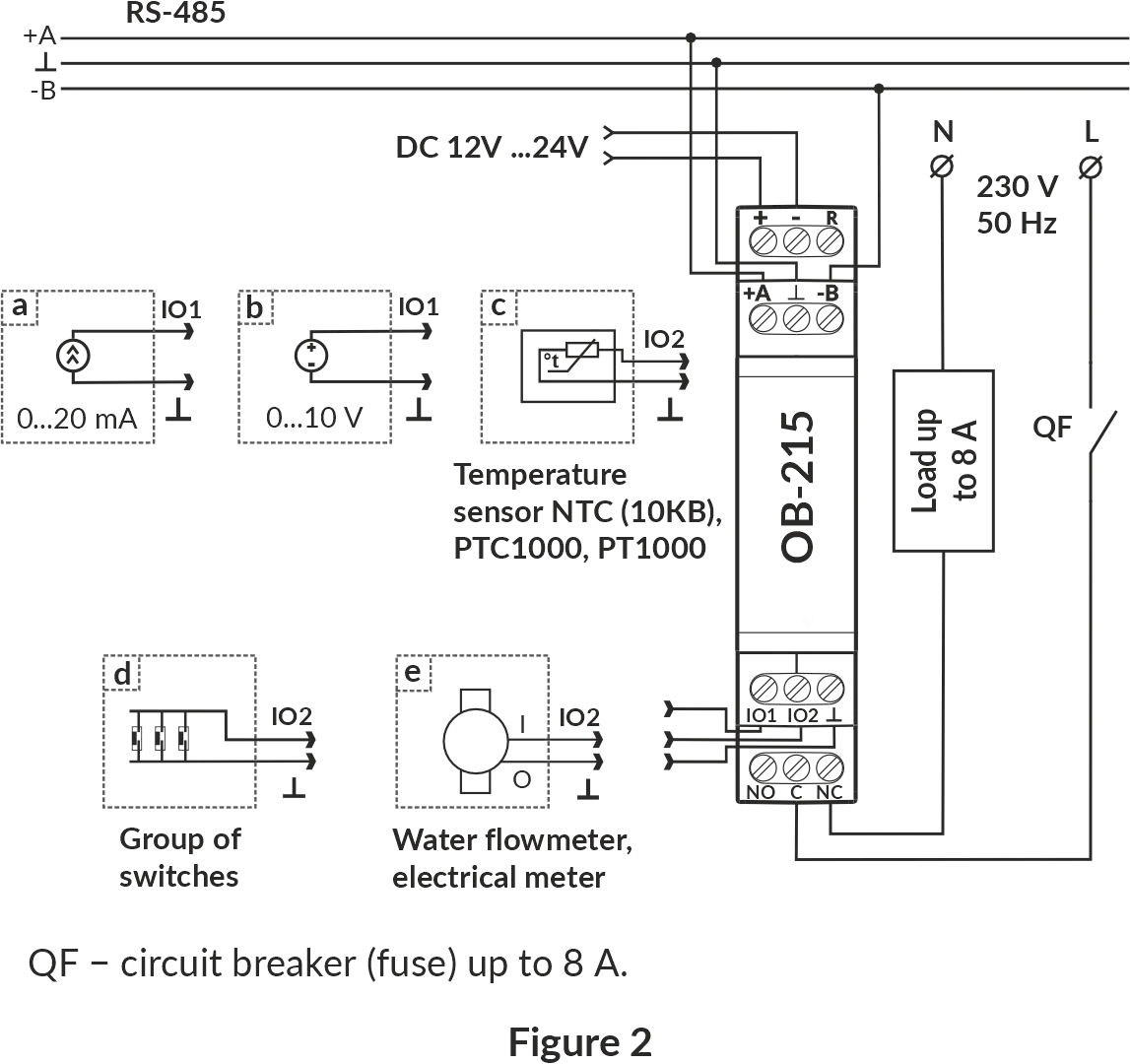
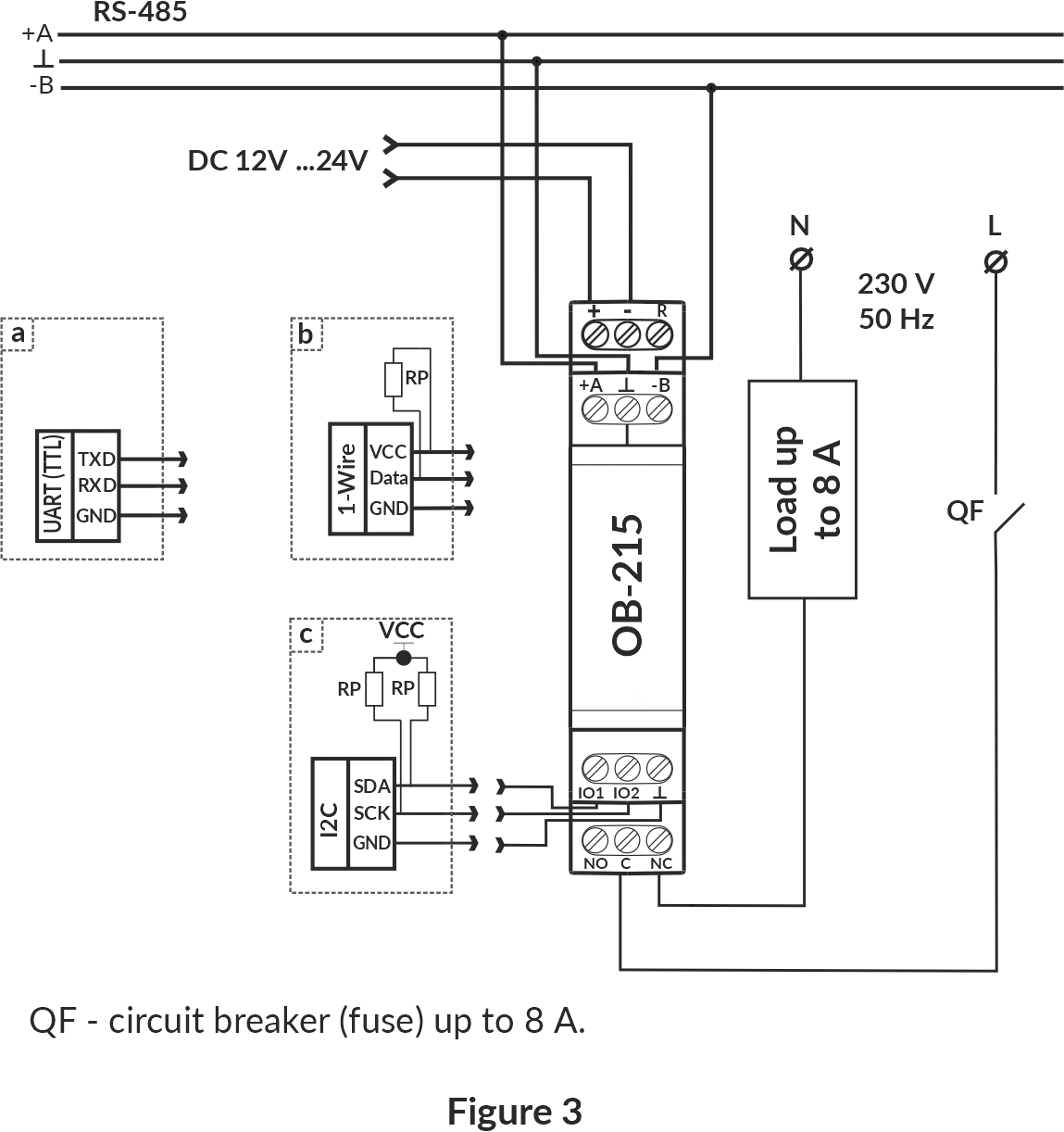
- Connect the device as shown in Fig. 2 (when using the device in the analog signals measurement mode) or in accordance with Fig. 3 (when using the device with digital sensors). A 12 V battery can be used as a power source. Supply voltage can be read (Table 6, address 7).
To connect the device to the ModBus network, use CAT.1 or higher twisted pair cable.
- Switch on the power of the device.
5 Using the Device
Section titled “5 Using the Device”After the power is on, the indicator « ⏻ » lights up. The indicator flashes for 1.5 seconds. Then the indicators and «RS-485» light up (Fig. 1, pos. 1, 2, 3) and after 0.5 second they go out.
To change any parameters you need:
- download the OB-215/OB-216 Control Panel program at www.novatek-electro.com or any other program that allows you to work with ModBus RTU/ASCII protocol.
- connect to the device via RS-485 interface;
- perform the necessary settings for the OB-215 parameters.
During the data exchange, the “RS-485” indicator flashes, otherwise the “RS-485” indicator does not light up.
Operation Modes
Section titled “Operation Modes”Measurement Mode
Section titled “Measurement Mode”In this mode, the device measures the readings of sensors connected to the inputs “IO1” or “IO2” (Fig. 1, it. 7), and depending on the settings, performs the necessary actions.
Interface Transformation Mode
Section titled “Interface Transformation Mode”In this mode, the device converts the data received via the RS-485 interface (Modbus RTU/ASCII) to the UART (TTL) interface (Table 2, address 100, value “7”). More detailed description see in Transformation of UART (TTL) interfaces to RS-485.
Device Operation
Section titled “Device Operation”Pulse Counter
Section titled “Pulse Counter”Connect the external device as shown in Fig. 2 (e). Set up the device for operation in the Pulse Counter Mode (Table 2, address 100, value “0”).
In this mode, the device counts the number of pulses at the input “IO2” (of duration no less than the value indicated in Table 2, Address 107, value in ms) and stores the data in memory with a periodicity of 1 minute. If the device has been turned off before 1 minute has ended, the last stored value will be restored upon power-up.
If you change the value in the register (Address 108), all the stored values of the pulse meter will be deleted.
When the value specified in the register (address 108) is reached, the counter is incremented by one (Table 6, address 4:5).
To set the initial value of the pulse counter it is necessary to write-down the required value into the register (Table 6, address 4:5).
Logic Input/Pulse Relay
Section titled “Logic Input/Pulse Relay”When selecting Logic Input/Pulse Relay mode (Table 2, Address 100, Value 1), or changing the Pulse meter mode (Table 2, Address 106), if the relay contacts were closed “C – NO” (LED lights up), the device will automatically open the “C-NO” contacts (LED turns off).
Logic Input Mode
Connect the device according to Fig. 2 (d). Set up the device for operation in the Logic Input/Pulse Relay Mode (Table 2, address 100, value “1”), set the required pulse count mode (Table 2, address 106, value “2”).
If the logic state on the “IO2” terminal (Fig. 1, it. 6) changes to a high level (rising edge), the device opens the contacts of the “C - NO” relay and closes the contacts of the “C - NC” relay (Fig. 1, it. 7).
If the logic state on the “IO2” terminal (Fig. 1, it. 6) changes to a low level (falling edge), the device will open the contacts of the “C - NC” relay and close the “C - NO” contacts (Fig. 1, it. 7).
Pulse Relay Mode
Connect the device according to Fig. 2 (d). Set up the device for operation in the Logic Input/Pulse Relay Mode (Table 2, address 100, value “1”), set Pulse Counter Mode (Table 2, address 106, value “0” or value “1”). For short-time pulse with duration of at least the value specified in Table 2 (Address 107, the value in ms) at the «IO2» terminal (Fig. 1, it. 6), the device closes the contacts of the “C - NO” relay and opens the contacts of the “C - NC” relay.
If the pulse is repeated for a short time, the device will open the contacts of the “C - NO” relay and close the “C - NC” relay contacts.
Voltage Measurement
Section titled “Voltage Measurement”Connect the device according to Fig. 2 (b). Set up the device for operation in the Voltage measurement mode (Table 2, address 100, value “2”). If it is necessary that the device monitors the threshold voltage, it is required to write a value other than “0” in the “Relay control” register (Table 2, address 103). If required, set the operation thresholds (Table 2, address 104 – upper threshold, address 105 – lower threshold).
In this mode, the device measures the DC voltage. The measured voltage value can be read at address 6 (Table 6).
Voltage values are derived to one hundredth of a volt (1234 = 12.34 V; 123 = 1.23 V).
Current Measurement
Section titled “Current Measurement”Connect the device according to Fig. 2 (a). Set up the device for operation in the “Current measurement” mode (Table 2, address 100, value “3”). If it is necessary for the device monitors the threshold current, it is required to write a value other than “0” in the “Relay control” register (Table 2, address 103). If required, set the operation thresholds (Table 2, address 104 – upper threshold, address 105 – lower threshold).
In this mode, the device measures DC. The measured current value can be read at address 6 (Table 6).
Current values are derived to one hundredth of a milliampere (1234 = 12.34 mА; 123 = 1.23 mА).
Temperature Measurement
Section titled “Temperature Measurement”Connect the device according to Fig. 2 (c). Set up the device for operation in the Temperature measurement mode (Table 2, address 100, value “4”, “5”, “6”). If it is necessary for the device monitors the threshold temperature value, it is required to write a value other than “0” in the register “Relay control” (Table 2, address 103). For set the operation thresholds to write a value in address 104 - upper threshold and address 105 - lower threshold (Table 2).
If it is required to correct the temperature, it is necessary to record the correction factor in the “Temperature Correction” register (Table 2, Address 102). In this mode, the device measures the temperature with the help of thermistor.
Temperature values are derived to one tenth of a Celsius degree (1234 = 123.4 °С; 123 = 12.3 °С).
Connection of Digital Sensors
Section titled “Connection of Digital Sensors”The device supports the digital sensors listed in Table 2 (address 101).
The measured value of the digital sensors can be read at the addresses 11–15, Table 6 (depending on what value the sensor measures). The query time period of digital sensors is 3 s.
In case if it is required to correct the temperature measured by the digital sensor, it is necessary to enter the temperature correction factor in register 102 (Table 2).
If a value other than zero is set in the register 103 (Table 2), the relay will be controlled based on the measured values in register 11 (Table 6).
Temperature values are derived to one tenth of a Celsius degree (1234 = 123.4 °С; 123 = 12.3 °С).
When connecting sensors via the I2C interface, refer to the specific sensor’s passport.
Converting RS-485 Interface to UART (TTL)
Section titled “Converting RS-485 Interface to UART (TTL)”Connect the device according to Fig. 3 (a). Set up the device for operation in RS-485-UART (TTL) mode (Table 2, address 100, value “7”).
In this mode, the device receives (transmits) data via the RS-485 ModBus RTU/ASCII interface (Fig. 1, it. 4) and converts them to the UART interface.
Example of query and response is shown in Fig. 10 and Fig. 11.
Conversion of the Measured Voltage (Current) Value
Section titled “Conversion of the Measured Voltage (Current) Value”To convert the measured voltage (current) to another value, it is necessary to enable the conversion (Table 2, address 130, value 1) and adjust the conversion ranges.
For example, the measured voltage should be converted to bars with such sensor parameters: voltage range from 0.5 V to 8 V corresponds to a pressure of 1 bar to 25 bar. Conversion Ranges Adjustment: minimum input value (address 131, value of 50 corresponds to 0.5 V), maximum input value (address 132, value of 800 corresponds to 8 V), minimum converted value (address 133, value of 1 corresponds to 1 bar), maximum converted value (address 134, value of 25 corresponds to 25 bars).
Converted value will be displayed in the register (Table 6, address 16).
Restarting the Device and Reset to Factory Settings
Section titled “Restarting the Device and Reset to Factory Settings”If the device needs to be restarted, the “R” and ”–” terminals (Fig. 1) must be closed and held for 3 seconds.
If you want to restore the factory settings of the device, you must close and hold the “R” and ”–” terminals (Fig. 1) for more than 10 seconds. After 10 seconds, the device automatically restores the factory settings and reloads.
Operation with RS (EIA/TIA)-485 Interface via ModBus Protocol
Section titled “Operation with RS (EIA/TIA)-485 Interface via ModBus Protocol”OB-215 allows data exchanging with external devices via the serial interface of RS (EIA/TIA)-485 via ModBus protocol with the limited set of commands (see Table 4 for a list of supported functions).
When constructing a network, the principle of the master-slave organization is used where OB-215 acts as the slave. There can be only one master node and several slave nodes in the network. As the master node is a personal computer or a programmable logic controller. With this organization, the initiator of the exchange cycles can only be the master node.
The queries of the master node are individual (addressed to a particular device). OB-215 performs transmission, responding to individual queries of the master node.
If errors are found in receiving queries, or if the received command cannot be executed, OB-215 as the respond generates an error message.
Addresses (in decimal form) of command registers and their purpose are given in Table 5.
Addresses (in decimal form) of additional registers and their purpose are given in Table 6.
Supported Functions
Section titled “Supported Functions”Table 4 – List of supported functions
| Function (hex) | Purpose | Remark |
|---|---|---|
| 0x03 | Reading one or more registers | Maximum 50 |
| 0x06 | Writing one value to the register | — |
Command Register
Section titled “Command Register”Table 5 – Command Register
| Name | Description | W/R | Address (DEC) |
|---|---|---|---|
| Command register | Command codes: | W/R | 50 |
Command codes:
- 0x37B6 – switch on the relay
- 0x37B7 – switch off the relay
- 0x37B8 – switch on the relay, then after a preset pulse period (register 129) switch it off
- 0x472C – write settings to flash memory
- 0x4757 – load settings from flash memory
- 0xA4F4 – restart the device
- 0xA2C8 – reset to factory settings
- 0xF225 – reset the pulse counter (all the values stored in the flash memory are deleted)
| Name | Description | W/R | Address (DEC) |
|---|---|---|---|
| Entering ModBus Password (8 characters ASCII) | To access the recording functions, set the correct password (the default value is “admin”). To disable the recording functions, set any value other than the password. Admissible characters: A-Z; a-z; 0-9 | W/R | 51 – 59 |
Notes:
- W/R – type of access to the write/read register;
- address of the form “50” means the value of 16 bits (UINT);
- address of the form “51 – 59” means a range of 8-bit values.
Additional Registers
Section titled “Additional Registers”Table 6 – Additional registers
| Name | Description | W/R | Address (DEC) |
|---|---|---|---|
| Identifier | Device identifier (value 27) | R | 0 |
| Firmware version | 20 | R | 1 |
| Pulse counter | — | W/R | 4:5 |
| Measured value* | — | R | 6 |
| Supply voltage of the device | — | R | 7 |
| Pulse frequency (Hz) | Counter growth rate, number of pulses per second | R | 8 |
Digital sensors
| Name | Description | W/R | Address (DEC) |
|---|---|---|---|
| Temperature (× 0.1°С) | — | R | 11 |
| Humidity (× 0.1%) | — | R | 12 |
| Pressure (Pa) | — | R | 13:14 |
Converting
| Name | Description | W/R | Address (DEC) |
|---|---|---|---|
| Converted value | — | R | 16 |
Notes:
- W/R – type of access to the register as write/read;
- address of the form “1” means the value of 16 bits (UINT);
- address of the form “2:3” means the value of 32 bits (ULONG).
- * Measured value from analog sensors (voltage, current, temperature).
Status Register
Section titled “Status Register”Table 6 (continued) – Status Register (Address 2:3)
| Bit | Description |
|---|---|
| bit 0 | 0 – pulse counter is disabled; 1 – pulse counter is enabled |
| bit 1 | 0 – counter for leading edge of the pulse is disabled; 1 – counter for leading edge of the pulse is enabled |
| bit 2 | 0 – counter for trailing edge of the pulse is disabled; 1 – counter for trailing edge of the pulse is enabled |
| bit 3 | 0 – counter for both pulse edges is disabled; 1 – counter for both pulse edges is enabled |
| bit 4 | 0 – logical input is disabled; 1 – logical input is enabled |
| bit 5 | 0 – voltage measurement is disabled; 1 – voltage measurement is enabled |
| bit 6 | 0 – current measurement is disabled; 1 – current measurement is enabled |
| bit 7 | 0 – temperature measurement by NTC (10 KB) sensor is disabled; 1 – temperature measurement by NTC (10 KB) sensor is enabled |
| bit 8 | 0 – temperature measurement by the PTC 1000 sensor is disabled; 1 – temperature measurement by the PTC 1000 sensor is enabled |
| bit 9 | 0 – temperature measurement by PT 1000 sensor is disabled; 1 – temperature measurement by PT 1000 sensor is enabled |
| bit 10 | 0 – RS-485 → UART(TTL) is disabled; 1 – RS-485 → UART(TTL) is enabled |
| bit 11 | 0 – UART (TTL) protocol data is not ready to be sent; 1 – UART (TTL) protocol data is ready to be sent |
| bit 12 | 0 – DS18B20 sensor is disabled; 1 – DS18B20 sensor is enabled |
| bit 13 | 0 – DHT11 sensor is disabled; 1 – DHT11 sensor is enabled |
| bit 14 | 0 – DHT21/AM2301 sensor is disabled; 1 – DHT21/AM2301 sensor is enabled |
| bit 15 | 0 – DHT22 sensor is disabled; 1 – DHT22 sensor is enabled |
| bit 16 | Reserved |
| bit 17 | 0 – BMP180 sensor is disabled; 1 – BMP180 sensor is enabled |
| bit 18 | 0 – the input «IO2» is open; 1 – the input «IO2» is closed |
| bit 19 | 0 – relay is Off; 1 – relay is On |
| bit 20 | 0 – there is no overvoltage; 1 – there is overvoltage |
| bit 21 | 0 – there is no reduction in voltage; 1 – there is reduction in voltage |
| bit 22 | 0 – there is no overcurrent; 1 – there is overcurrent |
| bit 23 | 0 – there is no decrease of current; 1 – there is decrease of current |
| bit 24 | 0 – there is no temperature rise; 1 – there is temperature rise |
| bit 25 | 0 – there is no temperature reduction; 1 – there is temperature reduction |
| bit 29 | 0 – the device settings are stored; 1 – the device settings are not stored |
| bit 30 | 0 – instrument is calibrated; 1 – instrument is not calibrated |
Message Formats
Section titled “Message Formats”The exchange protocol has clearly defined message formats. Compliance with the formats ensures the correctness and stability of the network.
Byte Format
Section titled “Byte Format”OB-215 is configured to operate with one of two formats of data bytes: with parity control (Fig. 4) and without parity control (Fig. 5). In parity control mode, the type of control is also indicated: Even or Odd. Transmission of data bits is performed by the least significant bits forward.
By default (during manufacture) the device is configured to operate without parity control and with two stop bits.
Byte transfer is performed at speeds of 1200, 2400, 4800, 9600, 14400 and 19200 bps. By default, during manufacturing, the device is configured to operate at a speed of 9600 bps.
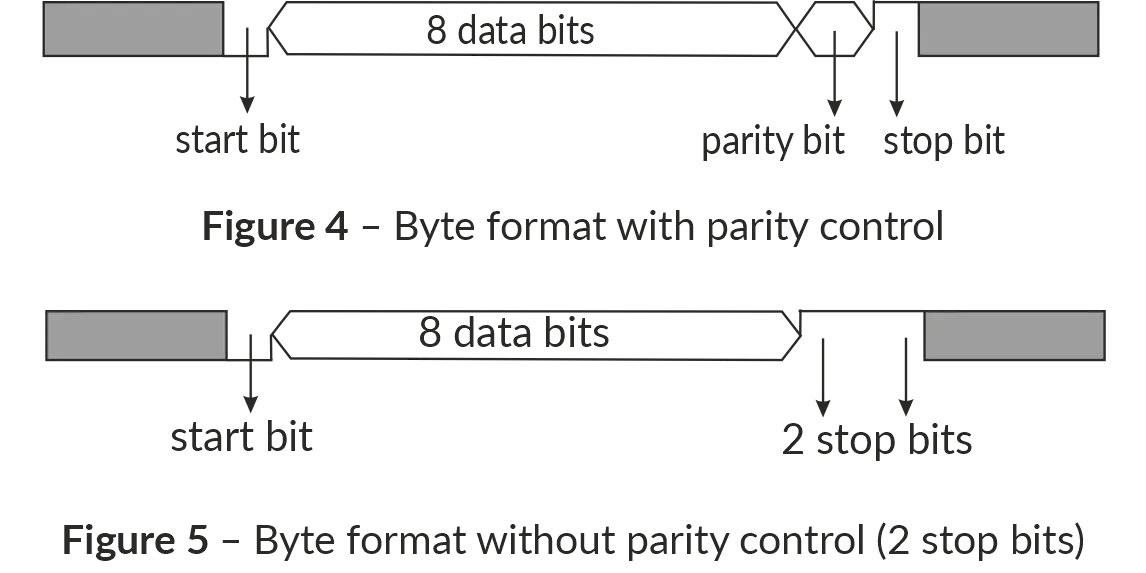
Figure 4, 5 – Byte format with parity control (top) and without parity control (bottom)
Frame Format
Section titled “Frame Format”The frame length cannot exceed 256 bytes for ModBus RTU and 513 bytes for ModBus ASCII.
In ModBus RTU mode the start and end of the frame are monitored by silence intervals of at least 3.5 bytes. The frame must be transmitted as a continuous byte stream. The correctness of frame acceptance is additionally controlled by checking the CRC checksum.
The address field occupies one byte. The addresses of the slaves are in the range from 1 to 247. Fig. 6 shows the RTU frame format.
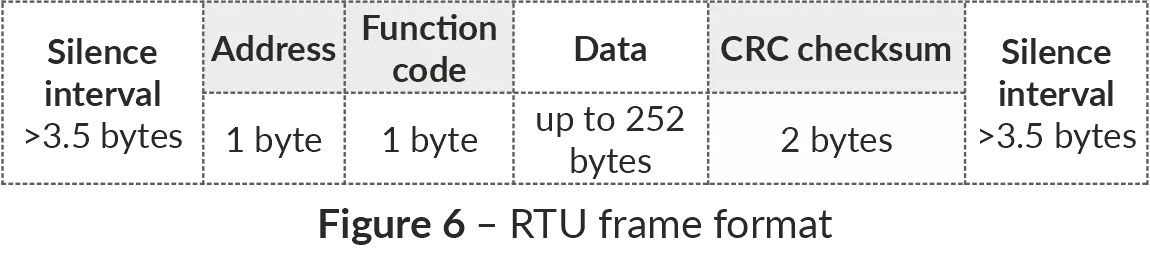
Figure 6 – RTU frame format
In ModBus ASCII mode the start and end of the frame are controlled by special characters (symbols (’:’ 0x3A) – for start of the frame; symbols (‘CRLF’ 0x0D0x0A) – for the end of the frame). The frame must be transmitted as a continuous stream of bytes. The correctness of frame acceptance is additionally controlled by checking the LRC checksum.
The address field occupies two bytes. The addresses of the slaves are in the range from 1 to 247. Fig. 7 shows the ASCII frame format.
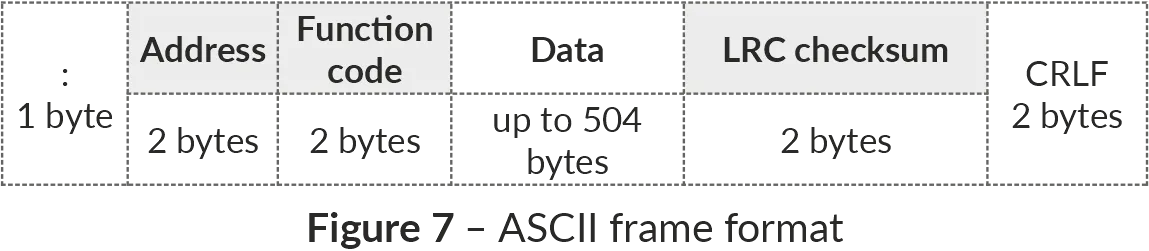
Figure 7 – ASCII frame format
Generation and Verification of Checksum
Section titled “Generation and Verification of Checksum”The sending device generates a checksum for all bytes of the transmitted message. OB-215 similarly generates a checksum for all bytes of the received message and compares it with the checksum received from the transmitter. If there is a mismatch between the generated checksum and the received checksum, an error message is generated.
CRC Checksum Generation
Section titled “CRC Checksum Generation”The checksum in the message is sent by the least significant byte forward, it is a cyclic verification code based on the irreducible polynomial 0xA001.
Subroutine for CRC checksum generation in C language:
uint16_t GenerateCRC(uint8_t *pSendRecvBuf, uint16_t uCount){ const uint16_t Polynom = 0xA001; uint16_t crc = 0xFFFF; uint16_t i; uint8_t byte; for(i=0; i<(uCount-2); i++){ crc = crc ^ pSendRecvBuf[i]; for(byte=0; byte<8; byte++){ if((crc & 0x0001) == 0){ crc = crc >> 1; }else{ crc = crc >> 1; crc = crc ^ Polynom; } } } return crc;}LRC Checksum Generation
Section titled “LRC Checksum Generation”The checksum in the message is transmitted by the most significant byte forward, which is a longitudinal redundancy check.
Subroutine for LRC checksum generation in C language:
uint8_t GenerateLRC(uint8_t *pSendRecvBuf, uint16_t uCount){ uint8_t lrc = 0x00; uint16_t i; for(i=0; i<(uCount-1); i++){ lrc = (lrc + pSendRecvBuf[i]) & 0xFF; } lrc = ((lrc ^ 0xFF) + 2) & 0xFF; return lrc;}Command System
Section titled “Command System”Function 0x03 – Reading a Group of Registers
Section titled “Function 0x03 – Reading a Group of Registers”Function 0x03 provides reading of the contents of registers OB-215. The master query contains the address of the initial register, as well as the number of words to read.
OB-215 response contains the number of bytes to return and the requested data. The number of registers returned is limited to 50. If the number of registers in the query exceeds 50 (100 bytes), the response is not divided into frames.
An example of the query and response in ModBus RTU is shown in Fig. 8.
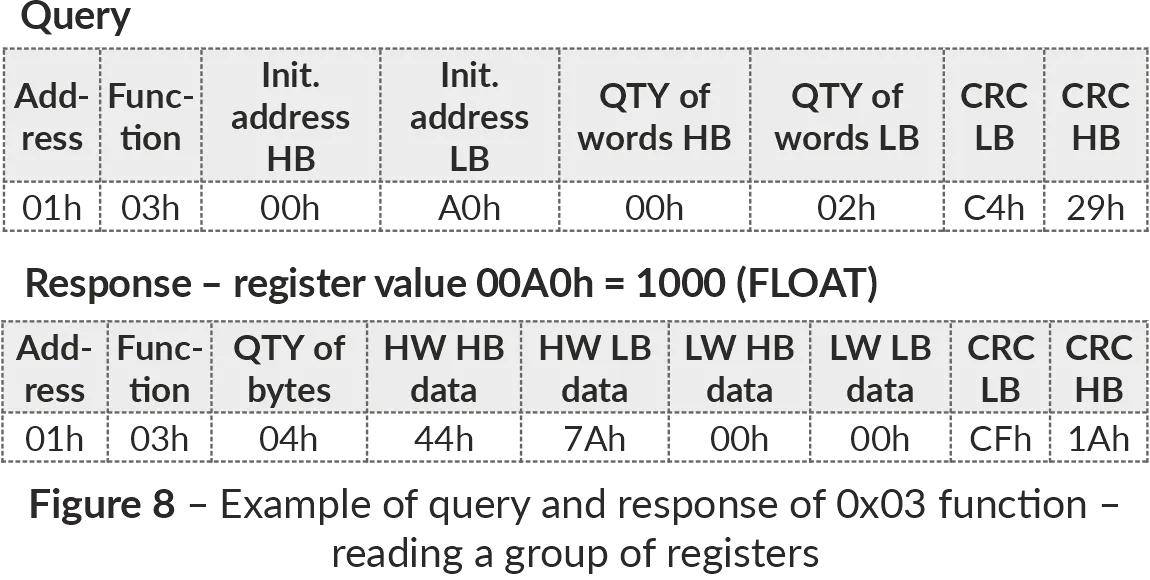
Figure 8 – Example of reading registers (Function 0x03)
Function 0x06 – Recording the Register
Section titled “Function 0x06 – Recording the Register”The function 0x06 provides recording in one OB-215 register. The master query contains the address of the register and the data to be written.
The device response is the same as the master query and contains the register address and the set data. An example of the query and response in ModBus RTU mode is shown in Fig. 9.
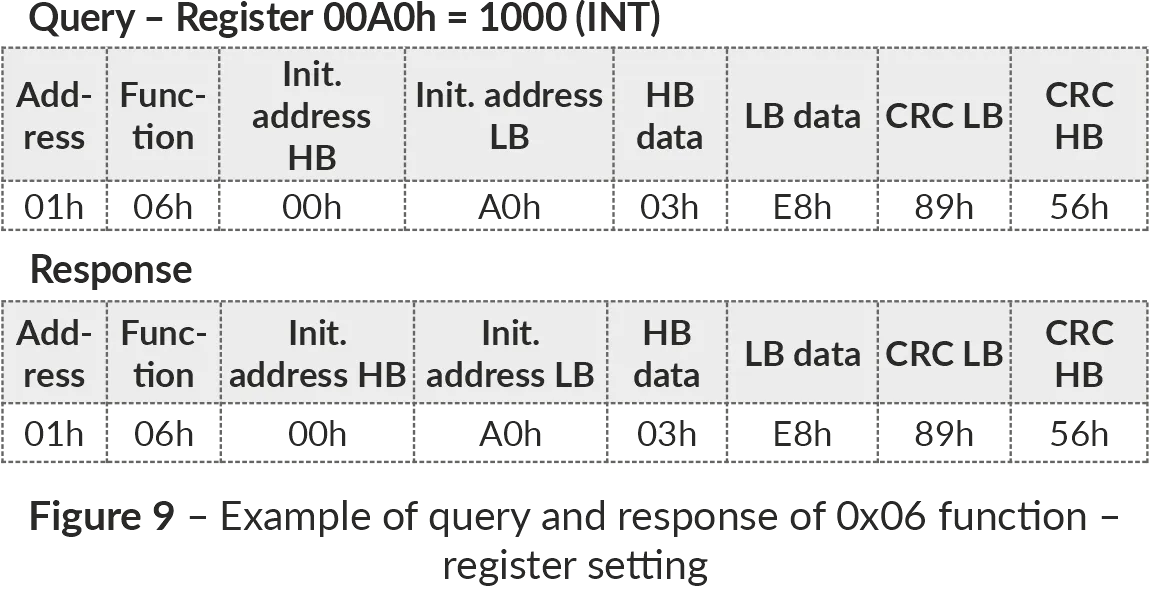
Figure 9 – Example of writing to a register (Function 0x06)
Transformation of UART (TTL) Interfaces to RS-485
Section titled “Transformation of UART (TTL) Interfaces to RS-485”In the interface transformation mode, if the query was not addressed to OB-215, it will be redirected to the device connected to «IO1» and «IO2». In this case the indicator «RS-485» will not change its state.
An example of query and response to the device on UART (TTL) line is shown in Fig. 10.
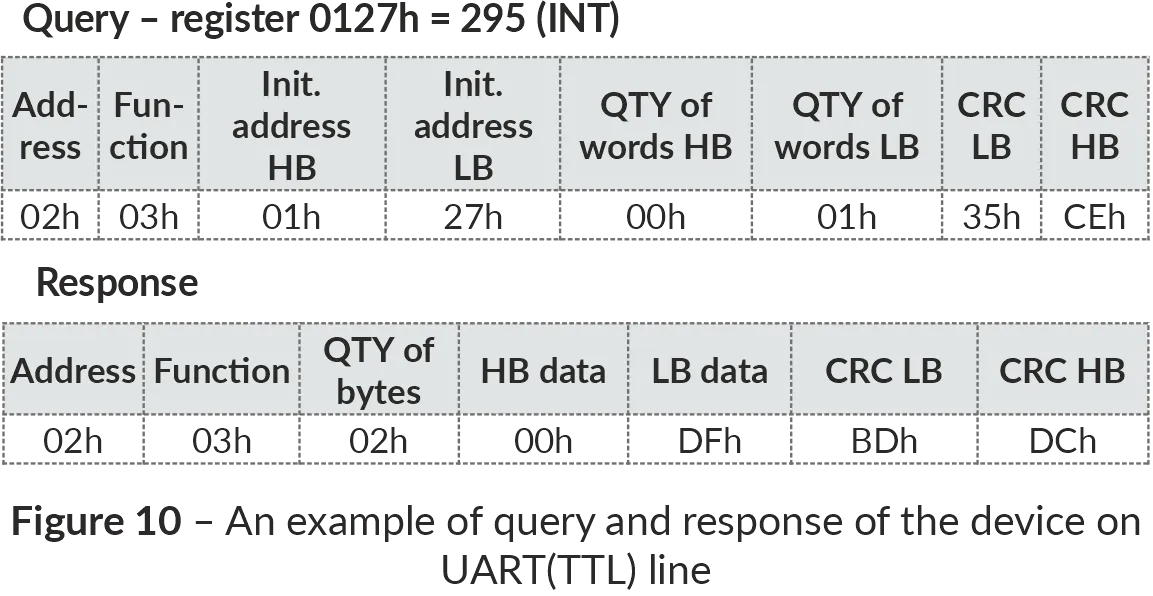
Figure 10 – Example of query and response to the device on UART (TTL) line
An example of recording to one register of the device on UART (TTL) line is shown in Fig. 11.
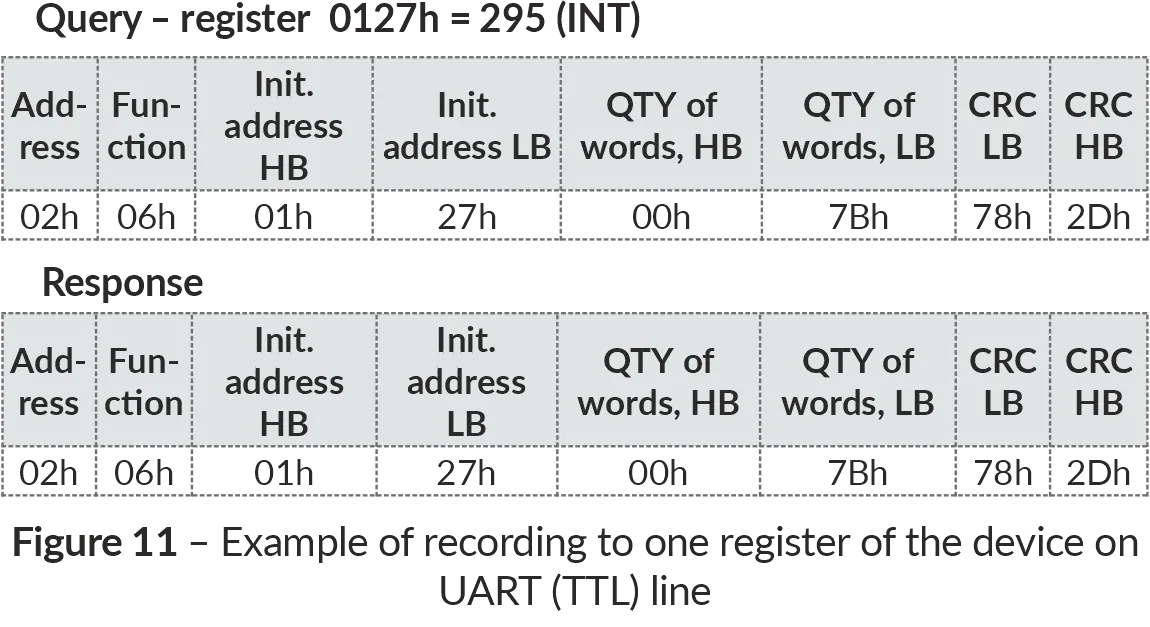
Figure 11 – Example of recording to one register of the device on UART (TTL) line
ModBus Error Codes
Section titled “ModBus Error Codes”| Error code | Name | Comments |
|---|---|---|
| 0x01 | ILLEGAL FUNCTION | Illegal function number |
| 0x02 | ILLEGAL DATA ADDRESS | Incorrect address |
| 0x03 | ILLEGAL DATA VALUE | Invalid data |
| 0x04 | SERVER DEVICE FAILURE | Failure of controller equipment |
| 0x05 | ACKNOWLEDGE | Data is not ready |
| 0x06 | SERVER DEVICE BUSY | System is busy |
| 0x08 | MEMORY PARITY ERROR | Memory error |
6 Safety Precautions
Section titled “6 Safety Precautions”It is not allowed water penetration on terminals and internal elements of the device.
During operation and maintenance the regulatory document requirements must be met, namely:
- Regulations for Operation of Consumer Electrical Installations;
- Safety Rules for Operation of Consumer Electrical Installations;
- Occupational Safety in Operation of Electrical Installations.
7 Maintenance Procedure
Section titled “7 Maintenance Procedure”Recommended frequency of maintenance is every six months.
Maintenance Procedure:
- Check the connection reliability of the wires, if necessary, clamp with the force 0.4 N·m;
- Visually check the integrity of the housing;
- If necessary, wipe the front panel and the housing of the device with cloth.
Do not use abrasives and solvents for cleaning.
8 Transportation and Storage
Section titled “8 Transportation and Storage”The device in the original package is permitted to be transported and stored at the temperature from minus 45 to +60 °C and relative humidity of no more than 80 %, not in aggressive environment.
9 Service Life and Warranty
Section titled “9 Service Life and Warranty”The lifetime of the device is 10 years.
Shelf life is 3 years.
Warranty period of the device operation is 5 years from the date of sale.
During the warranty period of operation, the manufacturer performs free repair of the device, if the user has complied with the requirements of the Operating Manual.
Warranty service is performed at the place of purchase or by the manufacturer of the device. Post-warranty service of the device is performed by the manufacturer at current rates.
Before sending for repair, the device should be packed in the original or other packing excluding mechanical damage.
For all questions, please contact the manufacturer:
“Novatek-Electro” Ltd.
59, Mykhailo Boltenko (Admiral Lazarev) str., Odesa, Ukraine, 65007
Tel: +38 (067) 565 37 68 +38 (050) 359 39 11 +38 (063) 301 30 40
VN241024