Novatek-Electro TR-100E Documentation
https://www.overvis.com/docs/en/tr-100e/
2026-10-28
 Novatek-Electro TR-100E Documentation |
|---|
Novatek-Electro TR-100E
The TR-100E is a digital temperature relay for monitoring up to four temperature zones. It provides relay protection, event and temperature logging, a web interface, Modbus TCP, and secure remote access through WireGuard VPN. DocumentationSection titled “Documentation”
ResourcesSection titled “Resources” |
| Novatek-Electro TR-100E Documentation | |||||||||||||||||||||||||||||||||||||||||||||||||||||||||||||||||||||||||||||||||||||||||||||||||||||||||||||||||||||||||||||||||||||||||||||||||||||||||||||||||||||||||||||||||||||||||||||||||||||||||||||||||||||||||||||||||||||||||||||||||||||||||||||||||||||||||||||||||||||||||||||||||||||||||||||||||||||||||||||||||||||||||||||||||||||||||||||||||||||||||||||||||||||||||||||||||||||||||||||||||||||||||||||||||||||||||||||||||||||||||||||||||||||||||||||||||||||||||||||||||||||||||||||||||||||||||||||||||||||||||||||||||||||||||||||||||||||||||||||||||||||||||||||||||||||||||||||||||||||||||||||||||||||||||||||||||||||||||||||||||||||||||||||||||||||||||||||||||||||||||||||||||||||||||||||||||||||||||||||||||||||||||||||||||||||||||||||||||||||||||||||||||||||||||||||||||||||||||||||||||||||||||||||||||||||||||||||||||||||||||||||||||||||||||||||||||||||||||||||||||||||||||||||||||||||||||||||||||||||||||||||||||||||||||||||||||||||||||||||||||||||||||||||||||||||||||||||||||||||||
|---|---|---|---|---|---|---|---|---|---|---|---|---|---|---|---|---|---|---|---|---|---|---|---|---|---|---|---|---|---|---|---|---|---|---|---|---|---|---|---|---|---|---|---|---|---|---|---|---|---|---|---|---|---|---|---|---|---|---|---|---|---|---|---|---|---|---|---|---|---|---|---|---|---|---|---|---|---|---|---|---|---|---|---|---|---|---|---|---|---|---|---|---|---|---|---|---|---|---|---|---|---|---|---|---|---|---|---|---|---|---|---|---|---|---|---|---|---|---|---|---|---|---|---|---|---|---|---|---|---|---|---|---|---|---|---|---|---|---|---|---|---|---|---|---|---|---|---|---|---|---|---|---|---|---|---|---|---|---|---|---|---|---|---|---|---|---|---|---|---|---|---|---|---|---|---|---|---|---|---|---|---|---|---|---|---|---|---|---|---|---|---|---|---|---|---|---|---|---|---|---|---|---|---|---|---|---|---|---|---|---|---|---|---|---|---|---|---|---|---|---|---|---|---|---|---|---|---|---|---|---|---|---|---|---|---|---|---|---|---|---|---|---|---|---|---|---|---|---|---|---|---|---|---|---|---|---|---|---|---|---|---|---|---|---|---|---|---|---|---|---|---|---|---|---|---|---|---|---|---|---|---|---|---|---|---|---|---|---|---|---|---|---|---|---|---|---|---|---|---|---|---|---|---|---|---|---|---|---|---|---|---|---|---|---|---|---|---|---|---|---|---|---|---|---|---|---|---|---|---|---|---|---|---|---|---|---|---|---|---|---|---|---|---|---|---|---|---|---|---|---|---|---|---|---|---|---|---|---|---|---|---|---|---|---|---|---|---|---|---|---|---|---|---|---|---|---|---|---|---|---|---|---|---|---|---|---|---|---|---|---|---|---|---|---|---|---|---|---|---|---|---|---|---|---|---|---|---|---|---|---|---|---|---|---|---|---|---|---|---|---|---|---|---|---|---|---|---|---|---|---|---|---|---|---|---|---|---|---|---|---|---|---|---|---|---|---|---|---|---|---|---|---|---|---|---|---|---|---|---|---|---|---|---|---|---|---|---|---|---|---|---|---|---|---|---|---|---|---|---|---|---|---|---|---|---|---|---|---|---|---|---|---|---|---|---|---|---|---|---|---|---|---|---|---|---|---|---|---|---|---|---|---|---|---|---|---|---|---|---|---|---|---|---|---|---|---|---|---|---|---|---|---|---|---|---|---|---|---|---|---|---|---|---|---|---|---|---|---|---|---|---|---|---|---|---|---|---|---|---|---|---|---|---|---|---|---|---|---|---|---|---|---|---|---|---|---|---|---|---|---|---|---|---|---|---|---|---|---|---|---|---|---|---|---|---|---|---|---|---|---|---|---|---|---|---|---|---|---|---|---|---|---|---|---|---|---|---|---|---|---|---|---|---|---|---|---|---|---|---|---|---|---|---|---|---|---|---|---|---|---|---|---|---|---|---|---|---|---|---|---|---|---|---|---|---|---|---|---|---|---|---|---|---|---|---|---|---|---|---|---|---|---|---|---|---|---|---|---|---|---|---|---|---|---|---|---|---|---|---|---|---|---|---|---|---|---|---|---|---|---|---|---|---|---|---|---|---|---|---|---|---|---|---|---|---|---|---|---|---|---|---|---|---|---|---|---|---|---|---|---|---|---|---|---|---|---|---|---|---|---|---|---|---|---|---|---|---|---|---|---|---|---|---|---|---|---|---|---|---|---|---|---|---|---|---|---|---|---|---|---|---|---|---|---|---|---|---|---|---|---|---|---|---|---|---|---|---|---|---|---|---|---|---|---|---|---|---|---|---|---|---|---|---|---|---|---|---|---|---|---|---|---|---|---|---|---|---|---|---|---|---|---|---|---|---|---|---|---|---|---|---|---|---|---|---|---|---|---|---|---|---|---|---|---|---|---|---|---|---|---|---|---|---|---|---|---|---|---|---|---|---|---|---|---|---|---|---|---|---|---|---|---|---|---|---|---|---|---|---|---|---|---|---|---|---|---|---|---|---|---|---|---|---|---|---|---|---|---|---|---|---|---|---|---|---|---|---|---|---|---|---|---|---|---|---|---|---|---|---|---|---|---|---|---|---|---|---|---|---|---|---|---|---|---|---|---|---|---|---|---|---|---|---|---|---|---|---|---|---|---|---|---|---|---|---|---|---|---|---|---|---|---|---|---|---|---|---|---|---|---|---|---|---|---|---|---|---|---|---|---|---|---|---|---|---|---|---|---|---|---|---|---|---|---|---|---|---|---|---|
TR-100E Operating ManualNOVATEK-ELECTRO LLC DIGITAL TEMPERATURE RELAY TR-100ESection titled “DIGITAL TEMPERATURE RELAY TR-100E”
OPERATING MANUAL (PASSPORT)Section titled “OPERATING MANUAL (PASSPORT)”This operating manual is intended to familiarize the user with the device, operating principle, operating rules, and setup of the TR-100E temperature relay. During operation and maintenance, the requirements of the following regulatory documents must be observed:
Connection and maintenance of the product must be performed by qualified specialists who have studied this Operating Manual. If the operating rules are observed, the product is safe to use. TERMS AND ABBREVIATIONSSection titled “TERMS AND ABBREVIATIONS”TABLE OF CONTENTSSection titled “TABLE OF CONTENTS”
1 PURPOSE AND TECHNICAL CHARACTERISTICSSection titled “1 PURPOSE AND TECHNICAL CHARACTERISTICS”1.1 Purpose of the ProductSection titled “1.1 Purpose of the Product”The TR-100E digital temperature relay (hereinafter referred to as the TR-100E) is intended for measuring and monitoring the temperature of an object using four sensors connected in a two-wire or three-wire configuration. The TR-100E displays the measured temperature values on the display, monitors sensor lines for open circuit and short circuit, generates control signals for “Trip”, “Alarm”, “Fault”, and “Fan”, maintains an event log (up to 2048 records) and temperature logging with a specified interval (up to 16384 records), and also provides a Web interface. If necessary, the TR-100E can be connected to a higher-level system (SCADA) via the Modbus TCP protocol or Web API. The TR-100E has a universal power supply: 24-250 V AC/DC. Main features:
1.2 Technical CharacteristicsSection titled “1.2 Technical Characteristics”The main technical characteristics are given in Table 1. Table 1 - main technical characteristics
1.3 Operating ConditionsSection titled “1.3 Operating Conditions”The TR-100E is intended for operation under the following conditions:
1.4 Appearance and Overall DimensionsSection titled “1.4 Appearance and Overall Dimensions”Figure 1 shows the appearance and overall dimensions of the TR-100E.
Figure 1 - appearance and overall dimensions 1.5 Temperature SensorsSection titled “1.5 Temperature Sensors”The TR-100E supports the following types of temperature sensors: Pt100/Pt1000, Ni100/Ni1000, Cu100, Ptc1000/EKS111, KTY83, KTY84, and PTC minika. Pt100 / Pt1000 - platinum resistance temperature detectors with nominal resistance of 100 Ω and 1000 Ω at 0 °C respectively. The characteristic is described by the coefficient W₁₀₀=1.3850 (according to IEC 60751) or W₁₀₀=1.3910. Measurement range: from minus 40 to +240 °C. They are connected to channels 1-4 in a two-wire or three-wire configuration. Ni100 / Ni1000 - nickel resistance temperature detectors with nominal resistance of 100 Ω and 1000 Ω at 0 °C (W₁₀₀=1.6178). Measurement range: from minus 40 to +180 °C. They are connected to channels 1-4 in a two-wire or three-wire configuration. Cu100 - copper resistance temperature detectors with nominal resistance of 100 Ω at 0 °C (W₁₀₀=1.4274). Measurement range: from minus 40 to +200 °C. They are connected to channels 1-4 in a two-wire or three-wire configuration. Ptc1000 / EKS111 - platinum resistance temperature detector with nominal resistance of 1000 Ω at 0 °C and an increased temperature coefficient (W₁₀₀=2.0805). Measurement range: from minus 40 to +100 °C. They are connected to channels 1-4 in a two-wire or three-wire configuration. KTY83 - silicon resistance temperature detector with nominal resistance R₂₅=1000 Ω at 25 °C, models 110/120/150. Measurement range: from minus 40 to +175 °C. They are connected to channels 1-4 in a two-wire or three-wire configuration. KTY84 - silicon resistance temperature detector with nominal resistance R₁₀₀=1000 Ω at 100 °C, models 130/150. Measurement range: from minus 40 to +200 °C. They are connected to channels 1-4 in a two-wire or three-wire configuration. PTC minika - semiconductor posistors that sharply increase their electrical resistance when the nominal response temperature (NAT) is reached. Sensors are produced with various NAT values in the range from 60 to 180 °C in increments of 10 °C. 1.6 Delivery SetSection titled “1.6 Delivery Set”The delivery set includes:
2 INTENDED USESection titled “2 INTENDED USE”2.1 Preparation of the TR-100E for UseSection titled “2.1 Preparation of the TR-100E for Use”2.1.1 Safety MeasuresSection titled “2.1.1 Safety Measures”2.1.2 Connect the TR-100E according to the wiring diagram in Figure 2.
Figure 2 - TR-100E wiring diagram 2.1.3 Power on the TR-100E and, if necessary, set the operating modes according to Table 3. 2.2 Use of the TR-100ESection titled “2.2 Use of the TR-100E”2.2.1 Operating PrincipleSection titled “2.2.1 Operating Principle”The TR-100E continuously measures temperature in 4 zones using the connected sensors (channels 1-4). Channels 1-3 are intended to monitor transformer winding temperature, and channel 4 is intended to monitor transformer core or ambient temperature. Event logging and temperature logging are performed in the background without affecting the main operation of the TR-100E. The saved data is available for viewing on the display and can be exported to a file through the Web interface. After power-up, the integrity check and firmware startup are performed, after which the TR-100E switches to the main screen, the primary information display mode during normal operation (Figure 3).
Figure 3 - TR-100E main screen The main screen displays:
If a channel sensor is faulty (open circuit or short circuit), an error symbol is displayed instead of the temperature value: “OPEN” (open circuit) or “SHORT” (short circuit). If the channel is configured for a PTC minika sensor and the temperature has not yet reached the NAT, the symbol ”< NAT” is displayed. If a channel is disabled (parameter Channel N → Enable = 0, where N is the channel number; Table 3), its field on the screen remains blank. In addition to the main screen, a temperature graph screen is available for each enabled channel. The graph shows the channel temperature change over the last 10 minutes with a 5 s refresh period. The screen displays the channel number, temperature scale, and the latest measured value. The graph scale is selected automatically. This operating history is formed after the TR-100E is powered on and does not replace the temperature logger data. To view the graphs, briefly press the «Up» (UP) button to go to the next screen or the «Down» (DOWN) button to go to the previous screen. The screens switch cyclically; graphs of disabled channels are skipped. The states of all LED indicators are given in Table 2. Table 2 - LED indicator states
2.2.2 Event LogSection titled “2.2.2 Event Log”During operation, the TR-100E automatically maintains an event log in the background; no action by the user is required for this. The log records significant events and diagnostic messages related to TR-100E operation. The main types of records are listed below; this list is not exhaustive:
Each record contains the date and time of the event, its description, and additional information that makes it possible to determine the cause of protection operation or a fault. The log is designed for 2048 records. When the limit is reached, new events continue to be recorded, overwriting the oldest ones. Data is stored in non-volatile memory and is not lost when the power is removed. Operating the log from the front panel: while on the main screen, press and hold the «Menu» (MENU) button for at least 5 s. If necessary, enter the password according to Sec. 2.2.5. Using the «Up» / «Down» (UP/DOWN) buttons, select Event log and press the «Enter» (SET) button. Then perform the required action:
Viewing and export through the Web interface: open the TR-100E Web interface and go to the Log tab. To save the log to the 2.2.3 Temperature LoggerSection titled “2.2.3 Temperature Logger”The logger periodically stores the temperature values of all four channels, which makes it possible to analyze the thermal operating mode of the monitored object for the period whose data is stored in the logger memory. By default, the logger is enabled with a logging interval of 600 seconds. The interval can be changed in the range from 5 to 3600 seconds using the Temperature logger → Recording period parameter, and the logger can be disabled using the Temperature logger → Enable parameter (Table 3). Each record contains the measurement date and time, the temperatures of all four channels, as well as the current channel status flags for each channel (TRIP, ALARM, FAN operation, sensor fault). The logger is designed for 16384 records. When the limit is reached, new data continues to be recorded, overwriting the oldest records. The shorter the logging interval, the faster the buffer fills and the smaller the depth of stored history. Data is stored in non-volatile memory and is not lost when the power is removed. Operating the logger from the front panel: while on the main screen, press and hold the «Menu» (MENU) button for at least 5 s. If necessary, enter the password according to Sec. 2.2.5. Using the «Up» / «Down» (UP/DOWN) buttons, select Temperature logger and press the «Enter» (SET) button. Then perform the required action:
Viewing and export through the Web interface: open the TR-100E Web interface and go to the Temperature logger tab. To save the records to the 2.2.4 Control of the TR-100ESection titled “2.2.4 Control of the TR-100E”The TR-100E is controlled by buttons located on the front panel (Fig. 1, items 10, 11, 13-15):
2.2.5 Parameter Modification (Settings Menu)Section titled “2.2.5 Parameter Modification (Settings Menu)”To enter parameter modification mode while on the main screen, press and hold the «Menu» (MENU) button for at least 5 s. If access is password-protected, enter the password according to the instructions below. If entered correctly, the message Password accepted is displayed, after which the parameter menu opens. If entered incorrectly, the number of remaining attempts is displayed. After five unsuccessful attempts, access is locked for 5 minutes. The factory password is indicated on the sticker with the QR code. In the Access menu, passwords can be changed and their verification can be enabled or disabled independently. Disabling verification does not delete the stored password. The local access password must contain 4…23 characters, and the Web and Modbus passwords 8…23 characters. Current passwords are not displayed: when Change password is selected, input starts from an empty field; canceling keeps the previous value. 2.2.6 Restoring Factory SettingsSection titled “2.2.6 Restoring Factory Settings”There are two ways to restore factory settings: After saving, user passwords are replaced with the factory passwords specified on the sticker with the QR code. 2.2.7 Diagnostic Mode and Testing of the TR-100ESection titled “2.2.7 Diagnostic Mode and Testing of the TR-100E”Diagnostic mode is intended for service work by qualified specialists and is not used during normal operation of the TR-100E. When diagnostic mode is enabled, factory values are loaded into a temporary working copy of settings, but are not saved to flash memory automatically. Until the next restart, the local menu and Web interface are available without entering a password, and the Web interface is granted the To enable diagnostic mode:
When the mode is enabled, the User run device in diagnostic mode message is recorded in the event log. While the mode is active, a warning about the enabled diagnostic mode is periodically displayed. To start the TR-100E in normal mode, restart the device without holding the «Up» and «Down» buttons, or remove and reapply power. If the settings were not saved, on such a startup the device will load the previously saved settings and restore normal password verification. 2.2.7.1 Checking LED Indication and Viewing Minimum and Maximum Channel TemperaturesSection titled “2.2.7.1 Checking LED Indication and Viewing Minimum and Maximum Channel Temperatures”To check LED indication, while on the main screen press the «Test» (TEST) button. The TR-100E will switch to a separate test screen, turn on all LED indicators, and display the minimum and maximum recorded temperatures for each channel. To exit test mode, press the «Menu» (MENU) button. If no buttons are pressed for 60 s, the test screen closes automatically. 2.2.7.2 Testing the Output RelaysSection titled “2.2.7.2 Testing the Output Relays”Test procedure:
To complete testing, press the «Menu» (MENU) button. Test states of all relays will be disabled, after which the TR-100E will return to the parameter menu. 2.2.8 Updating the Embedded Software (Firmware)Section titled “2.2.8 Updating the Embedded Software (Firmware)”The TR-100E supports two methods of updating the embedded software without using a programmer:
For the update, a TR-100E firmware file in For the detailed procedure, restoration of a previously uploaded image, and decoding of bootloader messages, see «Appendix A. Emergency Firmware Recovery». 2.2.9 Setting the Date, Time, and Time ZoneSection titled “2.2.9 Setting the Date, Time, and Time Zone”The TR-100E uses a real-time clock (RTC) to timestamp the event log and logger. The date and time can be set manually from the front panel or through the Web interface. Automatic NTP time synchronization is also available. Setting the date and time from the front panel:
To cancel entry without writing, press the «Menu» (MENU) button. Setting the date and time through the Web interface:
Time zone: In the Settings → Date and time section, in the Time zone field, select the required offset relative to UTC, for example UTC+02:00 or UTC+03:00. The selected time zone is applied when displaying local time. To save the setting, click the Save button. Daylight saving time (DST): The following values are available in the DST mode field:
After changing the DST mode and the parameters related to it, click the Save button. 2.3 Programmable and used TR-100E parametersSection titled “2.3 Programmable and used TR-100E parameters”The complete list of stored parameters is given in Table 3. In the Holding Register Address column, the Table 3 - Programmable and used parameters
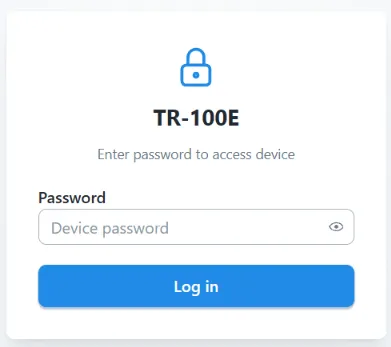
2.4 Use of the Web InterfaceSection titled “2.4 Use of the Web Interface”To access the TR-100E Web interface, a PC with an installed Web browser is required. In the address bar of the Web browser, enter the current IP address of the TR-100E displayed on its screen and press Enter. 2.4.1 Login and Access LevelsSection titled “2.4.1 Login and Access Levels”After opening the Web interface, the password entry form is displayed.
The TR-100E uses two independent Web access passwords:
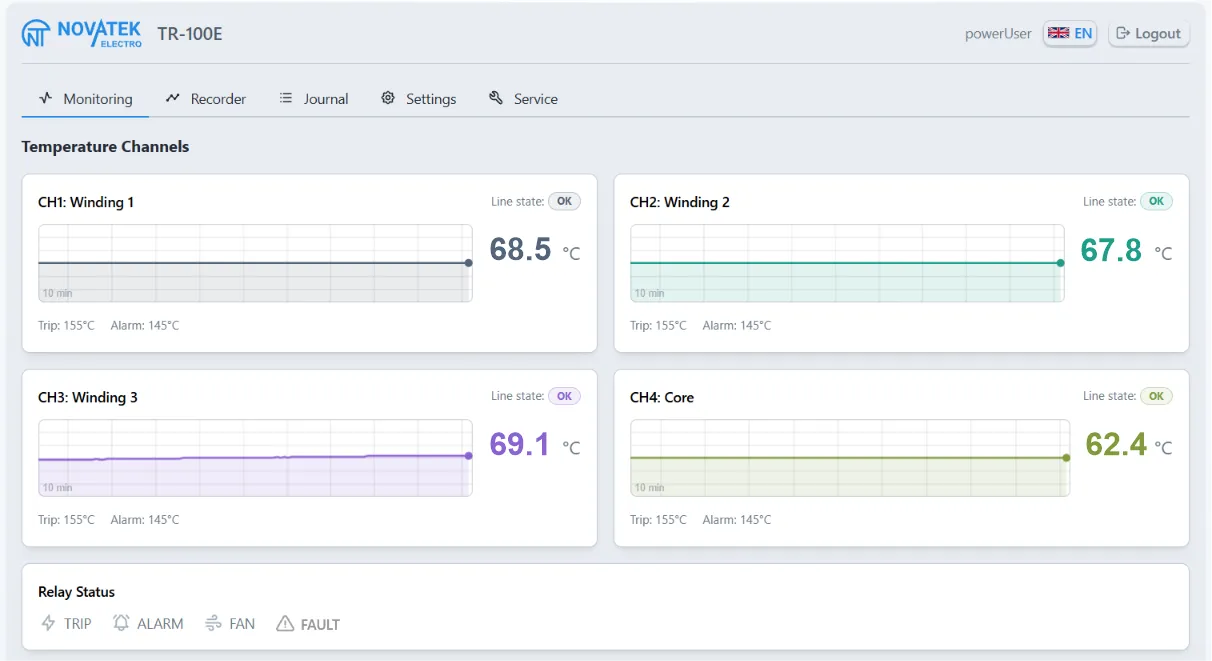
The entered password determines the granted access level. A user at the Password verification for Web 2.4.2 “Monitoring” TabSection titled “2.4.2 “Monitoring” Tab”The tab displays the current status of the TR-100E:
Unread events can be marked as viewed with the Acknowledge button.
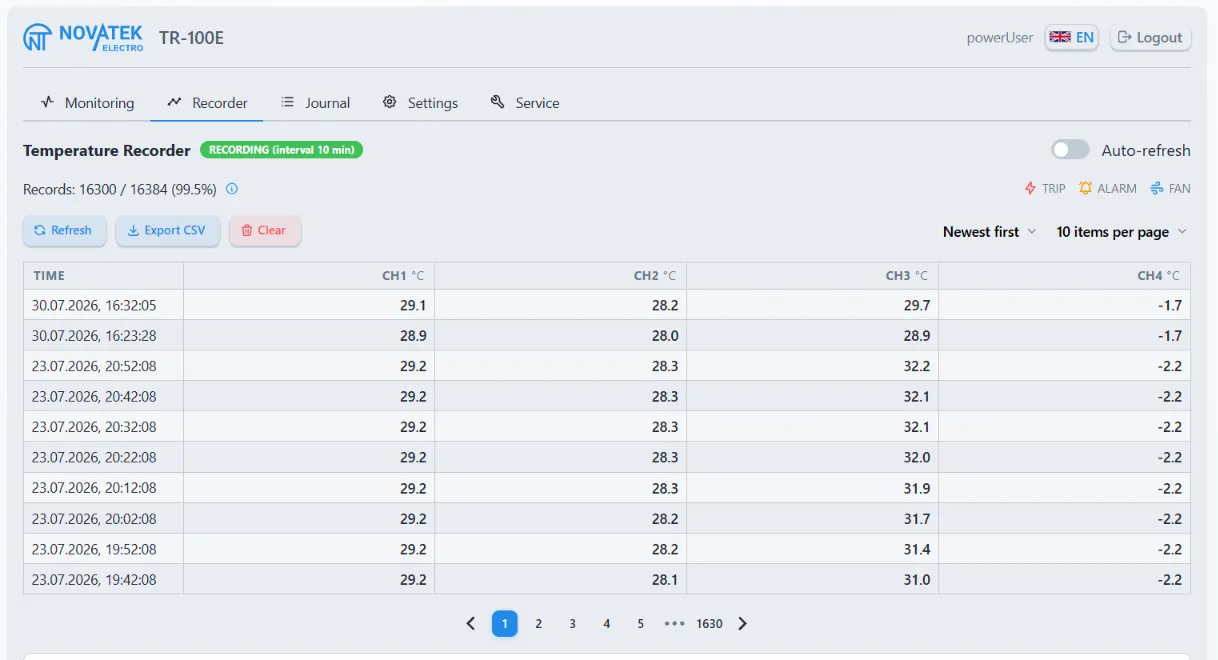
2.4.3 “Logger” TabSection titled “2.4.3 “Logger” Tab”The tab displays the number of saved records, the logging interval, the records table, and channel temperature charts. The following are available:
Clearing the logger is available only to a user at the
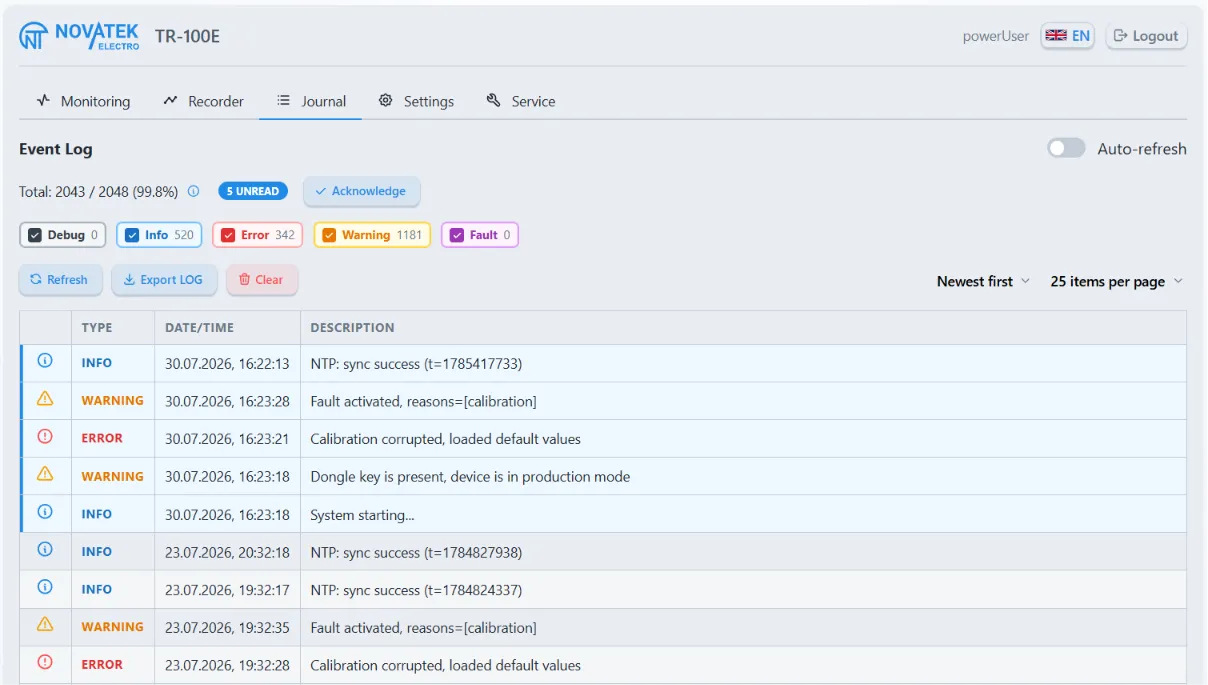
2.4.4 “Log” TabSection titled “2.4.4 “Log” Tab”The tab displays events with date, time, severity level, and description. The following are available:
Clearing the log is available only to a user at the
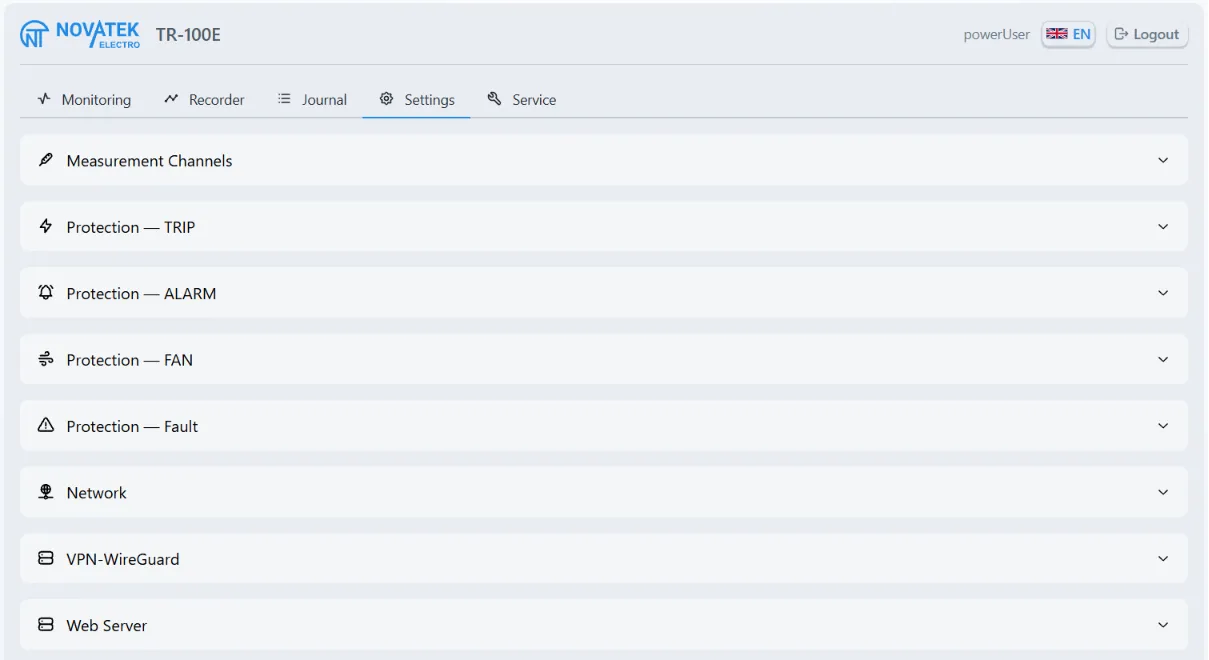
2.4.5 “Settings” TabSection titled “2.4.5 “Settings” Tab”The tab is available only to a user at the The settings of each section are loaded and saved separately. The Refresh button rereads the settings of the open section from the TR-100E, and the Save button writes the changes. If applying the saved settings requires a restart, the Web interface displays a corresponding warning; the restart is not performed automatically. In the Security section, saved passwords are not displayed. To leave a password unchanged, do not fill in the corresponding field; to replace a password, enter a new value.
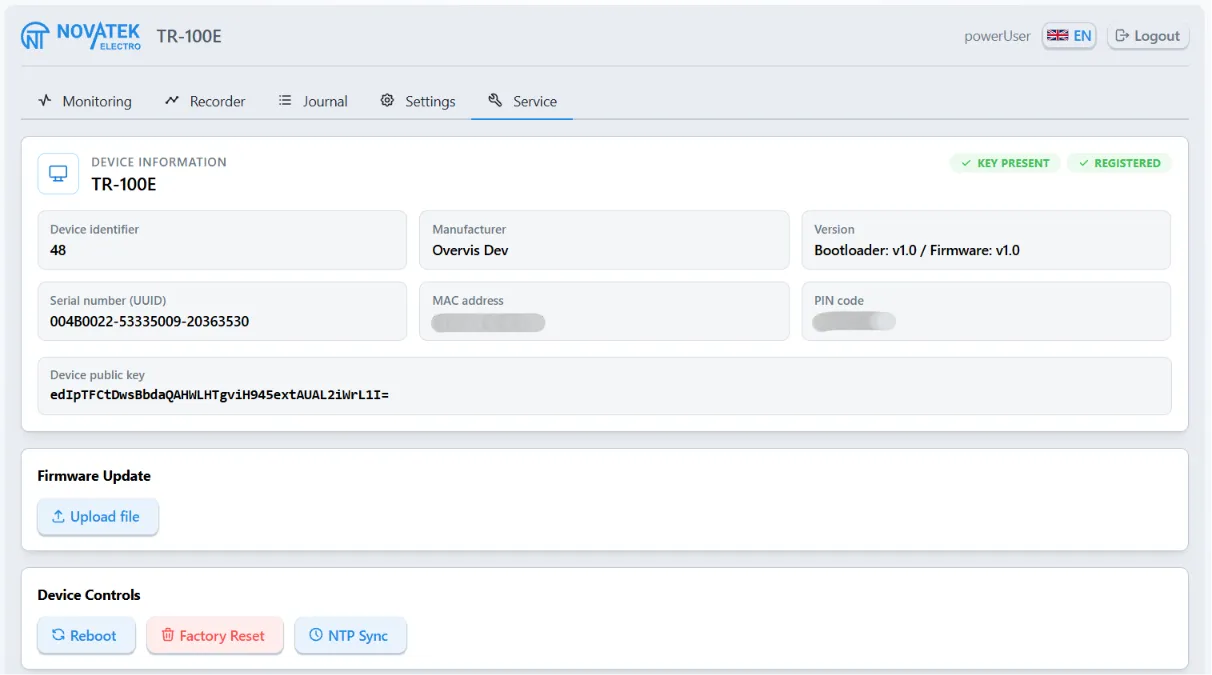
2.4.6 “Service” TabSection titled “2.4.6 “Service” Tab”The tab is available only to a user at the
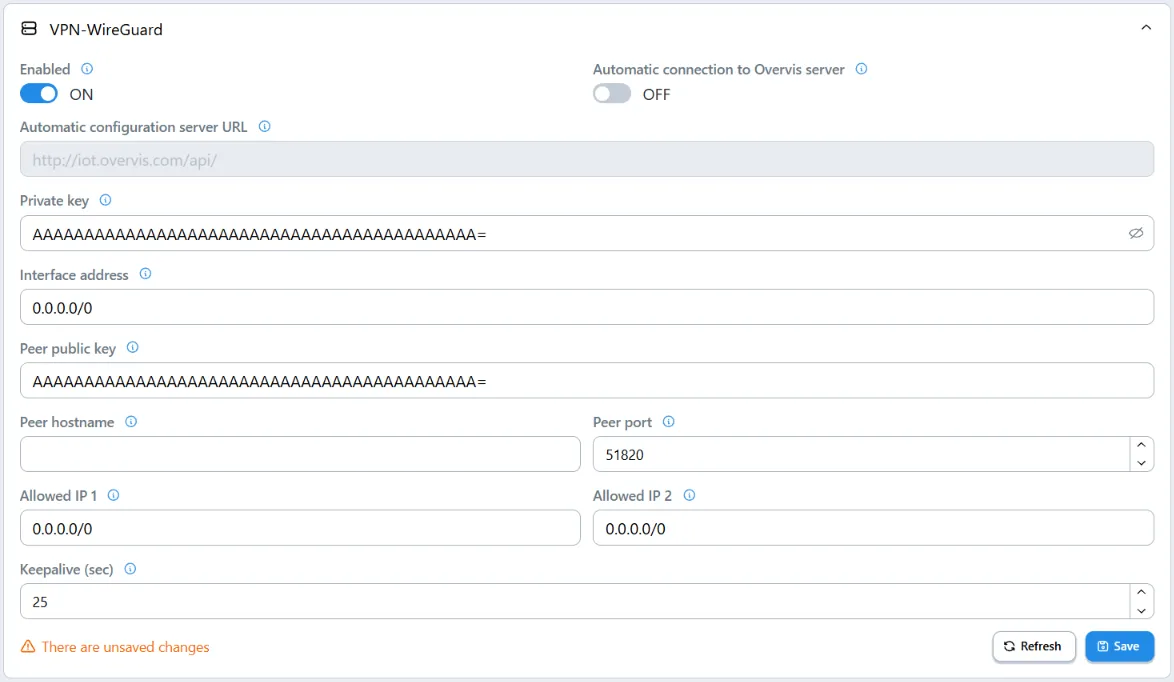
2.5 Use of WireGuard VPNSection titled “2.5 Use of WireGuard VPN”2.5.1 Purpose of the VPNSection titled “2.5.1 Purpose of the VPN”The TR-100E supports a VPN connection using the WireGuard protocol. The VPN creates a secure network channel between the TR-100E and a remote WireGuard peer and allows access to the device’s network services through the VPN interface. The VPN connection parameters can be set manually or obtained automatically. The configuration mode is selected in the TR-100E Web interface. For VPN operation, the TR-100E must have Internet access, correctly configured gateway and DNS servers, and the network must not block the connection to the remote WireGuard peer. 2.5.2 Manual WireGuard ConfigurationSection titled “2.5.2 Manual WireGuard Configuration”The VPN parameters are located in the Web interface under Settings -> VPN-WireGuard. Manual configuration is used to connect to a WireGuard peer selected by the user. To apply it:
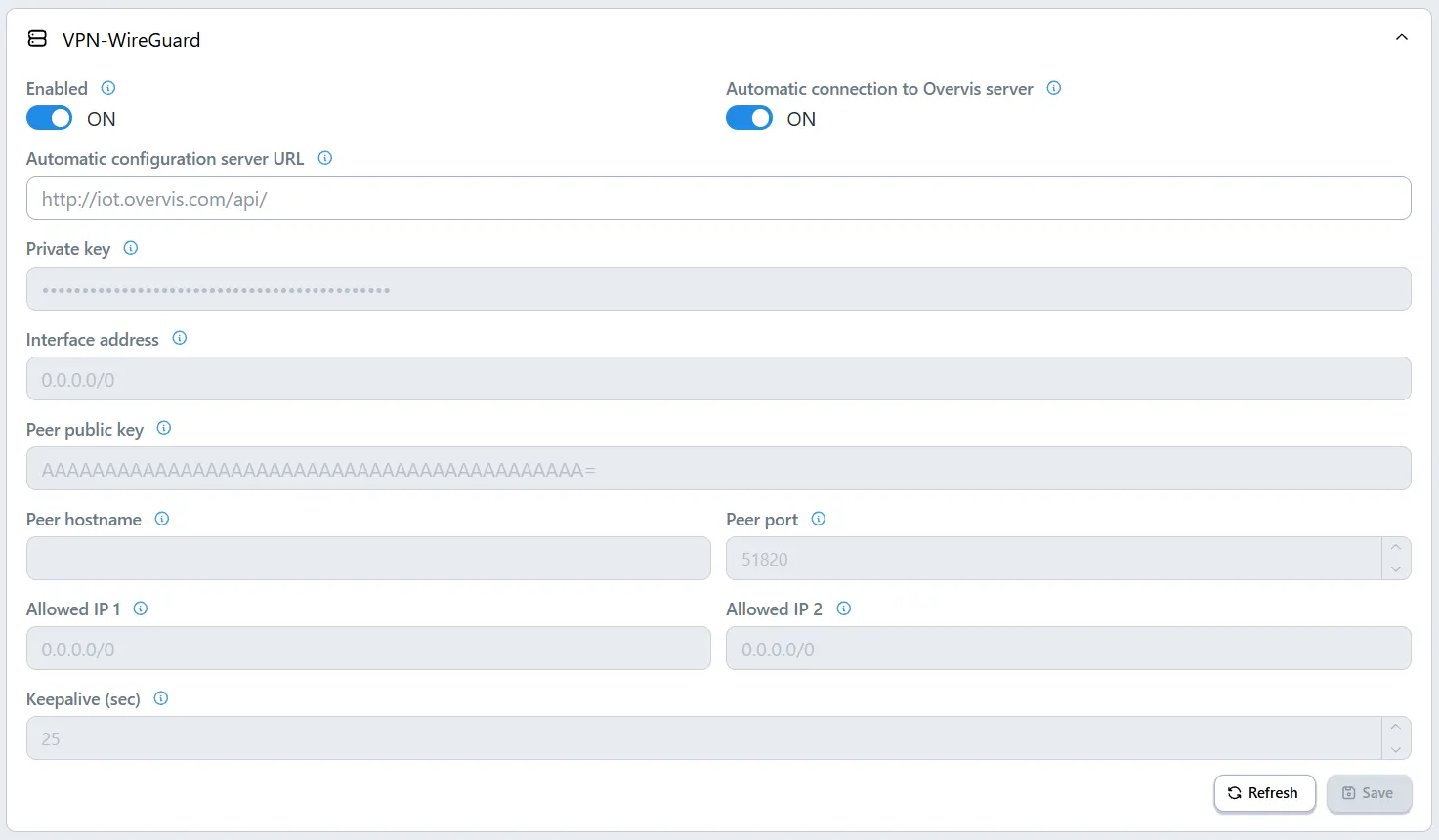
After the modified parameters are saved, the WireGuard service restarts automatically; restarting the TR-100E is not required. The detailed procedure for manual configuration is given in “Appendix B. WireGuard VPN Configuration”. 2.5.3 Automatic Configuration via OvervisSection titled “2.5.3 Automatic Configuration via Overvis”Overvis is a cloud-based monitoring and visualization system that can use WireGuard VPN to access the TR-100E. When automatic mode is selected, the TR-100E is identified by its factory PIN code, receives WireGuard parameters from Overvis, and establishes a VPN connection. In this case, a static public IP address and forwarding of incoming ports on the router are not required. When the Automatic connection to the Overvis server parameter is enabled, the manual configuration fields are not used. The Automatic configuration server URL field should be left empty unless a different address is provided by the manufacturer or technical support. To connect through Overvis, it is necessary to:
The step-by-step connection procedure is given in “Appendix B. WireGuard VPN Configuration”. Additional information about the Overvis system is available at www.overvis.com. 2.5.4 Access to the Web Interface and Modbus TCP via VPNSection titled “2.5.4 Access to the Web Interface and Modbus TCP via VPN”An established VPN connection by itself does not permit access to the TR-100E network services. The required services and access to them over VPN are configured separately:
In Standard protection mode, VPN sessions follow the common Modbus protection mode and require password unlocking under the same conditions as local connections. Read only permits passwordless reads over VPN and rejects all write commands. Read and write permits passwordless reads and writes over VPN; local connections continue to follow the common Modbus protection mode. Permit only the necessary services through the VPN and assign the minimum sufficient access level. 2.6 Use of Modbus TCPSection titled “2.6 Use of Modbus TCP”The TR-100E is connected to the local network via the Ethernet interface. The Modbus TCP protocol is used for data exchange between the TR-100E and a Modbus client over a TCP/IP network. Via Modbus TCP, it is possible to:
For safety reasons, direct control of the output relays via Modbus TCP is not provided: the relays are controlled by the built-in protection algorithms in accordance with the measurement results, configured thresholds, hysteresis, and delays. This prevents bypassing the protection algorithms by a remote command. The TR-100E uses two independent groups of Modbus registers: Input registers and Holding registers. Current states are read from the Input registers with function The Timeout parameter defines the permitted time without data from a Modbus client. If no data is received within the configured time, the TR-100E closes the TCP connection. TCP Keepalive control packets do not reset this timeout. A value of By default, the Modbus protection mechanism restricts writing to protected Holding registers. To unlock them, the Modbus password must be written to registers 52-63 in ASCII characters (two characters per register, most significant byte first, string terminated with a zero byte). By default, the factory password indicated on the sticker with the QR code is used. Successful verification unlocks only the current TCP session; the state of the protection mechanism is available in register 51. After five incorrect attempts, requests from this IP address are blocked for 5 minutes. When changing the Modbus password, a password length of 8…23 characters is allowed. Password verification is enabled and disabled by the Modbus password -> Protection parameter; disabling verification does not delete the saved password. The operating mode of the protection mechanism is set by register 169: VPN sessions are additionally governed by the Modbus access via VPN setting. The Read only and Read and write levels do not require password unlocking over VPN and do not change the protection of local Modbus connections. Table 4 - List of supported functions (Modbus)
Table 5 - Data types
Table 6 - Input registers (function 0x04)
Interpretation of Registers 5-6 “Status flags” A set bit (
Interpretation of Registers 7-8 “Device function readiness” Each bit indicates the readiness of the corresponding subsystem:
Interpretation of Registers 24-27 “CH1-CH4 status” Each channel corresponds to a separate register: 24 - CH1, 25 - CH2, 26 - CH3, 27 - CH4.
Table 7 - Holding registers: service values and commands
2.7 Network PortsSection titled “2.7 Network Ports”To configure a router or firewall, the network connections listed in Table 8 should be taken into account. Table 8 - TR-100E network ports
Incoming connections to the Web interface and Modbus TCP should be allowed only from trusted networks. If only outgoing connections to the NTP, DNS, and autoconfiguration server are used, port forwarding on the router is not required; the firewall must permit the response traffic of established connections. 3 MAINTENANCESection titled “3 MAINTENANCE”3.1 Safety PrecautionsSection titled “3.1 Safety Precautions”3.2 Maintenance FrequencySection titled “3.2 Maintenance Frequency”The recommended maintenance interval is every six months. 3.3 Maintenance Procedure:Section titled “3.3 Maintenance Procedure:”
3.4 Diagnostics and TroubleshootingSection titled “3.4 Diagnostics and Troubleshooting”Table 9 - Possible Faults and Remedies
4 SERVICE LIFE AND MANUFACTURER’S WARRANTYSection titled “4 SERVICE LIFE AND MANUFACTURER’S WARRANTY”4.1 Product Service LifeSection titled “4.1 Product Service Life”The service life of the product is 15 years. Upon expiration of the service life, contact the manufacturer. 4.2 Storage LifeSection titled “4.2 Storage Life”The storage life of the product is 3 years. 4.3 Warranty PeriodSection titled “4.3 Warranty Period”The warranty period for the product is 10 years from the date of sale. 4.4 Warranty ServiceSection titled “4.4 Warranty Service”Warranty service is provided at the place of purchase or by the manufacturer of the product. 4.5 Post-Warranty ServiceSection titled “4.5 Post-Warranty Service”Post-warranty service of the product is performed by the manufacturer at the current rates. 5 TRANSPORTATION AND STORAGESection titled “5 TRANSPORTATION AND STORAGE”TR-100E in the manufacturer’s packaging may be transported and stored at temperatures from minus 30 to +60 °C and relative humidity not exceeding 98% at 35 °C (without moisture condensation). |
| Novatek-Electro TR-100E Documentation | ||||||||||||||||||||||||||||||||||||||||||||
|---|---|---|---|---|---|---|---|---|---|---|---|---|---|---|---|---|---|---|---|---|---|---|---|---|---|---|---|---|---|---|---|---|---|---|---|---|---|---|---|---|---|---|---|---|
Appendix A: Emergency Firmware RecoveryAPPENDIX A. FIRMWARE RECOVERYSection titled “APPENDIX A. FIRMWARE RECOVERY”Main Document: TR-100E User Manual This appendix describes TR-100E firmware recovery using bootloader tools. Use this procedure if the standard Web interface does not open, an update ended with an error, or TR-100E reports an invalid application. The bootloader provides two recovery methods:
For recovery, you need:
A.1 Entering the Bootloader MenuSection titled “A.1 Entering the Bootloader Menu”
To navigate the menu, use:
The menu contains the following items:
A.2 Restoring a Previously Uploaded Firmware ImageSection titled “A.2 Restoring a Previously Uploaded Firmware Image”This method does not require a computer. Use it if the update file was completely loaded into TR-100E before the failure.
If Image not found, Image invalid, or Operation failed appears, load a new A.3 Loading a New Firmware Image via Recovery ModeSection titled “A.3 Loading a New Firmware Image via Recovery Mode”A.3.1 Connecting the DeviceSection titled “A.3.1 Connecting the Device”
In recovery mode, fixed network parameters are used:
A.3.2 Uploading and Verifying the FileSection titled “A.3.2 Uploading and Verifying the File”
If the upload is interrupted before clicking Firmware, the installed firmware will not be changed. Without rebooting TR-100E, select the file and click Send again: the incomplete upload will be replaced with the new one. A.3.3 Installing the FirmwareSection titled “A.3.3 Installing the Firmware”
Before installation, the bootloader verifies the compatibility, integrity, and authenticity of the file. A corrupted file, a file modified after release, or a file intended for a different device cannot be installed. A.4 Bootloader MessagesSection titled “A.4 Bootloader Messages”
If the recovery page does not open:
If recovery does not complete after re-uploading a valid file, record the text of the message on the display, the |
| Novatek-Electro TR-100E Documentation | ||||||||||||||||
|---|---|---|---|---|---|---|---|---|---|---|---|---|---|---|---|---|
Appendix B: WireGuard VPN ConfigurationAPPENDIX B. WIREGUARD VPN CONFIGURATIONSection titled “APPENDIX B. WIREGUARD VPN CONFIGURATION”Main document: TR-100E User Manual This appendix describes two WireGuard VPN configuration modes:
In both modes, TR-100E initiates communication with the remote peer independently. Configuration requires access to the TR-100E Web interface with the B.1 Manual WireGuard ConfigurationSection titled “B.1 Manual WireGuard Configuration”B.1.1 Entering ParametersSection titled “B.1.1 Entering Parameters”For static configuration, the VPN administrator must provide the WireGuard parameters for TR-100E and configure the corresponding peer on the remote endpoint.
The private key, interface address, peer public key, and peer host are required. Use a prefix from
If access to the Web interface or Modbus TCP is required through the static VPN connection, also configure the settings described in steps 5–11 of section B.2.2.
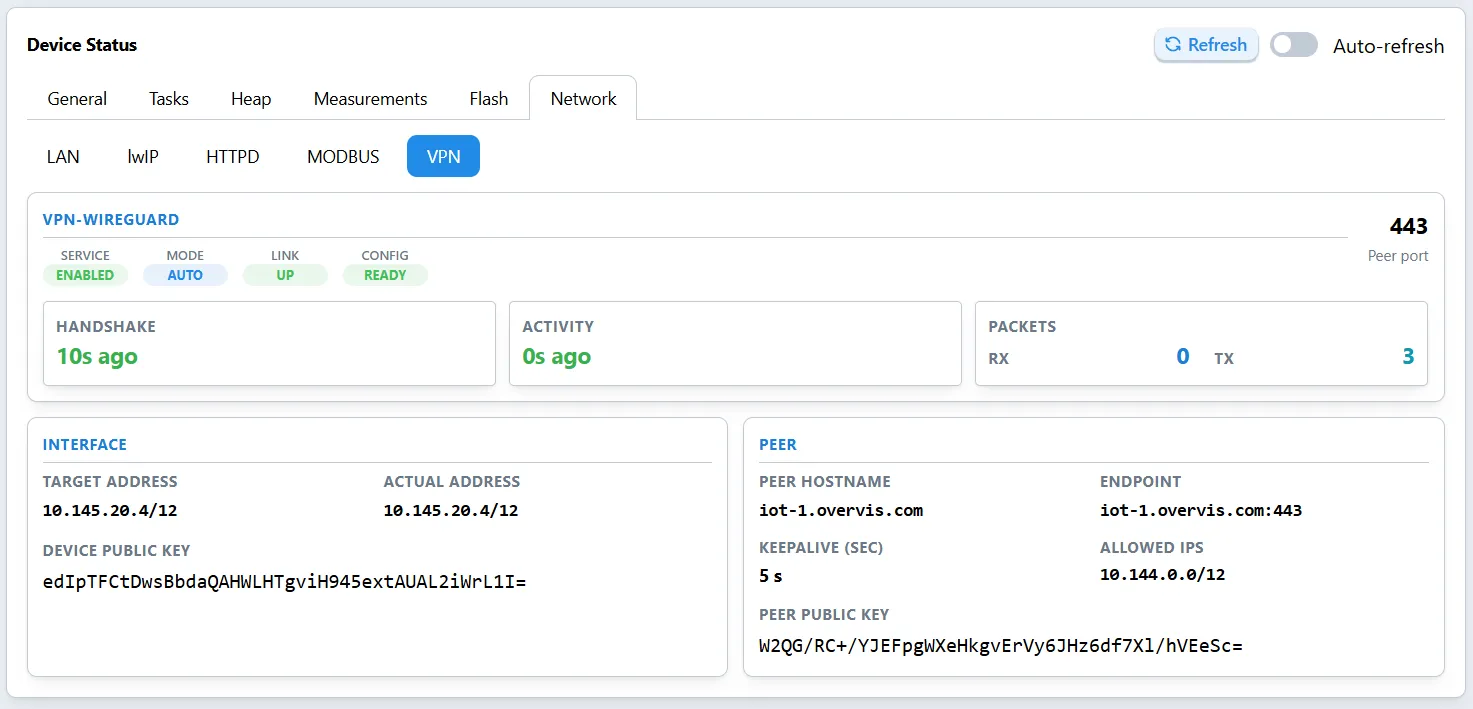
Figure B.1 – Static WireGuard configuration B.1.2 Verifying the ConnectionSection titled “B.1.2 Verifying the Connection”Go to the Service tab, select Network → VPN in the Diagnostics block, and enable Auto-refresh. For a correctly completed static configuration, the following values are displayed:
Successful communication with the remote endpoint is confirmed by the Connected or Active state, a time in the Handshake field, and increasing RX/TX packet counters. The Invalid Configuration state means that at least one required parameter is missing: private key, interface address, peer public key, or peer host.
Figure B.2 – Static WireGuard connection status If the static connection cannot be established:
B.2 Automatic Configuration via OvervisSection titled “B.2 Automatic Configuration via Overvis”B.2.1 Verifying Identification DataSection titled “B.2.1 Verifying Identification Data”
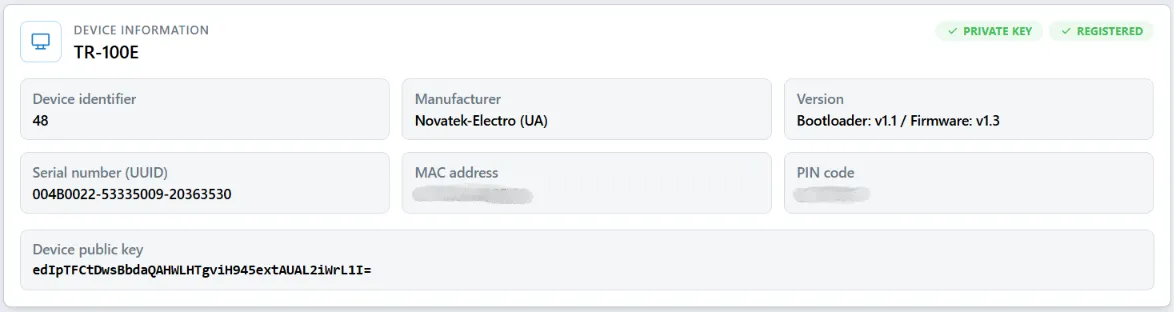
Figure B.3 – TR-100E identification data B.2.2 Enabling Automatic ConnectionSection titled “B.2.2 Enabling Automatic Connection”
Figure B.4 – Configuring automatic connection to Overvis
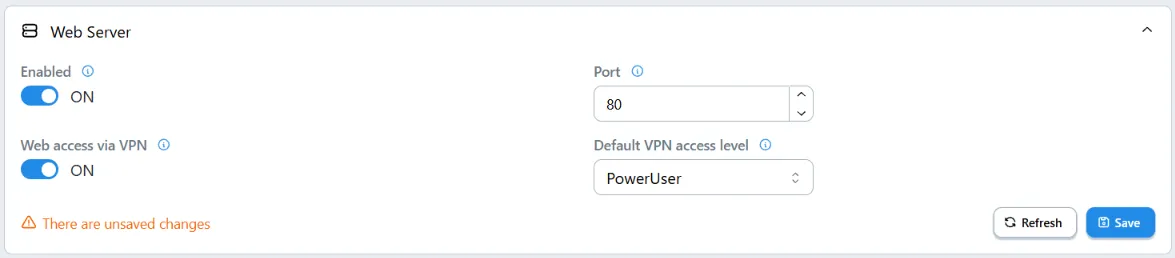
Figure B.5 – Configuring access to the Web interface via VPN
The Read and Write level grants password-free access to any Modbus TCP session accepted through the VPN interface. Use it only with a trusted WireGuard configuration. If remote parameter changes are not required, select Read Only.
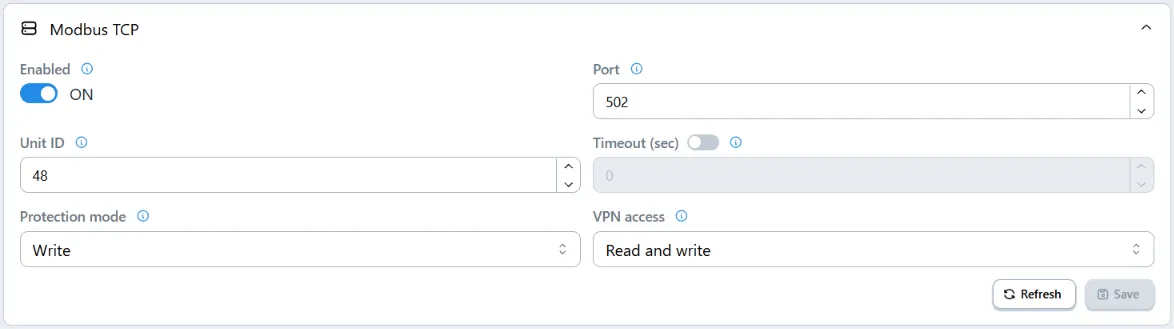
Figure B.6 – Configuring access to Modbus TCP via VPN B.2.3 Monitoring Automatic ConnectionSection titled “B.2.3 Monitoring Automatic Connection”After saving the settings, go to the Service tab, select Network → VPN in the Diagnostics block, and enable Auto-refresh. Wait for automatic configuration to finish. The following states indicate readiness for connection through Overvis:
After these states appear, proceed to connect TR-100E to the Overvis HMI account.
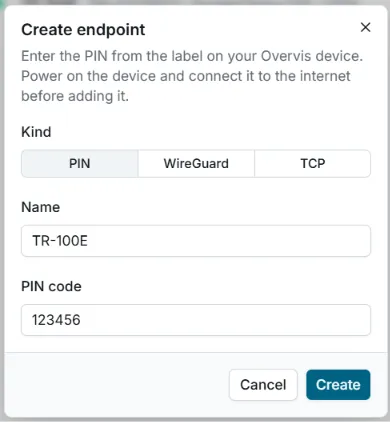
Figure B.7 – WireGuard ready for connection through Overvis B.2.4 Connecting TR-100E to an Overvis HMI AccountSection titled “B.2.4 Connecting TR-100E to an Overvis HMI Account”Before continuing, make sure that TR-100E is connected to the Internet and that automatic WireGuard configuration has been completed as described in section B.2.3. Have the 8-character PIN code printed on the enclosure label ready.
Figure B.8 – Creating a TR-100E connection using a PIN code
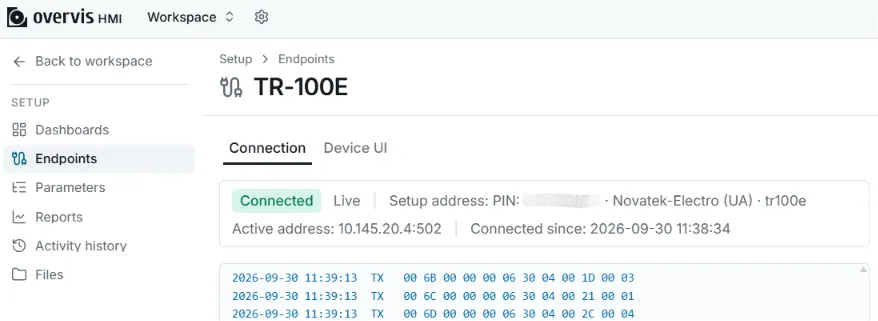
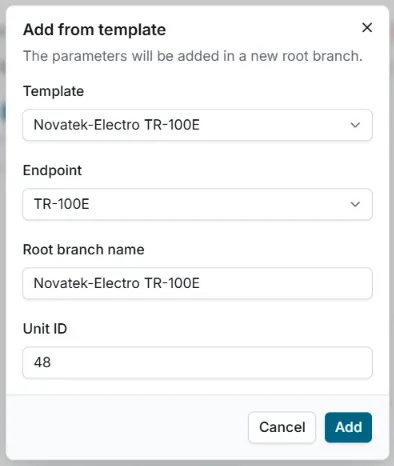
Figure B.9 – TR-100E connected to the workspace After creation, the Type and linked device cannot be changed. If the PIN was entered incorrectly, delete the connection and create it again. This connection does not display temperatures by itself: the TR-100E parameters are added separately. B.2.5 Adding TR-100E Parameters from a TemplateSection titled “B.2.5 Adding TR-100E Parameters from a Template”After creating the connection, add the controller parameters from the Novatek-Electro TR-100E template. The connection address and port do not need to be entered again.
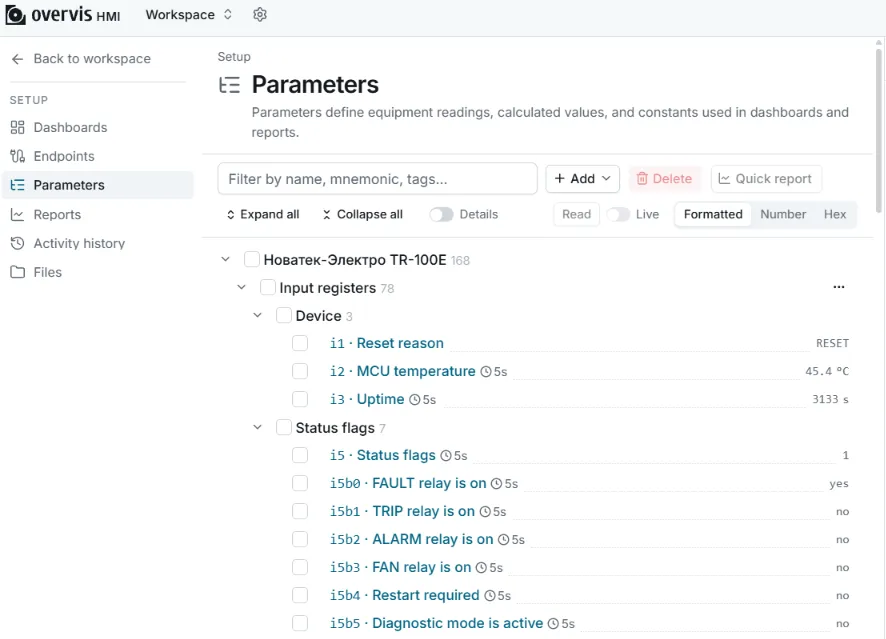
Figure B.10 – Adding TR-100E parameters from a template After the template is applied, a new root branch containing the TR-100E parameters will appear in the Parameters tree. To check communication with the controller, select the new branch and click Read. The values received must appear to the right of the parameters. For continuous polling, enable Live.
Figure B.11 – Verifying that TR-100E parameters can be read If an error is displayed instead of values, check that the Device ID field matches the controller’s Modbus address and that the created connection has the Connected state. Additional information is provided in the Overvis equipment connection documentation. |
| Novatek-Electro TR-100E Documentation | |||||||||||||||||||||||||||||||||||||||||||||||||||||||||||||||||||||||||||||||||||||||||||||||||||||||||||||||||||||||||||||||||||||||||||||||||||||||||||||||||||||||||||||||||||||||||||||||||||||||||||||||||||||||||||||
|---|---|---|---|---|---|---|---|---|---|---|---|---|---|---|---|---|---|---|---|---|---|---|---|---|---|---|---|---|---|---|---|---|---|---|---|---|---|---|---|---|---|---|---|---|---|---|---|---|---|---|---|---|---|---|---|---|---|---|---|---|---|---|---|---|---|---|---|---|---|---|---|---|---|---|---|---|---|---|---|---|---|---|---|---|---|---|---|---|---|---|---|---|---|---|---|---|---|---|---|---|---|---|---|---|---|---|---|---|---|---|---|---|---|---|---|---|---|---|---|---|---|---|---|---|---|---|---|---|---|---|---|---|---|---|---|---|---|---|---|---|---|---|---|---|---|---|---|---|---|---|---|---|---|---|---|---|---|---|---|---|---|---|---|---|---|---|---|---|---|---|---|---|---|---|---|---|---|---|---|---|---|---|---|---|---|---|---|---|---|---|---|---|---|---|---|---|---|---|---|---|---|---|---|---|---|---|---|---|---|---|---|---|---|---|---|---|---|---|---|---|---|
HTTP APIHTTP API for interacting with the TR-100E device. All request paths begin with General PrinciplesSection titled “General Principles”
Access LevelsSection titled “Access Levels”
All AuthorizationSection titled “Authorization”
Web authorization uses two independent passwords: one for the
Partial Settings UpdatesSection titled “Partial Settings Updates”
GET RequestsSection titled “GET Requests”
POST RequestsSection titled “POST Requests”
Errors and Status CodesSection titled “Errors and Status Codes”
|
| Novatek-Electro TR-100E Documentation | ||||||||||||||||||||
|---|---|---|---|---|---|---|---|---|---|---|---|---|---|---|---|---|---|---|---|---|
GET /api/version/Basic public endpoint for identifying the device and retrieving the firmware version before login. Auth: not required. The endpoint does not return sensitive settings, passwords, network secrets, or diagnostic data. Response Section titled “Response 200” |
| Field | Type | Required | Description |
|---|---|---|---|
deviceId | number | yes | Numeric device type ID |
deviceName | string | yes | Device name |
firmwareVersion | string | yes | Firmware version |
bootloaderVersion | string | null | yes | Bootloader version published by the bootloader in the RTC backup register; null if the bootloader did not report a version |
| Novatek-Electro TR-100E Documentation | ||||||||
|---|---|---|---|---|---|---|---|---|
GET /api/auth/status/Return the current access level for this request. Auth: not required. Response Section titled “Response 200” |
| Field | Type | Required | Description |
|---|---|---|---|
accessLevel | string | yes | Current access level: guest, user, or powerUser |
guest, user, or powerUser.powerUser validation is disabled, powerUser is returned; otherwise, if user validation is disabled, user is returned.| Novatek-Electro TR-100E Documentation | ||||||||
|---|---|---|---|---|---|---|---|---|
GET /api/auth/salt/Retrieve the Auth: not required. Response Section titled “Response 200” |
| Field | Type | Required | Description |
|---|---|---|---|
salt | string | yes | 40-character ASCII string |
salt requirements40 characters.[A-Za-z0-9].POST /api/auth/login/ attempt, whether successful or not.| Novatek-Electro TR-100E Documentation | ||||||||||||||||||||||||||||||||
|---|---|---|---|---|---|---|---|---|---|---|---|---|---|---|---|---|---|---|---|---|---|---|---|---|---|---|---|---|---|---|---|---|
POST /api/auth/login/Create an authenticated session. Auth: not required. RequestSection titled “Request”Request fieldsSection titled “Request fields”
Hash formulaSection titled “Hash formula”where
If Web password verification is disabled by the Response Section titled “Response 200” |
| Field | Type | Required | Description |
|---|---|---|---|
authType | string | yes | Always "Bearer" |
token | string | yes | 48-character ASCII string [A-Za-z0-9] |
ttlSec | number | yes | Session lifetime in seconds |
accessLevel | string | yes | "user" or "powerUser" |
5 failed attempts, all interfaces are locked out for 300 seconds.300 seconds of inactivity or after a successful login.401 (incorrect password){ "error": "ERROR_UNAUTHORIZED", "message": "3 attempts left"}429 (lockout active){ "error": "ERROR_LOCKED", "message": "Retry after 247 seconds"}| Novatek-Electro TR-100E Documentation |
|---|
POST /api/auth/logout/Terminate the current session. Auth: Bearer. RequestSection titled “Request”The request body contains no meaningful fields. Response Section titled “Response 200” |
| Novatek-Electro TR-100E Documentation | ||||||||||||||||||||||||||||||||||||||||||||||||||||||||||||||||||||||||||||||||||||||||||||||||||||||||||||||||||||||||||||||||||||||||||||||||||||||||||||||||||||||||||||||||||||||||||||||||||||||||||||||||||||||||||||||||||||||||||||||||||||||||||||||||||||||||||||||||||||||||||||||||||||||||||||||||||||||||||||||||||||||||||||||||||||||||||||||||||||||||||||||||||||||||||||||||
|---|---|---|---|---|---|---|---|---|---|---|---|---|---|---|---|---|---|---|---|---|---|---|---|---|---|---|---|---|---|---|---|---|---|---|---|---|---|---|---|---|---|---|---|---|---|---|---|---|---|---|---|---|---|---|---|---|---|---|---|---|---|---|---|---|---|---|---|---|---|---|---|---|---|---|---|---|---|---|---|---|---|---|---|---|---|---|---|---|---|---|---|---|---|---|---|---|---|---|---|---|---|---|---|---|---|---|---|---|---|---|---|---|---|---|---|---|---|---|---|---|---|---|---|---|---|---|---|---|---|---|---|---|---|---|---|---|---|---|---|---|---|---|---|---|---|---|---|---|---|---|---|---|---|---|---|---|---|---|---|---|---|---|---|---|---|---|---|---|---|---|---|---|---|---|---|---|---|---|---|---|---|---|---|---|---|---|---|---|---|---|---|---|---|---|---|---|---|---|---|---|---|---|---|---|---|---|---|---|---|---|---|---|---|---|---|---|---|---|---|---|---|---|---|---|---|---|---|---|---|---|---|---|---|---|---|---|---|---|---|---|---|---|---|---|---|---|---|---|---|---|---|---|---|---|---|---|---|---|---|---|---|---|---|---|---|---|---|---|---|---|---|---|---|---|---|---|---|---|---|---|---|---|---|---|---|---|---|---|---|---|---|---|---|---|---|---|---|---|---|---|---|---|---|---|---|---|---|---|---|---|---|---|---|---|---|---|---|---|---|---|---|---|---|---|---|---|---|---|---|---|---|---|---|---|---|---|---|---|---|---|---|---|---|---|---|---|---|---|---|---|---|---|---|---|---|---|---|---|---|---|---|---|---|---|---|---|---|---|---|---|---|---|---|---|---|---|---|---|---|---|---|---|---|---|
GET /api/state/get/?device&network&relays&leds&protection&recorder&channels&log&ntp&httpd&modbus&wireguardRetrieve one or more top-level runtime-state groups. Auth: Bearer. Query paramsSection titled “Query params”Each query key is a flag requesting the corresponding group. Valid keys:
Response Section titled “Response 200” |
| Field | Type | Description |
|---|---|---|
uptimeSec | number | Uptime since power-on (seconds) |
dateTimeUtc | string | Current device time in ISO 8601 UTC |
localOffsetMin | number | Effective local offset in minutes, including DST |
dstActive | boolean | Whether DST is active |
deviceNeedReboot | boolean | The device requires a reboot |
isDiagnosticMode | boolean | Diagnostic mode was activated at startup by pressing Up + Down |
settingsValid | boolean | The saved settings are valid |
calibrationValid | boolean | The saved factory calibration is valid |
rebootAfterSec | number|null | Seconds until the scheduled reboot (null = not scheduled) |
network| Field | Type | Description |
|---|---|---|
macAddress | string | MAC address |
isUnique | boolean | true = unique EUI-48, false = fallback |
ipAddress | string | IP address |
subnetMask | string | Subnet mask |
gateway | string | Gateway |
dns | string[] | DNS servers |
dhcp.state | string | DHCP state: off, configuring, searching, requesting, bound, renewing, rebinding, retrying |
dhcp.serverAddress | string | DHCP server IPv4 address |
dhcp.leaseSeconds | number | Full lease duration in seconds |
dhcp.remainingSeconds | number | Remaining lease duration in seconds |
relays| Field | Type | Description |
|---|---|---|
trip | boolean | Trip relay state |
alarm | boolean | Alarm relay state |
fan | boolean | Fan relay state |
fault | boolean | Fault relay state |
inTestMode | boolean | Service relay test is active |
leds| Field | Type | Description |
|---|---|---|
inTestMode | boolean | Service LED test is active |
protection| Field | Type | Description |
|---|---|---|
trip | boolean | Logical trip protection flag |
alarm | boolean | Logical alarm protection flag |
fan | boolean | Logical fan protection flag |
fault | boolean | Logical fault protection flag |
recorder| Field | Type | Description |
|---|---|---|
enabled | boolean | Recorder is enabled |
available | boolean | Recorder is available |
total | number | Number of available records |
periodSec | number | Current recording period (seconds) |
lastError | number | Most recent error code |
errorCount | number | Error count |
channelsArray of 4 elements (CH1..CH4).
| Field | Type | Description |
|---|---|---|
enabled | boolean | Channel is enabled |
temperature | string|null | Current temperature (decimal, 1 digit after the decimal point), null if invalid |
minTemperature | string|null | Minimum temperature |
maxTemperature | string|null | Maximum temperature |
trend | string | "up", "down", "stable" |
circuitState | string | "normal", "open", "short" |
trip | boolean | Channel is in the trip state |
alarm | boolean | Channel is in the alarm state |
fan | boolean | Channel is in the fan state |
log| Field | Type | Description |
|---|---|---|
available | boolean | Log is available |
total | number | Number of available events |
lastTimestampUtc | string|null | UTC timestamp of the most recent event; null if empty |
pending | number | Number of unacknowledged events in the current power session |
ntp| Field | Type | Description |
|---|---|---|
enabled | boolean | NTP is enabled in settings |
available | boolean | The NTP client is ready in the current runtime state |
lastSyncUtc | string|null | UTC time of the most recent successful synchronization; null if none has occurred |
syncCount | number | Number of successful synchronizations since power-on |
failCount | number | Number of failed attempts since power-on |
httpd| Field | Type | Description |
|---|---|---|
enabled | boolean | The web server is enabled in settings |
available | boolean | HTTPD is ready in the current runtime state |
activeConnections | number | Currently active TCP connections |
maxConnections | number | Maximum concurrent connections (constant) |
activeSessions | number | Currently authorized sessions |
maxSessions | number | Maximum concurrent sessions (constant) |
port | number | HTTP server TCP port |
connections | array | Active TCP connections |
connections[].ip | string | Client IP address |
connections[].port | number | Client TCP port |
modbus| Field | Type | Description |
|---|---|---|
enabled | boolean | Modbus TCP is enabled in settings |
available | boolean | The Modbus TCP server is ready |
activeConnections | number | Current number of active TCP connections |
maxConnections | number | Maximum concurrent connections |
blockedIps | number | Number of IP addresses blocked after failed password attempts |
port | number | Modbus TCP port |
rxPackets | number | Packets received across all connections since startup |
txPackets | number | Packets sent across all connections since startup |
rxErrors | number | Receive errors across all connections since startup |
txErrors | number | Transmit errors across all connections since startup |
exceptionResp | number | Modbus Exception responses sent since startup |
rxBytes | number | Bytes received across all connections since startup |
txBytes | number | Bytes sent across all connections since startup |
rxPerSec | number | Current aggregate receive rate, packets/s |
txPerSec | number | Current aggregate transmit rate, packets/s |
connections | array | Active TCP connections |
connections[].ip | string | Client IP address |
connections[].port | number | Client TCP port |
connections[].uptimeSec | number | Connection uptime, seconds |
connections[].unlocked | boolean | Protected operations are unlocked for the connection |
connections[].rxPackets | number | Packets received on the connection |
connections[].txPackets | number | Packets sent on the connection |
connections[].rxErrors | number | Receive errors on the connection |
connections[].txErrors | number | Transmit errors on the connection |
connections[].exceptionResp | number | Modbus Exception responses sent on the connection |
connections[].rxBytes | number | Bytes received on the connection |
connections[].txBytes | number | Bytes sent on the connection |
connections[].rxPerSec | number | Current connection receive rate, packets/s |
connections[].txPerSec | number | Current connection transmit rate, packets/s |
wireguard| Field | Type | Description |
|---|---|---|
enabled | boolean | WG is enabled in settings |
mode | string | Configuration mode: "auto" or "static" |
status | object | Brief WireGuard operational state |
endpoint | object | Remote peer endpoint |
interface | object | Configured/runtime interface mapping |
wireguard.status| Field | Type | Description |
|---|---|---|
link | string | Link state: "disabled", "netif", "configured", "connected", "up" |
config | string | Configuration state: "disabled", "staticInvalid", "pause", "serverResolving", "serverConnecting", "discoverWait", "connectWait", "peerResolving", "ready" |
lastPeerUpUtc | string|null | UTC time when the peer was last up; null if never |
lastHandshakeAgeSec | number|null | Age of the peer’s latest handshake/keepalive in seconds; null if none |
lastActivityAgeSec | number|null | Age of the peer’s latest activity (handshake/keepalive, RX, or TX) in seconds; null if none |
rxPackets | number | Packets received through the WG tunnel |
txPackets | number | Packets sent through the WG tunnel |
wireguard.endpoint| Field | Type | Description |
|---|---|---|
hostname | string|null | Endpoint hostname |
address | string|null | Resolved endpoint IP address |
port | number|null | Endpoint port |
keepaliveSec | number|null | Current peer keepalive interval in seconds |
peerPublicKey | string|null | Peer public key |
allowedIps | array | Peer networks allowed in IPv4 CIDR format |
wireguard.interface| Field | Type | Description |
|---|---|---|
configured | string|null | Configured interface address in CIDR notation |
runtime | string|null | Actual active interface address in CIDR notation |
devicePublicKey | string|null | Device public key |
| Novatek-Electro TR-100E Documentation | ||||||||||||||||||||||||||||||||||||||||||||||||||||||||||||||||||||||||||||||||||||||||||||||||||||||||||||||||||||||||||||||||||||||||||||||||||||||||||||||||||||||||||||||||||||||||||||||||||||||||||||||||||||||||||||||||||||||||||||||||||||||||||||||||||||||||
|---|---|---|---|---|---|---|---|---|---|---|---|---|---|---|---|---|---|---|---|---|---|---|---|---|---|---|---|---|---|---|---|---|---|---|---|---|---|---|---|---|---|---|---|---|---|---|---|---|---|---|---|---|---|---|---|---|---|---|---|---|---|---|---|---|---|---|---|---|---|---|---|---|---|---|---|---|---|---|---|---|---|---|---|---|---|---|---|---|---|---|---|---|---|---|---|---|---|---|---|---|---|---|---|---|---|---|---|---|---|---|---|---|---|---|---|---|---|---|---|---|---|---|---|---|---|---|---|---|---|---|---|---|---|---|---|---|---|---|---|---|---|---|---|---|---|---|---|---|---|---|---|---|---|---|---|---|---|---|---|---|---|---|---|---|---|---|---|---|---|---|---|---|---|---|---|---|---|---|---|---|---|---|---|---|---|---|---|---|---|---|---|---|---|---|---|---|---|---|---|---|---|---|---|---|---|---|---|---|---|---|---|---|---|---|---|---|---|---|---|---|---|---|---|---|---|---|---|---|---|---|---|---|---|---|---|---|---|---|---|---|---|---|---|---|---|---|---|---|---|---|---|---|---|---|---|---|---|---|---|---|---|---|---|---|
GET /api/settings/get/?meta&general&dateTime&display&access&recorder&network&ntp&web&modbus&vpnWireguard&channels&protectionRetrieve one or more top-level persistent-settings groups. Auth: Bearer.
Query paramsSection titled “Query params”Each query key is a flag requesting the corresponding group. Valid keys:
Response Section titled “Response 200” |
| Field | Type | Description |
|---|---|---|
sequence | number | Settings save sequence number |
fwVersion | string | Version of the firmware that created the snapshot |
isDefault | boolean | Default settings |
savedAt | string | Time of the most recent save (ISO 8601 UTC) |
dataLength | number | Data length |
dataCrc32 | string | Data CRC32 (hex, 8 characters) |
headerCrc32 | string | Header CRC32 (hex, 8 characters) |
general| Field | Type | Description |
|---|---|---|
language | string | Interface language |
logDebugMask | number | Debug-log module bitmask (bit0 = WireGuard) |
dateTime| Field | Type | Description |
|---|---|---|
timezoneOffset | number | Time-zone offset in minutes |
dst | object | Daylight-saving-time settings |
dst.mode | number | DST mode |
dst.deltaMin | number | Offset amount in minutes |
dst.startLocal | string | DST start (local time) |
dst.endLocal | string | DST end (local time) |
display| Field | Type | Description |
|---|---|---|
contrast | number | Contrast |
activeBacklightPercent | number | Active backlight brightness, % |
idleBacklightEnable | boolean | Whether the backlight dims when idle |
idleBacklightPercent | number | Idle backlight brightness, % |
idleTimeoutSec | number | Idle timeout before dimming, seconds |
access| Field | Type | Description |
|---|---|---|
devPasswordEnable | boolean | Require a password when entering the local menu |
webUserPassEnable | boolean | Require the user-level web-access password |
webPwrPassEnable | boolean | Require the powerUser-level web-access password |
modbusPasswordEnable | boolean | Require a password to unlock protected Modbus TCP operations |
The devPassword, webUserPass, webPwrPass, and modbusPassword fields are intentionally omitted from the response. The API exposes neither saved passwords nor whether a custom value has been set. Clients must use only the ...PasswordEnable flags as the protection state. At the user level, these flags are returned as null; their values are available to powerUser.
recorder| Field | Type | Description |
|---|---|---|
enabled | boolean | Temperature recording is enabled |
periodSec | number | Recording period in seconds |
network| Field | Type | Description |
|---|---|---|
enabled | boolean | Ethernet is enabled |
dhcpEnable | boolean | DHCP is enabled |
dns | string[] | DNS servers |
ipAddress | string | Static IP address |
subnetMask | string | Subnet mask |
gateway | string | Gateway |
ntp| Field | Type | Description |
|---|---|---|
enabled | boolean | NTP is enabled |
syncPeriodSec | number | Synchronization period (seconds) |
server1 | string | Primary NTP server |
server2 | string | Secondary NTP server |
web| Field | Type | Description |
|---|---|---|
enabled | boolean | Web server is enabled |
port | number | HTTP port |
vpnTrusted | boolean | Trust web access through the VPN |
vpnAccessLevel | number | Access through the VPN: 0 = standard password authorization, 1 = user, 2 = powerUser |
modbus| Field | Type | Description |
|---|---|---|
enabled | boolean | Modbus TCP is enabled |
unitId | number | Unit ID |
port | number | TCP port |
timeoutSec | number | Timeout (seconds) |
protectMode | number | Protection mode: 0 = none, 1 = write-protect, 2 = read-write-protect |
vpnAccessLevel | number | Access through the VPN: 0 = disabled, 1 = uses general protection, 2 = read-only, 3 = read-write |
vpnWireguard| Field | Type | Description |
|---|---|---|
enabled | boolean | WireGuard is enabled |
autoConfigEnable | boolean | Overvis auto-configuration mode (parameters are retrieved from the cloud using the device identity) |
autoConfigUrl | string | Auto-configuration server URL |
privateKey | string | Static WireGuard private key in base64 |
address | string | Local interface address in CIDR notation, for example 10.0.0.2/24 |
peerPublicKey | string | Static WireGuard peer public key in base64 |
peerHostname | string | Peer hostname |
peerPort | number | Peer port |
allowedIps | string[] | Exactly 2 peer CIDR routes |
keepaliveSec | number | Persistent keepalive interval in seconds |
autoConfigEnable = false, all static vpnWireguard fields are used, including keys and the endpoint.autoConfigEnable = true, the static vpnWireguard fields are ignored at runtime; WireGuard/Overvis obtains parameters through the service identity API for automatic configuration.channels| Field | Type | Description |
|---|---|---|
filterLevel | number | Filter level |
items | array | Array of 4 channels |
channels.items[]| Field | Type | Description |
|---|---|---|
enabled | boolean | Channel is enabled |
sensorTypeId | number | Sensor type ID (see /api/reference/sensor-types/) |
userOffset | number | User offset |
ptcMinikaNominal | number | PTC Minika nominal value |
linked | number | Membership in the shared TRIP/ALARM/FAN threshold and hysteresis group: 0 = independent, 1 = linked |
protectionprotection.trip / protection.alarm| Field | Type | Description |
|---|---|---|
delaySec | number | Activation delay (seconds) |
channels | array | Per-channel setpoints (4 elements) |
protection.trip.channels[] / protection.alarm.channels[]| Field | Type | Description |
|---|---|---|
threshold | number | Temperature setpoint |
hysteresis | number | Hysteresis |
protection.fan| Field | Type | Description |
|---|---|---|
mode | number | Operating mode |
delaySec | number | Activation delay (seconds) |
channels | array | Per-channel setpoints (4 elements) |
protection.fault| Field | Type | Description |
|---|---|---|
delaySec | number | Activation delay (seconds) |
The ranges below match the firmware constraints in Application/User/settings.h.
general.language: en | pl | ua | ru.general.logDebugMask: 0..65535 (bitmask).dateTime.timezoneOffset: -720..840 minutes.dateTime.dst.mode: 0..3 (OFF, EU, US, MANUAL).dateTime.dst.deltaMin: 0..180 minutes.display.contrast: 0..64.display.activeBacklightPercent: 0..100.display.idleBacklightEnable: true | false.display.idleBacklightPercent: 0..100.display.idleTimeoutSec: 30..3600 seconds.access.devPasswordEnable, access.webUserPassEnable, access.webPwrPassEnable, access.modbusPasswordEnable: true | false.access passwords are not returned by this endpoint; their write constraints are described in POST /api/settings/set/.recorder.enabled: true | false.recorder.periodSec: 5..3600 seconds.ntp.syncPeriodSec: 300..86400 seconds.ntp.server1, ntp.server2: up to 31 characters each.web.port: 1..65535.web.vpnTrusted: true | false.web.vpnAccessLevel: 0..2 (password, user, powerUser); 0 uses standard password authorization.modbus.unitId: 0..247; 0 — accept requests with any Unit ID.modbus.port: 1..65535.modbus.timeoutSec: 1..3600 seconds.modbus.protectMode: 0..2 (none, write-protect, read-write-protect).modbus.vpnAccessLevel: 0..3 (disabled, password, read-only, read-write).vpnWireguard.peerPort: 1..65535.vpnWireguard.keepaliveSec: 1..300 seconds.channels.filterLevel: 1..10.channels.items[].sensorTypeId: 0..MSR_SENSOR_COUNT-1; valid values are published through GET /api/reference/sensor-types/.channels.items[].userOffset: -10.0..10.0 °C.channels.items[].ptcMinikaNominal: 60.0..180.0 °C.channels.items[].linked: 0..1.protection.trip.delaySec, protection.alarm.delaySec, protection.fan.delaySec, protection.fault.delaySec: 0..60 seconds.protection.trip.channels[].threshold, protection.alarm.channels[].threshold, protection.fan.channels[].threshold: -40.0..240.0 °C.protection.trip.channels[].hysteresis, protection.alarm.channels[].hysteresis, protection.fan.channels[].hysteresis: 0.0..100.0 °C.protection.fan.mode: 0..3.| Novatek-Electro TR-100E Documentation |
|---|
POST /api/settings/set/Partially update saved settings (merge semantics). Auth: Bearer ( RequestSection titled “Request”Request fieldsSection titled “Request fields”
ValidationSection titled “Validation”
Writable field constraintsSection titled “Writable field constraints”The constraints below match the firmware validation in
Response Section titled “Response 200” |
| Novatek-Electro TR-100E Documentation | ||||||||||||||||||||
|---|---|---|---|---|---|---|---|---|---|---|---|---|---|---|---|---|---|---|---|---|
GET /api/reference/sensor-types/Retrieve the list of supported sensor types. Auth: Bearer. Response Section titled “Response 200” |
| Field | Type | Required | Description |
|---|---|---|---|
items | array | yes | List of types |
items[].id | number | yes | Numeric ID |
items[].shortName | string | yes | Short sensor name |
items[].description | string | yes | Sensor description |
| Novatek-Electro TR-100E Documentation | ||||||||||||||||||||
|---|---|---|---|---|---|---|---|---|---|---|---|---|---|---|---|---|---|---|---|---|
GET /api/history/temperature/info/Get live-history window metadata without the sample array. Auth: Bearer. Response Section titled “Response 200” |
| Field | Type | Required | Description |
|---|---|---|---|
capacity | number | yes | Maximum ring-buffer capacity per channel |
periodSec | number | yes | Sample recording interval in seconds |
total | number | yes | Current number of valid samples |
lastSequence | number | yes | Sequence number of the newest sample |
| Novatek-Electro TR-100E Documentation | |||||||||||||||||||||||||||||||||||||||||||||||||||||||||||||
|---|---|---|---|---|---|---|---|---|---|---|---|---|---|---|---|---|---|---|---|---|---|---|---|---|---|---|---|---|---|---|---|---|---|---|---|---|---|---|---|---|---|---|---|---|---|---|---|---|---|---|---|---|---|---|---|---|---|---|---|---|---|
GET /api/history/temperature/samples/?page=1&pageSize=2&direct=descGet a page of synchronized history samples for all four channels. Auth: Bearer. Query paramsSection titled “Query params”
*Either
Section titled “cursor” |
| Field | Type | Description |
|---|---|---|
nextCursor | number|null | Cursor for the next request. null if the end of the query has been reached. |
periodSec | number | History recording interval in seconds. |
lastSequence | number | Current monotonic sequence number at the time of the request. |
samples | array | Samples in direct order (0..pageSize elements). |
sampleCount | number | Number of samples in the current result set. |
If no more data is available, the response contains sampleCount: 0, samples: [],
and nextCursor: null. This is not an error.
samples[]| Field | Type | Description |
|---|---|---|
sequence | number | Sequence number of this sample. |
channels | array | 4 elements (CH1..CH4). |
samples[].channels[]| Field | Type | Description |
|---|---|---|
state | string | "normal", "open", "short", "invalid" |
temperature | number|null | Temperature (null if invalid) |
GET /api/history/temperature/samples/?page=1&pageSize=20&direct=desc→ { "nextCursor": 1216, "sampleCount": 20, "samples": [...] }
GET /api/history/temperature/samples/?cursor=1216&pageSize=20&direct=desc→ { "nextCursor": 1196, "sampleCount": 20, "samples": [...] }
GET /api/history/temperature/samples/?cursor=1196&pageSize=20&direct=desc→ { "nextCursor": null, "sampleCount": 20, "samples": [...] }
The first request uses page=1; subsequent requests use the cursor from the previous response.
| Novatek-Electro TR-100E Documentation | ||||||||||||||||||||||||
|---|---|---|---|---|---|---|---|---|---|---|---|---|---|---|---|---|---|---|---|---|---|---|---|---|
GET /api/recorder/info/Get recorder metadata without the record array. Auth: Bearer. Response Section titled “Response 200” |
| Field | Type | Required | Description |
|---|---|---|---|
capacity | number | yes | Maximum ring-buffer capacity |
total | number | yes | Number of available archived records |
oldestSequence | number | yes | Sequence number of the oldest record |
lastSequence | number | yes | Sequence number of the newest record |
period | number | yes | Configured recording interval in seconds (1..3600); recording is enabled separately by the tempRecordEnable setting |
| Novatek-Electro TR-100E Documentation | ||||||||||||||||||||||||||||||||||||||||||||||||||||||||||||||||||||||
|---|---|---|---|---|---|---|---|---|---|---|---|---|---|---|---|---|---|---|---|---|---|---|---|---|---|---|---|---|---|---|---|---|---|---|---|---|---|---|---|---|---|---|---|---|---|---|---|---|---|---|---|---|---|---|---|---|---|---|---|---|---|---|---|---|---|---|---|---|---|---|
GET /api/recorder/records/?page=1&pageSize=2&direct=descGet a page of archived recorder entries. Auth: Bearer. Query paramsSection titled “Query params”
*Either
Section titled “cursor” |
| Field | Type | Description |
|---|---|---|
nextCursor | number|null | Cursor for the next request. null if the end of the query has been reached. |
recordCount | number | Number of records in the current result set (0..pageSize). |
records | array | Records in direct order. |
If no more data is available, the response contains recordCount: 0, records: [],
and nextCursor: null. This is not an error.
records[]| Field | Type | Description |
|---|---|---|
sequence | number | Record sequence number |
timestamp | string | ISO 8601 UTC |
channels | array | 4 elements (CH1..CH4) |
records[].channels[]| Field | Type | Description |
|---|---|---|
state | string | "normal", "open", "short", "invalid" |
temperature | number|null | Temperature (null if the state is not "normal") |
enabled | boolean | Whether the channel is enabled |
trip | boolean | Trip state |
alarm | boolean | Alarm state |
fan | boolean | Fan state |
GET /api/recorder/records/?page=1&pageSize=5&direct=desc→ { "nextCursor": 1529, "recordCount": 5, "records": [...] }
GET /api/recorder/records/?cursor=1529&pageSize=5&direct=desc→ { "nextCursor": 1524, "recordCount": 5, "records": [...] }
GET /api/recorder/records/?cursor=1524&pageSize=5&direct=desc→ { "nextCursor": 1519, "recordCount": 5, "records": [...] }
GET /api/recorder/records/?cursor=1519&pageSize=5&direct=desc→ { "nextCursor": 1514, "recordCount": 5, "records": [...] }
GET /api/recorder/records/?cursor=1514&pageSize=5&direct=desc→ { "nextCursor": null, "recordCount": 5, "records": [...] }
The first request uses page=1; subsequent requests use the cursor from the previous response.
| Novatek-Electro TR-100E Documentation |
|---|
GET /api/recorder/export.csv/Export recorder data as CSV. Auth: Bearer. Response Section titled “Response 200” |
| Novatek-Electro TR-100E Documentation | ||||||||
|---|---|---|---|---|---|---|---|---|
POST /api/recorder/clear/Clear the recorder. Auth: Bearer ( RequestSection titled “Request”Request fieldsSection titled “Request fields”
An empty or syntactically invalid JSON body → Response Section titled “Response 200” |
| Novatek-Electro TR-100E Documentation | ||||||||||||||||||||||||||||||||||||||||||||||||||||||||||||||||||||
|---|---|---|---|---|---|---|---|---|---|---|---|---|---|---|---|---|---|---|---|---|---|---|---|---|---|---|---|---|---|---|---|---|---|---|---|---|---|---|---|---|---|---|---|---|---|---|---|---|---|---|---|---|---|---|---|---|---|---|---|---|---|---|---|---|---|---|---|---|
GET /api/log/info/Get an event-log summary. Auth: Bearer. Response Section titled “Response 200” |
| Field | Type | Required | Description |
|---|---|---|---|
capacity | number | yes | Maximum ring-buffer capacity |
total | number | yes | Number of available events |
pending | number | yes | Number of unacknowledged events in the current power session |
oldestSequence | number | yes | Sequence number of the oldest available event in the ring buffer. For UI pages showing the oldest events, this is the primary indication that the old edge of the window has actually moved because events were evicted. |
lastSequence | number | yes | Sequence number of the newest event. The UI uses this field to detect new events: if the value has increased relative to the previously stored value, N = lastSequence_new - lastSequence_old new events have been added to the log. Fetching these N events is appropriate only if the current UI page contains the previously stored lastSequence (that is, the user is on the latest page where new entries appear); no updates are needed on other pages. |
totalBySeverity | object | yes | Breakdown of total by severity |
pendingBySeverity | object | yes | Breakdown of pending by severity |
totalBySeverity| Field | Type | Description |
|---|---|---|
debug | number | Number of available DEBUG events |
info | number | Number of available INFO events |
warning | number | Number of available WARNING events |
error | number | Number of available ERROR events |
fault | number | Number of available FAULT events |
pendingBySeverity| Field | Type | Description |
|---|---|---|
debug | number | Number of pending DEBUG events |
info | number | Number of pending INFO events |
warning | number | Number of pending WARNING events |
error | number | Number of pending ERROR events |
fault | number | Number of pending FAULT events |
| Novatek-Electro TR-100E Documentation | |||||||||||||||||||||||||||||||||||||||||||||||||||||||||||||||||||||||||||||||||||||||||||||||||||||||||||||||||||
|---|---|---|---|---|---|---|---|---|---|---|---|---|---|---|---|---|---|---|---|---|---|---|---|---|---|---|---|---|---|---|---|---|---|---|---|---|---|---|---|---|---|---|---|---|---|---|---|---|---|---|---|---|---|---|---|---|---|---|---|---|---|---|---|---|---|---|---|---|---|---|---|---|---|---|---|---|---|---|---|---|---|---|---|---|---|---|---|---|---|---|---|---|---|---|---|---|---|---|---|---|---|---|---|---|---|---|---|---|---|---|---|---|---|---|---|
GET /api/log/events/?page=1&pageSize=1&direct=descGet a page of log events using stable pagination. Auth: Bearer. Query paramsSection titled “Query params”
*Either
Section titled “cursor” |
| Field | Type | Description |
|---|---|---|
nextCursor | number|null | Cursor for the next request. null if the end of the query has been reached. |
eventCount | number | Number of events in the current result set (0..pageSize). |
events | array | Events in direct order. |
If no more data is available, the response contains eventCount: 0, events: [],
and nextCursor: null. This is not an error.
events[]| Field | Type | Required | Description |
|---|---|---|---|
sequence | number | yes | Event sequence number |
timestamp | string | yes | ISO 8601 UTC |
errorCode | number | yes | Error code |
pending | boolean | yes | true if the event has not yet been acknowledged in the current power session |
severity | string | yes | "DEBUG", "INFO", "WARNING", "ERROR", "FAULT" |
dataType | string | yes | "GENERIC", "FAULT", "NETWORK" |
generic | object | no | Present if dataType = "GENERIC" |
fault | object | no | Present if dataType = "FAULT" |
network | object | no | Present if dataType = "NETWORK" |
generic| Field | Type | Description |
|---|---|---|
message | string | Event text |
| Field | Type | Description |
|---|---|---|
taskName | string | Task name |
registers | string | A single string in the form PC=... LR=... SP=... CFSR=... HFSR=... MMFAR=... BFAR=... R0=... R1=... R2=... R3=... R12=... xPSR=... |
network| Field | Type | Description |
|---|---|---|
message | string | Text |
remoteIp | string | Remote IP address |
remotePort | number | Remote port |
localPort | number | Local port |
lwipError | number | lwIP error code |
GET /api/log/events/?page=1&pageSize=5&direct=desc&severityMask=31→ { "nextCursor": 245, "eventCount": 5, "events": [...] }
GET /api/log/events/?cursor=245&pageSize=5&direct=desc&severityMask=31→ { "nextCursor": 240, "eventCount": 5, "events": [...] }
GET /api/log/events/?cursor=240&pageSize=5&direct=desc&severityMask=31→ { "nextCursor": 235, "eventCount": 5, "events": [...] }
GET /api/log/events/?cursor=235&pageSize=5&direct=desc&severityMask=31→ { "nextCursor": 230, "eventCount": 5, "events": [...] }
GET /api/log/events/?cursor=230&pageSize=5&direct=desc&severityMask=31→ { "nextCursor": null, "eventCount": 5, "events": [...] }
The first request uses page=1; subsequent requests use the cursor from the previous response.
The cursor prevents the server from rescanning records that have already been read,
which is especially important when filtering by severityMask.
| Novatek-Electro TR-100E Documentation |
|---|
GET /api/log/export.log/Export the log in text format. Auth: Bearer. Response Section titled “Response 200” |
| Novatek-Electro TR-100E Documentation | ||||||||
|---|---|---|---|---|---|---|---|---|
POST /api/log/acknowledge/Clear the unacknowledged-events flag. Auth: Bearer. RequestSection titled “Request”Request fieldsSection titled “Request fields”
An empty body or invalid JSON → Response Section titled “Response 200” |
| Novatek-Electro TR-100E Documentation | ||||||||
|---|---|---|---|---|---|---|---|---|
POST /api/log/clear/Clear the event log. Auth: Bearer ( RequestSection titled “Request”Request fieldsSection titled “Request fields”
An empty body or invalid JSON → Response Section titled “Response 200” |
| Novatek-Electro TR-100E Documentation |
|---|
Calibration ServiceFactory calibration is managed as a single device-wide session. The session owns the measurement path, expires after 30 seconds of inactivity, and holds a RAM draft until AuthorizationSection titled “Authorization”
Data ModelSection titled “Data Model”There are six independent slots: Each saved snapshot contains the applied absolute tolerance and the raw ADC values for four channels. The live resistance and verification values for the current slot are calculated only from its reference and captured ADC value: The Manufacturer Tool calculates the tolerance. At Immediately after capture, the corresponding The source data of a completed snapshot does not change until the same slot is captured again. Capturing another point does not invalidate completed snapshots. GET /api/service/calibration/report/Section titled “GET /api/service/calibration/report/”Generates the latest complete quality report from the saved calibration slots. No separate report entity is stored in Flash. Response Section titled “Response 200, report unavailable” |
| Novatek-Electro TR-100E Documentation | ||||||||||
|---|---|---|---|---|---|---|---|---|---|---|
Overvis Ownership ChallengeThe challenge confirms physical access to the TR-100E when connecting the device to Overvis using a PIN code. The code is displayed on the device for no more than 5 minutes. The user can enter this code in Overvis or confirm the connection by selecting Yes on the TR-100E. The code is runtime state: it is not saved to Flash/EEPROM and is not returned by the status API. POST /api/service/challenge/set/Section titled “POST /api/service/challenge/set/”Set, replace, or clear the challenge. Access: WireGuard only, Bearer/implicit (
Response Response An empty body or invalid JSON returns GET /api/service/challenge/status/Section titled “GET /api/service/challenge/status/”Retrieve a consistent snapshot of the challenge state. Access: WireGuard only, Bearer/implicit ( Response
After Yes is selected, the TR-100E displays a waiting screen until Overvis reads If the user confirms ownership by entering the code in Overvis, the cloud service compares it with its original value and, after successful verification, sends |
| Novatek-Electro TR-100E Documentation | ||||||||
|---|---|---|---|---|---|---|---|---|
POST /api/service/firmware/apply/Apply a previously uploaded and verified OTA image. Auth: Bearer ( RequestSection titled “Request”Request fieldsSection titled “Request fields”
An empty or syntactically invalid JSON body → Response Section titled “Response 200” |
| Novatek-Electro TR-100E Documentation | |||||||||||||||||||||||||||||||||||||||||||||||||||||||
|---|---|---|---|---|---|---|---|---|---|---|---|---|---|---|---|---|---|---|---|---|---|---|---|---|---|---|---|---|---|---|---|---|---|---|---|---|---|---|---|---|---|---|---|---|---|---|---|---|---|---|---|---|---|---|---|
Firmware Upload SessionUploading an GET /api/service/firmware/upload/status/Section titled “GET /api/service/firmware/upload/status/”Retrieve the current upload-session status and OTA image validity. Auth: Bearer ( Response Section titled “Response 200” |
| Field | Type | Description |
|---|---|---|
uploadInProgress | boolean | Erase/receive/verify is in progress |
imageValid | boolean | The OTA image has been fully uploaded and verified |
receivedBytes | number | Number of confirmed bytes |
totalBytes | number | Expected image size |
percent | number | Progress as a percentage |
lastError | number | Error code (0 = none) |
lastInstallState | string | Most recent installation state: "idle", "ready", "running", "failed", "unknown" |
meta | object | Metadata of the verified image; present only when imageValid: true |
meta.fwVersion | string | Firmware version from the OTA image, up to 15 ASCII characters (for example, 1.0 or 1.2.3-rc4) |
meta.buildTimestamp | number | Build Unix timestamp |
meta.deviceStr | string | Target hardware tag; TR-100E (48) for this device |
meta.description | string | Image description |
Open an upload session, set the image size, and prepare the OTA slot.
Auth: Bearer (powerUser).
{ "size": 524288}| Field | Type | Required | Description |
|---|---|---|---|
size | number | yes | Integer: OTA image size in bytes (> 0 and ≤ the OTA slot size) |
erase/verify is in progress → 503 ERROR_NOT_READY.200{ "acceptedOffset": 0}Write a chunk of the OTA image.
Auth: Bearer (powerUser).
Content-Type: application/octet-streamoffset: chunk offset within the complete image.1024 bytes).| Parameter | Type | Required | Description |
|---|---|---|---|
offset | number | yes | Integer: non-negative offset within the complete OTA image |
offset must match the expected offset or refer to an already confirmed chunk (idempotent retry).400 ERROR_INVALID_VALUE.400 ERROR_INVALID_VALUE.200{ "acceptedOffset": 1024}Complete the upload session and start validation.
Auth: Bearer (powerUser).
{ "confirm": true}400 ERROR_INVALID_VALUE.200{ "uploadInProgress": false, "imageValid": true, "receivedBytes": 524288, "totalBytes": 524288, "percent": 100, "lastError": 0, "lastInstallState": "ready", "meta": { "fwVersion": "1.0", "buildTimestamp": 1785412800, "deviceStr": "TR-100E (48)", "description": "Production firmware" }}Delete the staged OTA image and reset the upload session.
Auth: Bearer (powerUser).
{ "confirm": true}An empty or syntactically invalid JSON body → 400 ERROR_API_PARSING.
A missing confirm, a non-boolean value, or false → 400 ERROR_INVALID_ARGUMENT.
200Returns the complete status in the same format as GET /api/service/firmware/upload/status/.
| Novatek-Electro TR-100E Documentation | |||||||||||||||||||||||||||||||||||||||||||||
|---|---|---|---|---|---|---|---|---|---|---|---|---|---|---|---|---|---|---|---|---|---|---|---|---|---|---|---|---|---|---|---|---|---|---|---|---|---|---|---|---|---|---|---|---|---|
GET /api/service/identity/get/Return device service information. Auth: Bearer ( RequestSection titled “Request”The request body is not used. Query parametersSection titled “Query parameters”
Example: Response Section titled “Response 200” |
| Field | Type | Description |
|---|---|---|
available | boolean | Device service data is available |
donglePresent | boolean | The hardware service dongle is present |
hasDevicePrivateKey | boolean | The device private key is set |
hasDevicePassword | boolean | The device password is set; the password value is not disclosed |
uuid | string | null | Full MCU unique ID in XXXXXXXX-XXXXXXXX-XXXXXXXX format |
devicePublicKey | string | null | Device public key in WireGuard base64 format |
macAddress | string | Effective MAC address in XX:XX:XX:XX:XX:XX format, including the fallback value |
isUnique | boolean | true if the MAC address was read from the EUI-48 chip; false if the fallback derived from the MCU UUID is used |
urlAutoConfig | string | null | Auto-configuration URL |
manufacturer | string | null | Manufacturer string |
pinCode | string | null | PIN code |
devicePassword | string | null | Device password. Present only when requested with ?includePassword=1 |
If the device service data is not ready yet, the API returns 503 ERROR_NOT_READY.
| Novatek-Electro TR-100E Documentation | ||||||||||||||||
|---|---|---|---|---|---|---|---|---|---|---|---|---|---|---|---|---|
POST /api/service/identity/set/Update identity fields other than the device private key and save them to EEPROM. Auth: Bearer ( RequestSection titled “Request”The request body must be a JSON object without an additional Request fieldsSection titled “Request fields”
Length limits:
Empty body → A body that is not an object → If none of the supported fields are provided → Response Section titled “Response 200” |
| Novatek-Electro TR-100E Documentation | ||||||||
|---|---|---|---|---|---|---|---|---|
POST /api/service/reboot/Initiate a delayed reboot. Auth: Bearer ( RequestSection titled “Request”Request fieldsSection titled “Request fields”
Response Section titled “Response 200” |
| Novatek-Electro TR-100E Documentation | ||||||||
|---|---|---|---|---|---|---|---|---|
POST /api/service/settings/reset/Reset settings to factory defaults. Auth: Bearer ( RequestSection titled “Request”Request fieldsSection titled “Request fields”
An empty or syntactically invalid JSON body → Response Section titled “Response 200” |
| Novatek-Electro TR-100E Documentation | ||||||||
|---|---|---|---|---|---|---|---|---|
POST /api/service/time/set/Set the system time (RTC) manually. Auth: Bearer ( RequestSection titled “Request”Request fieldsSection titled “Request fields”
ValidationSection titled “Validation”
Response Section titled “Response 200” |
| Novatek-Electro TR-100E Documentation | ||||||||
|---|---|---|---|---|---|---|---|---|
POST /api/service/time/sync/Initiate forced time synchronization via SNTP. Auth: Bearer. RequestSection titled “Request”Request fieldsSection titled “Request fields”
Empty body → Response Section titled “Response 200” |
| Novatek-Electro TR-100E Documentation | ||||||||||||||||||||||||||||||||||||
|---|---|---|---|---|---|---|---|---|---|---|---|---|---|---|---|---|---|---|---|---|---|---|---|---|---|---|---|---|---|---|---|---|---|---|---|---|
GET /api/debug/adc/, POST /api/debug/adc/start/, POST /api/debug/adc/stop/Raw ADC data and intermediate measurement results for each channel. Intended for calibration and diagnostics. Auth: Bearer (
Response Section titled “Response 200” |
| Field | Type | Description |
|---|---|---|
diagnostic.active | boolean | Whether the temporary channel configuration is active |
diagnostic.ready | boolean | Whether fresh data with stable states for all channels has been received |
diagnostic.sensorTypeId | number | Temporarily selected sensor type from GET /api/reference/sensor-types/; present when active=true |
diagnostic.gain | string | Calculated gain; present when active=true |
mcuTemperature | number|null | Internal MCU sensor temperature (°C), or null if invalid |
channels | array | 4 items (CH1..CH4) |
channels[].filteredAdc | number | Filtered raw ADC value |
channels[].resistance | number | Calculated resistance (ohms) |
channels[].temperature | number|null | Calculated temperature (°C), or null if invalid |
channels[].gain | string | Gain: "x2" or "x24" |
channels[].circuitState | string | Circuit state |
circuitState values"NORMAL""OPEN_CIRCUIT""SHORT_CIRCUIT""UNDER_RANGE""OVER_RANGE""DISABLED""UNKNOWN"Temporarily enables all four channels with the specified sensor type. The firmware selects the gain. Settings and flash are not modified.
The sensorTypeId value must be taken from the items[].id field in the response from
GET /api/reference/sensor-types/.
{ "sensorTypeId": 0 }Calling this endpoint again restarts accumulation and filtering. The response contains the diagnostic object; ready=false until fresh, stable data becomes available.
Ends the test and restores the channel configuration from Settings. The request body is ignored. The mode also ends after 30 seconds without a GET /api/debug/adc/ request, or when diagnostic mode is exited.
| Novatek-Electro TR-100E Documentation | ||||||||||||||||||||||||||||
|---|---|---|---|---|---|---|---|---|---|---|---|---|---|---|---|---|---|---|---|---|---|---|---|---|---|---|---|---|
POST /api/debug/display/start/ and POST /api/debug/display/stop/Display test that temporarily overrides the normal image, contrast, and backlight. Auth: Bearer ( POST /api/debug/display/start/Section titled “POST /api/debug/display/start/”Enables the display override. RequestSection titled “Request”
Calling Response Section titled “Response 200” |
| Novatek-Electro TR-100E Documentation |
|---|
GET /api/debug/external-storage/dump/Streams a read-only dump of every byte in the installed external storage. The firmware reads bounded chunks and does not allocate the complete dump in RAM. Auth: Bearer ( The response uses connection close to terminate the stream. A successful diagnostic
must receive exactly the |
| Novatek-Electro TR-100E Documentation | |||||||||||||||||||||||||||||||||||||||||||||||||||||||||
|---|---|---|---|---|---|---|---|---|---|---|---|---|---|---|---|---|---|---|---|---|---|---|---|---|---|---|---|---|---|---|---|---|---|---|---|---|---|---|---|---|---|---|---|---|---|---|---|---|---|---|---|---|---|---|---|---|---|
GET /api/debug/external-storage/External storage information: installed chip, capacity, and complete region map. Auth: Bearer ( Response Section titled “Response 200” |
| Field | Type | Description |
|---|---|---|
jedecId | string | Six-character hex string (manufacturer + type + capacity) |
chipType | string | Human-readable chip name |
sizeBytes | number | Total external storage capacity (bytes) |
sectorSize | number | Sector size (bytes) |
regions.logger.startAddress | string | Start address (hex) |
regions.logger.sizeBytes | number | Region size (bytes) |
regions.logger.usedEntries | number | Number of used entries |
regions.logger.maxEntries | number | Maximum number of entries |
regions.recorder.startAddress | string | Start address (hex) |
regions.recorder.sizeBytes | number | Region size (bytes) |
regions.recorder.usedEntries | number | Number of used entries |
regions.recorder.maxEntries | number | Maximum number of entries |
regions.ota.startAddress | string | Start address (hex) |
regions.ota.sizeBytes | number | OTA slot size (bytes) |
regions.ota.imagePresent | boolean | Whether an image with a valid header is present |
regions.ota.imageSize | number | Payload size from the header (0 if absent) |
regions.reserved.startAddress | string | Start address of the reserved region (hex) |
regions.reserved.sizeBytes | number | Reserved region size (bytes) |
| Novatek-Electro TR-100E Documentation | ||||||||||||||||||||||||||||||||||||
|---|---|---|---|---|---|---|---|---|---|---|---|---|---|---|---|---|---|---|---|---|---|---|---|---|---|---|---|---|---|---|---|---|---|---|---|---|
GET /api/debug/heap/FreeRTOS and lwIP heap state. Auth: Bearer ( Response Section titled “Response 200” |
| Field | Type | Description |
|---|---|---|
rtos.totalBytes | number | Total FreeRTOS heap size (configTOTAL_HEAP_SIZE) |
rtos.freeBytes | number | Current free space (sum of all free blocks) |
rtos.minEverFreeBytes | number | All-time minimum free space (watermark) |
rtos.largestFreeBlockBytes | number | Size of the largest free block (fragmentation indicator) |
rtos.smallestFreeBlockBytes | number | Size of the smallest free block |
rtos.freeBlockCount | number | Number of free blocks |
rtos.allocCount | number | Number of successful pvPortMalloc calls since startup |
rtos.freeCount | number | Number of successful vPortFree calls since startup |
lwip.totalBytes | number | Total lwIP heap size |
lwip.freeBytes | number | Current free space in the lwIP heap |
lwip.minEverFreeBytes | number | All-time minimum free space in the lwIP heap |
When
freeBytes > 0, the FreeRTOS heap fragmentation metric is1 - largestFreeBlockBytes / freeBytes. IflargestFreeBlockBytesis significantly smaller thanfreeBytes, a large allocation may fail despite sufficient total free memory. WhenfreeBytes == 0, the Web UI reports0%without evaluating the formula.
| Novatek-Electro TR-100E Documentation | ||||||||||||||||||
|---|---|---|---|---|---|---|---|---|---|---|---|---|---|---|---|---|---|---|
GET /api/debug/keyget/Current state of the physical front-panel buttons. Auth: Bearer ( States are read directly from the hardware inputs. Virtual events submitted through Response Section titled “Response 200” |
| Field | Type | Description |
|---|---|---|
up | boolean | Up button is pressed |
down | boolean | Down button is pressed |
menu | boolean | Menu button is pressed |
set | boolean | Set button is pressed |
test | boolean | Test button is pressed |
| Novatek-Electro TR-100E Documentation | ||||||||||||||||
|---|---|---|---|---|---|---|---|---|---|---|---|---|---|---|---|---|
POST /api/debug/keypress/Inject a virtual button event for automated UI/menu testing. Auth: Bearer ( Diagnostic mode must be active. Otherwise, the endpoint returns RequestSection titled “Request”Request fieldsSection titled “Request fields”
Response Section titled “Response 200” |
| Novatek-Electro TR-100E Documentation | ||||||||||||||||||||||||||||||||||||||||
|---|---|---|---|---|---|---|---|---|---|---|---|---|---|---|---|---|---|---|---|---|---|---|---|---|---|---|---|---|---|---|---|---|---|---|---|---|---|---|---|---|
POST /api/debug/led/start/ and POST /api/debug/led/stop/Service LED test. Auth: Bearer ( Diagnostic mode must be active. Otherwise, the endpoints return POST /api/debug/led/start/Section titled “POST /api/debug/led/start/”Force the LEDs into test states. RequestSection titled “Request”
Response Section titled “Response 200” |
| Novatek-Electro TR-100E Documentation | ||||||||||||||||||||||||||||||||||||||||||||||||||||||
|---|---|---|---|---|---|---|---|---|---|---|---|---|---|---|---|---|---|---|---|---|---|---|---|---|---|---|---|---|---|---|---|---|---|---|---|---|---|---|---|---|---|---|---|---|---|---|---|---|---|---|---|---|---|---|
GET /api/debug/lwip-stats/Snapshot of the lwIP stack’s internal counters: per-protocol statistics and memp pool state. The data source is the global Auth: Bearer ( Response Section titled “Response 200” |
| Field | Type | Description |
|---|---|---|
recv | number | Packets received |
xmit | number | Packets transmitted |
drop | number | Packets dropped |
chkerr | number | Checksum errors |
lenerr | number | Length errors |
memerr | number | Memory allocation failures |
rterr | number | Routing errors |
proterr | number | Protocol errors |
opterr | number | Option errors |
err | number | Other errors |
cachehit | number | etharp only: ARP cache hits |
Possible proto keys: link, etharp, ip, icmp, udp, and tcp. (These correspond to the LINK_STATS, ETHARP_STATS, IP_STATS, ICMP_STATS, UDP_STATS, and TCP_STATS flags.)
memp[] (struct stats_mem)An array containing one item per memp pool. The name field is the short pool identifier from the memp_t enum, without the MEMP_ prefix.
| Field | Type | Description |
|---|---|---|
name | string | Pool name (for example, TCP_PCB or PBUF_POOL) |
avail | number | Pool capacity (number of items) |
used | number | Current number of items in use |
max | number | Peak used value during operation |
err | number | Number of failed allocations from the pool |
This block is present only when MEMP_STATS = 1.
| Novatek-Electro TR-100E Documentation | |||||||||||||||||||||
|---|---|---|---|---|---|---|---|---|---|---|---|---|---|---|---|---|---|---|---|---|---|
GET /api/debug/menu/Current UI menu state for automated navigation tests. Auth: Bearer ( Response Section titled “Response 200” |
| Field | Type | Description |
|---|---|---|
isActive | number | Whether the menu is active (1) or not (0) |
depth | number | Current nesting depth |
selectedIndex | number | Index of the selected item |
itemCount | number | Number of items in the current group |
groupId | number | ID of the current menu group |
mode | number | Mode: 0 = NAV, 1 = EDIT |
| Novatek-Electro TR-100E Documentation | |||||||||||||||||||||
|---|---|---|---|---|---|---|---|---|---|---|---|---|---|---|---|---|---|---|---|---|---|
GET /api/debug/network/Low-level network stack diagnostics: PHY layer and MAC address.
Auth: Bearer ( Response Section titled “Response 200” |
| Field | Type | Description |
|---|---|---|
phy.linkUp | boolean | Whether the Ethernet link is established |
phy.speed | number | Link speed (Mbit/s): 10 or 100 |
phy.fullDuplex | boolean | Whether full-duplex mode is active |
phy.autoNegComplete | boolean | Whether auto-negotiation is complete |
phy.mac | string | Interface MAC address (AA:BB:CC:DD:EE:FF) |
phy.macSource | string | "EUI48" (from flash) or "FALLBACK" (firmware) |
| Novatek-Electro TR-100E Documentation | ||||||||||||||||||||||||
|---|---|---|---|---|---|---|---|---|---|---|---|---|---|---|---|---|---|---|---|---|---|---|---|---|
POST /api/debug/relay/start/ and POST /api/debug/relay/stop/Service relay test. Auth: Bearer ( Diagnostic mode must be active. Otherwise, the endpoints return POST /api/debug/relay/start/Section titled “POST /api/debug/relay/start/”Force the relays into test states. RequestSection titled “Request”
Response Section titled “Response 200” |
| Novatek-Electro TR-100E Documentation | ||||||||||||||||||||||||||||||||||||
|---|---|---|---|---|---|---|---|---|---|---|---|---|---|---|---|---|---|---|---|---|---|---|---|---|---|---|---|---|---|---|---|---|---|---|---|---|
GET /api/debug/settings/Retrieve the state of both persistent settings banks, regardless of the source of the current runtime settings. Auth: Bearer ( Diagnostic mode is not required. In diagnostic mode, implicit Response Section titled “Response 200” |
| Field | Type | Description |
|---|---|---|
runtimeSource | string | Source of the current runtime settings: builtIn, bank1, or bank2 |
bootBank | number | null | Bank selected during a normal boot: 1, 2, or null if both banks are invalid |
banks | array | State of the two physical settings banks |
banks[].bank | number | Bank number: 1 or 2 |
banks[].valid | boolean | Result of full validation of the header, firmware version, length, and data CRC |
banks[].sequence | number | Record sequence number; present only for a valid bank |
banks[].isDefault | boolean | Whether the payload matches the effective factory settings; present only for a valid bank |
banks[].savedAt | string | null | Save time in ISO 8601 UTC; present only for a valid bank |
banks[].dataLength | number | Payload length; present only for a valid bank |
banks[].dataCrc32 | string | Payload CRC32 as eight hex characters; present only for a valid bank |
banks[].headerCrc32 | string | Header CRC32 as eight hex characters; present only for a valid bank |
runtimeSource and bootBank may differ. For example, in diagnostic mode the runtime uses builtIn, while a normal boot selects the latest valid flash bank.
If both banks are valid, bootBank identifies the bank with the newer sequence, accounting for uint32_t wraparound. If the sequence values are equal, bank 1 is selected.
Header fields are not returned for an invalid bank because their values are not considered reliable.
The saved settings are considered factory settings if bootBank is not null and the specified bank has valid: true and isDefault: true. The other, older bank may contain custom settings and does not affect the result.
| Novatek-Electro TR-100E Documentation | ||||||||||||||||||||||||||||||||||||||||||||||||
|---|---|---|---|---|---|---|---|---|---|---|---|---|---|---|---|---|---|---|---|---|---|---|---|---|---|---|---|---|---|---|---|---|---|---|---|---|---|---|---|---|---|---|---|---|---|---|---|---|
GET /api/debug/system/General system diagnostics: RTC clocking, reset reason, and subsystem status. Auth: Bearer ( Response Section titled “Response 200” |
| Field | Type | Description |
|---|---|---|
core | string | Core architecture: "ARM32" |
uptimeSec | number | Uptime since power-on (seconds) |
cpuFreqMHz | number | Core frequency (SystemCoreClock / 1000000) |
resetReason | string | Reason for the most recent reset |
rtcSource | string | RTC clock source: "LSE", "LSI", or "UNKNOWN" |
rtcTime | string | Current RTC time in UTC (UTC+0) |
rtcSync | string | Source that most recently set the RTC time: "NONE", "BACKUP", "NTP", or "MANUAL" |
readyFlags | object | Boolean subsystem initialization flags |
resetReason values| Value | RCC_CSR flag | Description |
|---|---|---|
"Power on" | RCC_CSR_PORRSTF | Power-on reset |
"Reset pin" | RCC_CSR_PADRSTF | External reset (RESET button) |
"Watchdog" | RCC_CSR_WDGRSTF | Watchdog reset |
"Software" | RCC_CSR_SFTRSTF | Software reset (NVIC_SystemReset()) |
"Low power" | RCC_CSR_LPWRRSTF | Low-power reset |
"Unknown" | — | Unknown |
rtcSource values"LSE" — external 32.768 kHz crystal (accurate)."LSI" — internal RC oscillator (±5% drift)."UNKNOWN" — source not determined.rtcSync values"NONE" — the RTC started with the default time; no synchronization or restoration occurred."BACKUP" — time restored from the backup domain at startup."NTP" — time set by SNTP/NTP synchronization."MANUAL" — time set manually through the UI, API, or Modbus.readyFlags fieldssettings, calibration, rtc, button, led, lcd, extmem, identity, logger, temprec, temphistory, msr, random, eth, lwip, httpd, sntp, wireguard, modbus
| Novatek-Electro TR-100E Documentation | |||||||||||||||||||||
|---|---|---|---|---|---|---|---|---|---|---|---|---|---|---|---|---|---|---|---|---|---|
GET /api/debug/tasks/Diagnostic snapshot of the current RTOS tasks and their stack watermarks. Auth: Bearer token with Response Section titled “Response 200” |
| Field | Type | Description |
|---|---|---|
tasks | array | Task list |
tasks[].number | number | RTOS xTaskNumber |
tasks[].name | string | Task name |
tasks[].priority | number | RTOS priority |
tasks[].stackMinFreeByte | number | All-time minimum free stack space, in bytes |
tasks[].stackSizeByte | number | Total stack size, in bytes |
If memory allocation fails → 507 ERROR_NO_MEMORY.
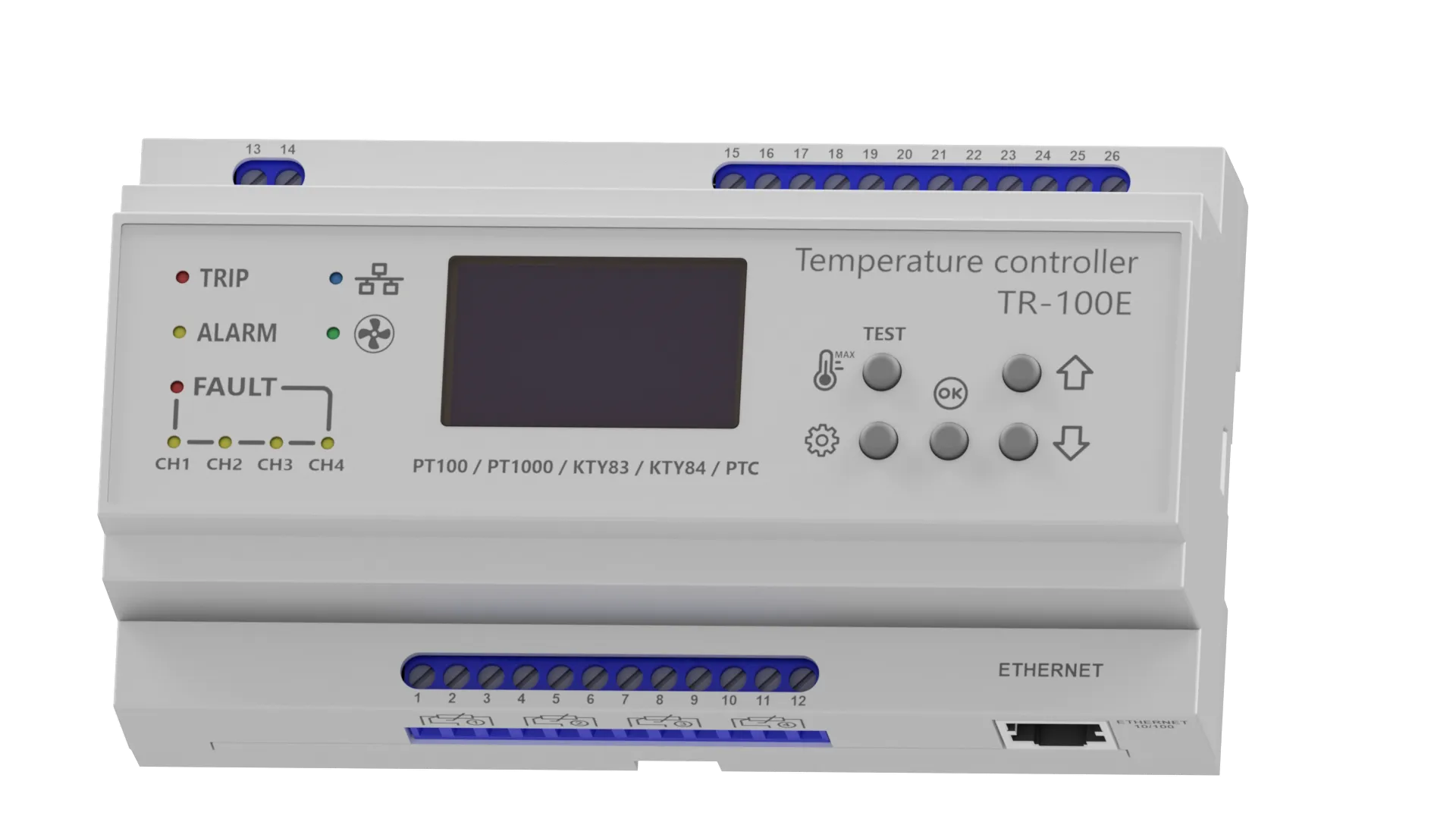
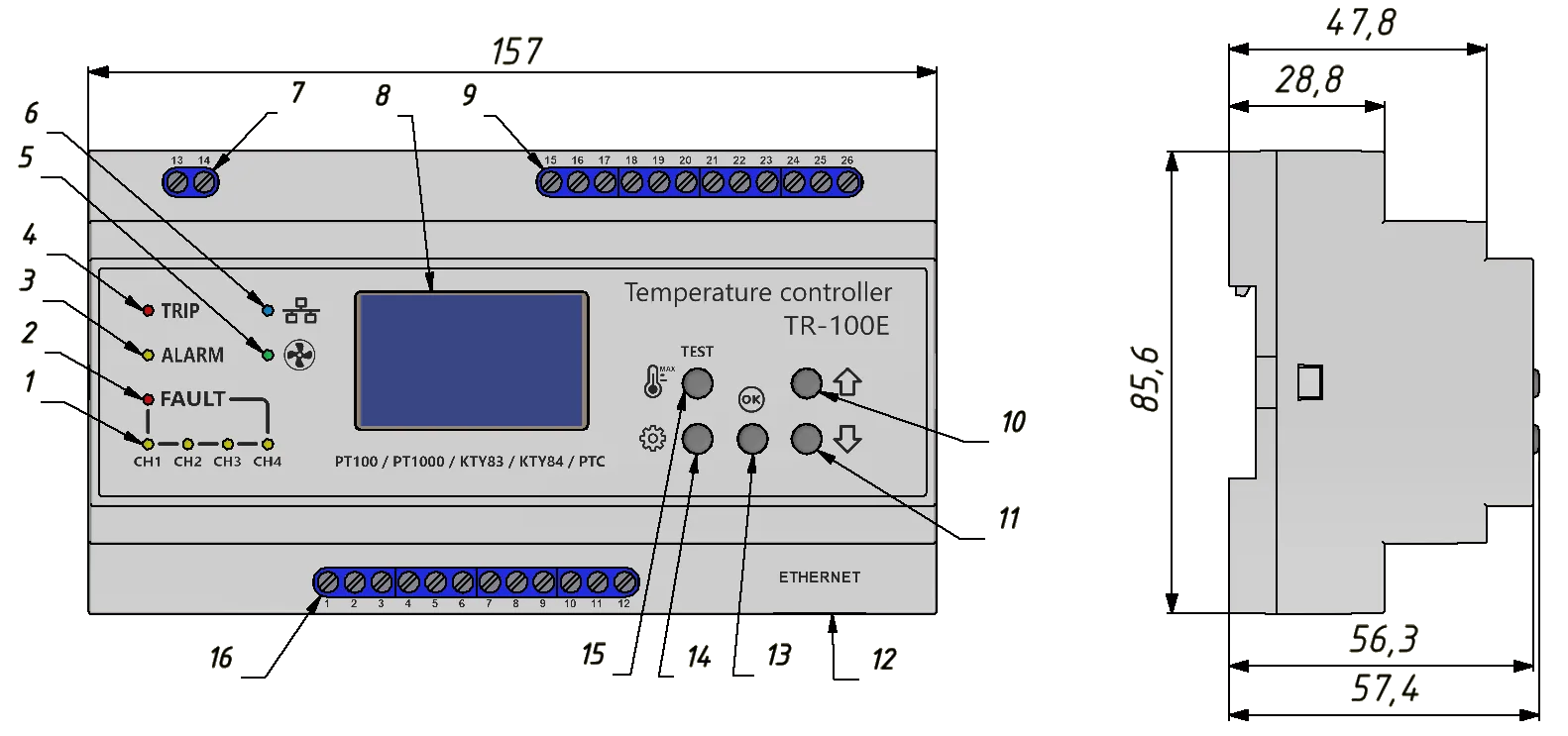
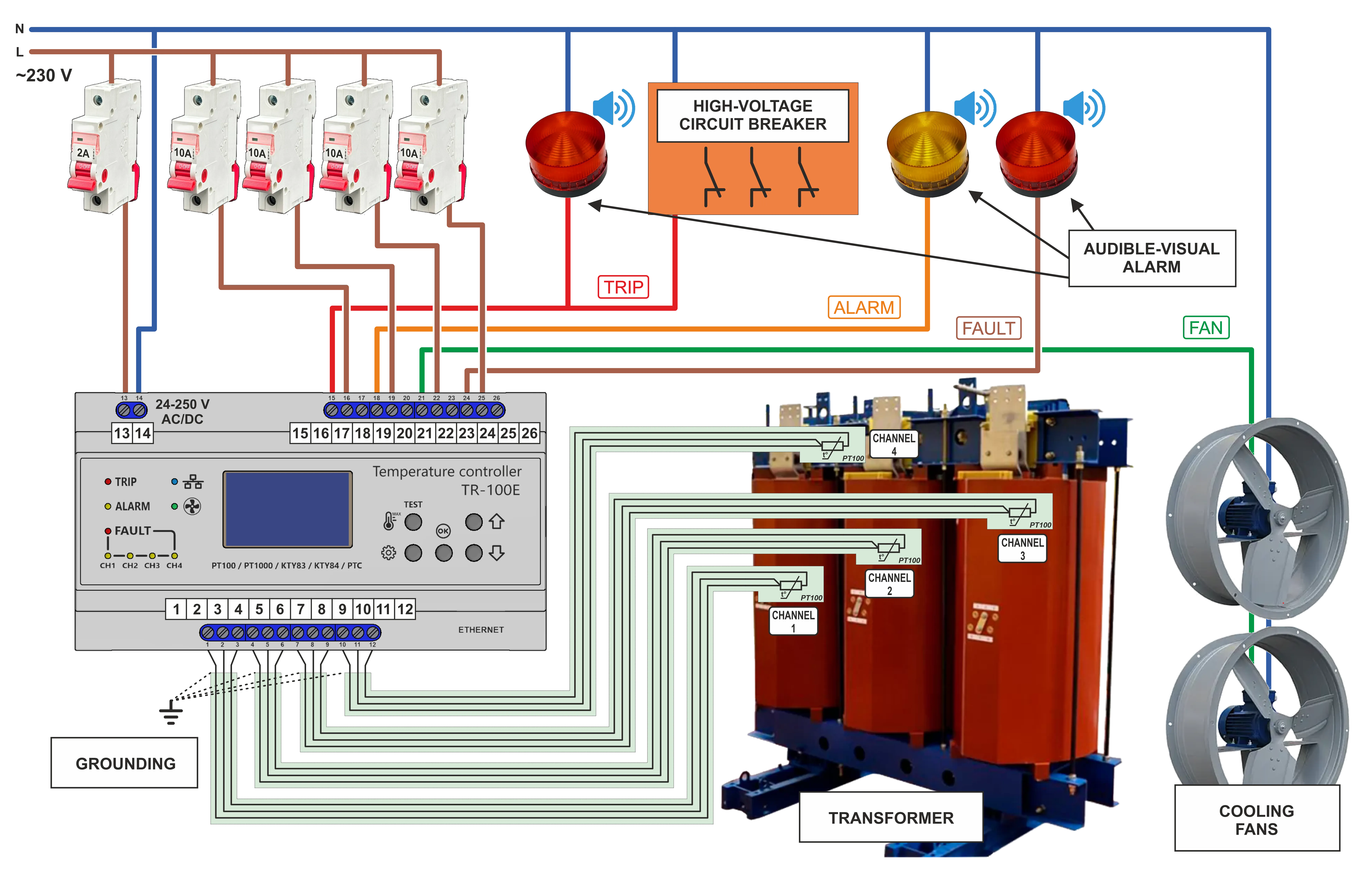
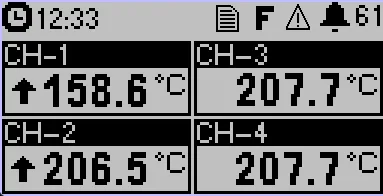
 temperature logger status indicator (on / off);
 fault indicator (FAULT);
 indicator of new events in the event log;
 trend of channel temperature change (rising / falling / unchanged);