Novatek-Electro UBZ-302M Documentation
https://www.overvis.com/docs/en/ubz-302m/
2026-07-30
 Novatek-Electro UBZ-302M Documentation Novatek-Electro UBZ-302M Documentation |
|---|
Novatek-Electro UBZ-302M
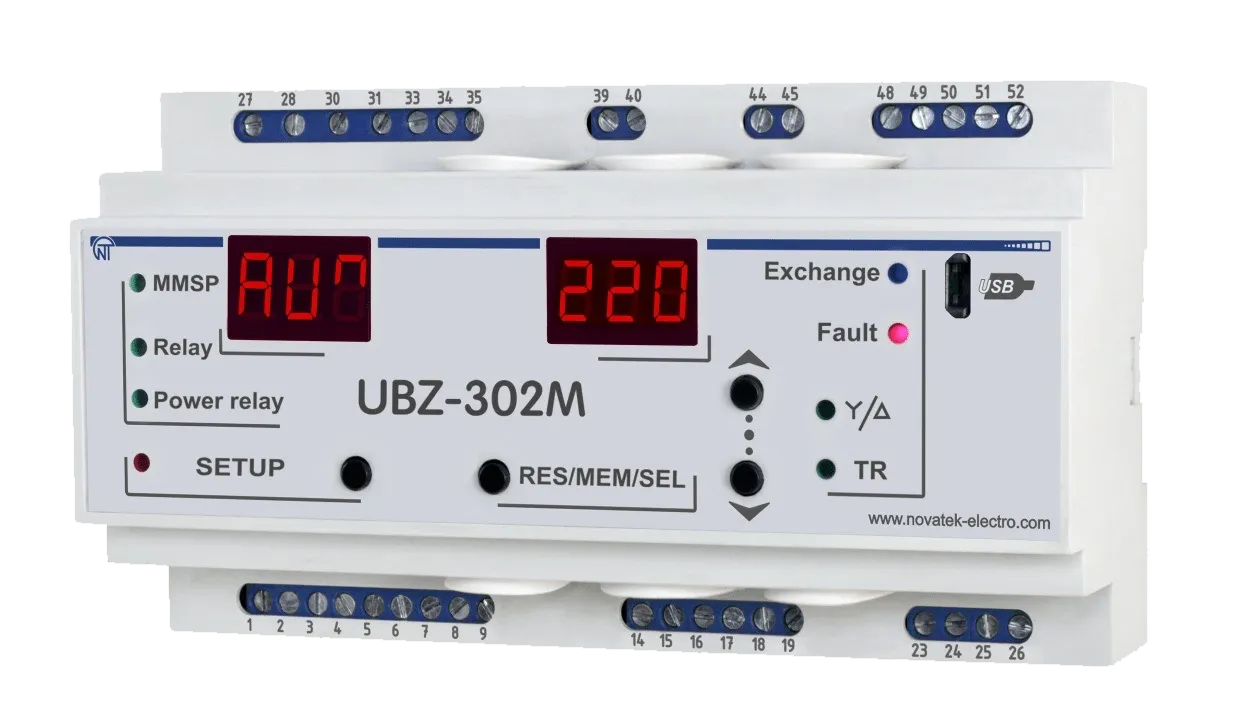
The UBZ-302M is an Electric Motor Universal Protection Device manufactured by NOVATEK-ELECTRO LTD. It is designed for continuous monitoring of circuit voltage parameters, RMS values of phase/line currents of three-phase electric equipment, and electric motor insulation resistance values. Key FeaturesSection titled “Key Features”
Protection TypesSection titled “Protection Types”
Common Use CasesSection titled “Common Use Cases”
DocumentationSection titled “Documentation”
Technical ReferenceSection titled “Technical Reference”
SupportSection titled “Support”
|
| Novatek-Electro UBZ-302M Documentation | |||||||||||||||||||||||||||||||||||||||||||||||||||||||||||||||||||||||||||||||||||||||||||||||||||||||||||||||||||||||||||||||||||||||||||||||||||||||||||||||||||||||||||||||||||||||||||||||||||||||||||||||||||||||||||||||||||||||||||||||||||||||||||||||||||||||||||||||||||||||||||||||||||||||||||||||||||||||||||||||||||||||
|---|---|---|---|---|---|---|---|---|---|---|---|---|---|---|---|---|---|---|---|---|---|---|---|---|---|---|---|---|---|---|---|---|---|---|---|---|---|---|---|---|---|---|---|---|---|---|---|---|---|---|---|---|---|---|---|---|---|---|---|---|---|---|---|---|---|---|---|---|---|---|---|---|---|---|---|---|---|---|---|---|---|---|---|---|---|---|---|---|---|---|---|---|---|---|---|---|---|---|---|---|---|---|---|---|---|---|---|---|---|---|---|---|---|---|---|---|---|---|---|---|---|---|---|---|---|---|---|---|---|---|---|---|---|---|---|---|---|---|---|---|---|---|---|---|---|---|---|---|---|---|---|---|---|---|---|---|---|---|---|---|---|---|---|---|---|---|---|---|---|---|---|---|---|---|---|---|---|---|---|---|---|---|---|---|---|---|---|---|---|---|---|---|---|---|---|---|---|---|---|---|---|---|---|---|---|---|---|---|---|---|---|---|---|---|---|---|---|---|---|---|---|---|---|---|---|---|---|---|---|---|---|---|---|---|---|---|---|---|---|---|---|---|---|---|---|---|---|---|---|---|---|---|---|---|---|---|---|---|---|---|---|---|---|---|---|---|---|---|---|---|---|---|---|---|---|---|---|---|---|---|---|---|---|---|---|---|---|---|---|---|---|---|---|---|---|---|---|---|---|---|---|---|---|---|---|---|---|---|---|---|---|---|---|---|---|---|---|---|---|---|---|---|---|---|---|---|---|
UBZ-302M Operating Manual«NOVATEK-ELECTRO» Ltd Intelligent industrial electronics ELECTRIC MOTORS UNIVERSAL PROTECTION DEVICESection titled “ELECTRIC MOTORS UNIVERSAL PROTECTION DEVICE”UBZ-302MSection titled “UBZ-302M”
Operating MANUAL Quality control system on the development and production complies with requirements ISO 9001:2015 Dear customer, Company NOVATEK-ELECTRO LTD. thanks you for purchasing our devices. You will be able to use properly the device after carefully studying the Operating Manual. Keep the Operating Manual throughout the service life of the device. UKRAINE, Odesa — www.novatek-electro.com 1 Description and DesignSection titled “1 Description and Design”1.1 PurposeSection titled “1.1 Purpose”1.1.1 General InformationSection titled “1.1.1 General Information”UBZ-302M Electric Motor Universal Protection Device (UBZ-302M) is designed for continuous monitoring of the circuit voltage parameters, the RMS values of phase/line currents of three-phase electric equipment, and the electric motor insulation resistance values. UBZ-302M is a functional analog of UBZ-302. But in UBZ-302M, the USB interface is used for communication with PC instead of RS-232. UBZ-302M is designed for protection of asynchronous induction motors ranging from 2.5 kW to 30 kW that use integrated current transformers, including in circuits with insulated neutral. UBZ-302M provides for electric motor protection in case of:
For each protection type, automatic reclosing (ARC) can be enabled or disabled. The device provides for electric equipment protection by means of controlling a magnetic starter (contactor) coil. The device detects the presence of load currents when the load relay is open (when the load relay is open and the functional relay is in the star-delta mode). In this case the Unit initiates the alarm of external Magnetic Starter (further in text as MS), which starts the engine, until the unit or the control of engine currents are switched off while the load relay is deactivated. UBZ-302M provides for electric motor control through the following interfaces:
Communication:
To use UBZ-302M with a PC, you can use the “UBZ-302 Control Panel” software, available from the website of NOVATEК-ELECTRO www.novatek-electro.com, there is software in division. The UBZ-302M Control Panel software is designed for monitoring the status of UBZ-302M devices and retrieving data from them via the USB or RS-485 interface. The application allows saving (loading) various UBZ-302M settings, collecting data and saving it for further analysis. Saved data can be viewed on a diagram for parameter comparison. The software’s graphic user interface allows viewing the current status of various UBZ-302M parameters in real-time. The flexible interface design allows any degree of customization. 1.1.2 Changes in the UBZ-302M Specifications and Operation Depending on the Software VersionSection titled “1.1.2 Changes in the UBZ-302M Specifications and Operation Depending on the Software Version”There are no changes in the program version 22. 1.1.3 Limitations of UBZ-302M Application and Correct Choice of ParametersSection titled “1.1.3 Limitations of UBZ-302M Application and Correct Choice of Parameters”When using internal current transformers, UBZ-302M cannot be used to protect motors with wattage over 30 kW. When measuring motor currents of 63 A to 300 A, the measurement error does not exceed 5%, while at currents over 320 A, the current transformer core becomes saturated, and the measurement error increases rapidly. Regardless of the actual current value, the current measured by UBZ-302M will not exceed 400 A. Setting up certain programmable parameters (maximum current protection, delayed start and rotor locking, thermal overload) without regard to the saturation of current transformers will make protection tripping impossible. For example, at The rated current of external standard current transformers must be equal or higher than the rated current of the motor. 1.1.4 List of AbbreviationsSection titled “1.1.4 List of Abbreviations”
1.2 Technical SpecificationsSection titled “1.2 Technical Specifications”1.2.1 Main Technical SpecificationsSection titled “1.2.1 Main Technical Specifications”An overview is provided in Table 1.1. The main technical specifications are provided in Table 1.2. The parameters of the integrated relay output terminals are shown in Table 1.3. Table 1.1 - General Information
Table 1.2 – Main Technical Specifications
Main outputs:
Analog inputs:
Dimensions: nine S type modules. Mounting – on a standard 35 mm DIN bar. The device retains its operability in any position in space. Table 1.3 – Characteristics of output terminals of integrated relays
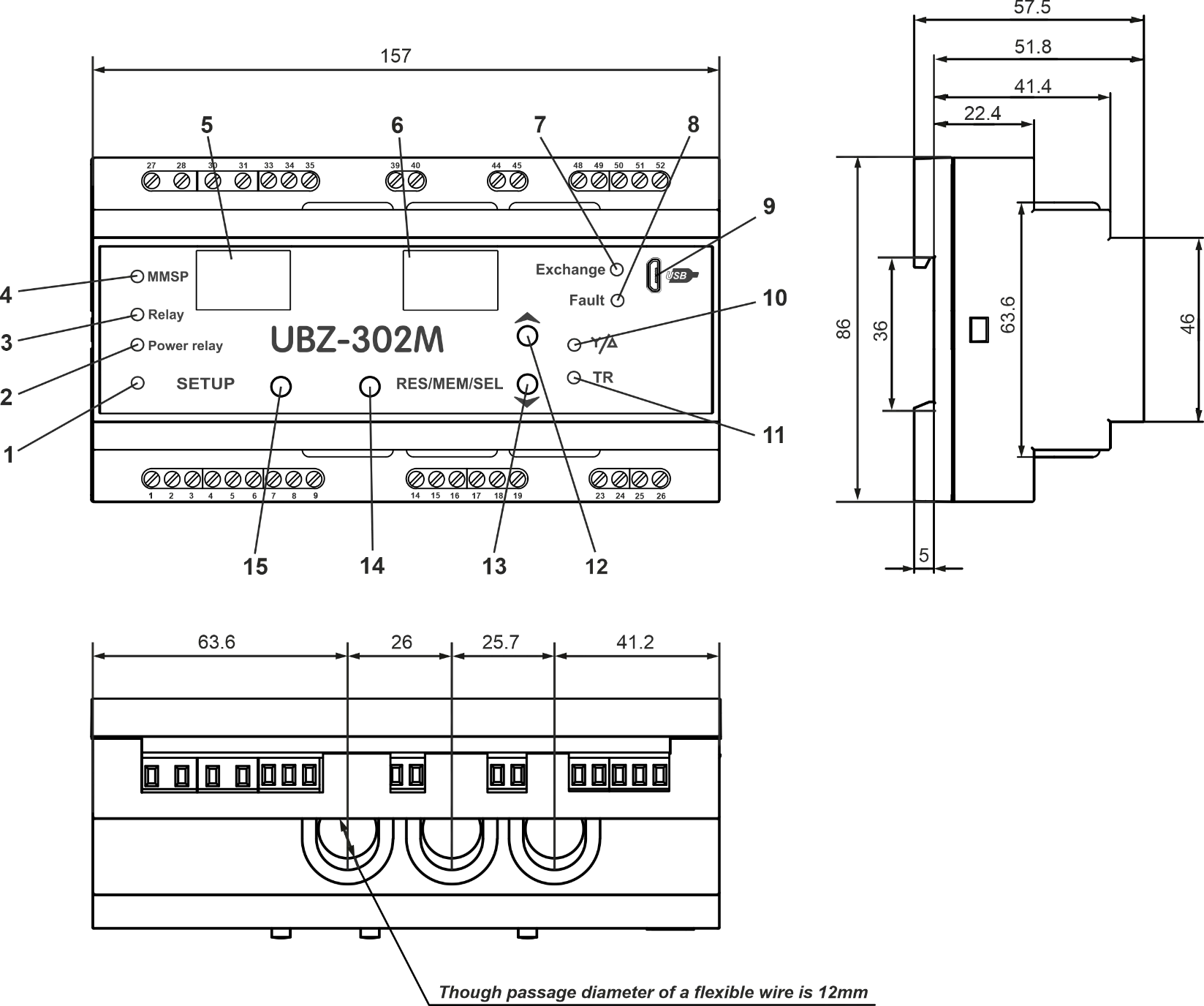
UBZ-302M complies with requirements: EN 60947-1; EN 60947-6-2; EN 55011; EN 61000-4-2 Hazardous substances in excess of maximum allowable concentration – absent. 1.2.2 Measured and Calculated ParametersSection titled “1.2.2 Measured and Calculated Parameters”Measured and calculated parameters output to the display unit. Measured and displayed parameters, their effective range limits and tolerances are shown in Table 1.4 of Appendix C: Modbus Communication. 1.2.3 Programmable ParametersSection titled “1.2.3 Programmable Parameters”Programmable parameters and their variability ranges are shown in Table 1.5 of Appendix C: Modbus Communication. 1.2.4 UBZ-302M controls and dimensionsSection titled “1.2.4 UBZ-302M controls and dimensions”UBZ-302M controls and dimensions are shown in Figure 1.1.
Figure 1.1 – UBZ-302M dimensions Controls description:
1.2.5 Protection FunctionsSection titled “1.2.5 Protection Functions”1.2.5.1 Protection TypesSection titled “1.2.5.1 Protection Types”UBZ-302M provides the following types of electric motor protection:
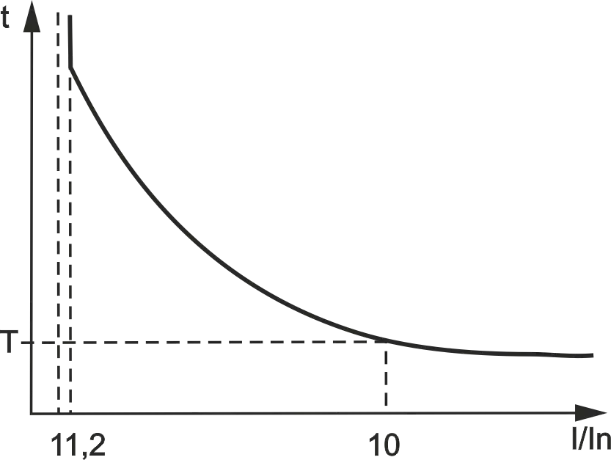
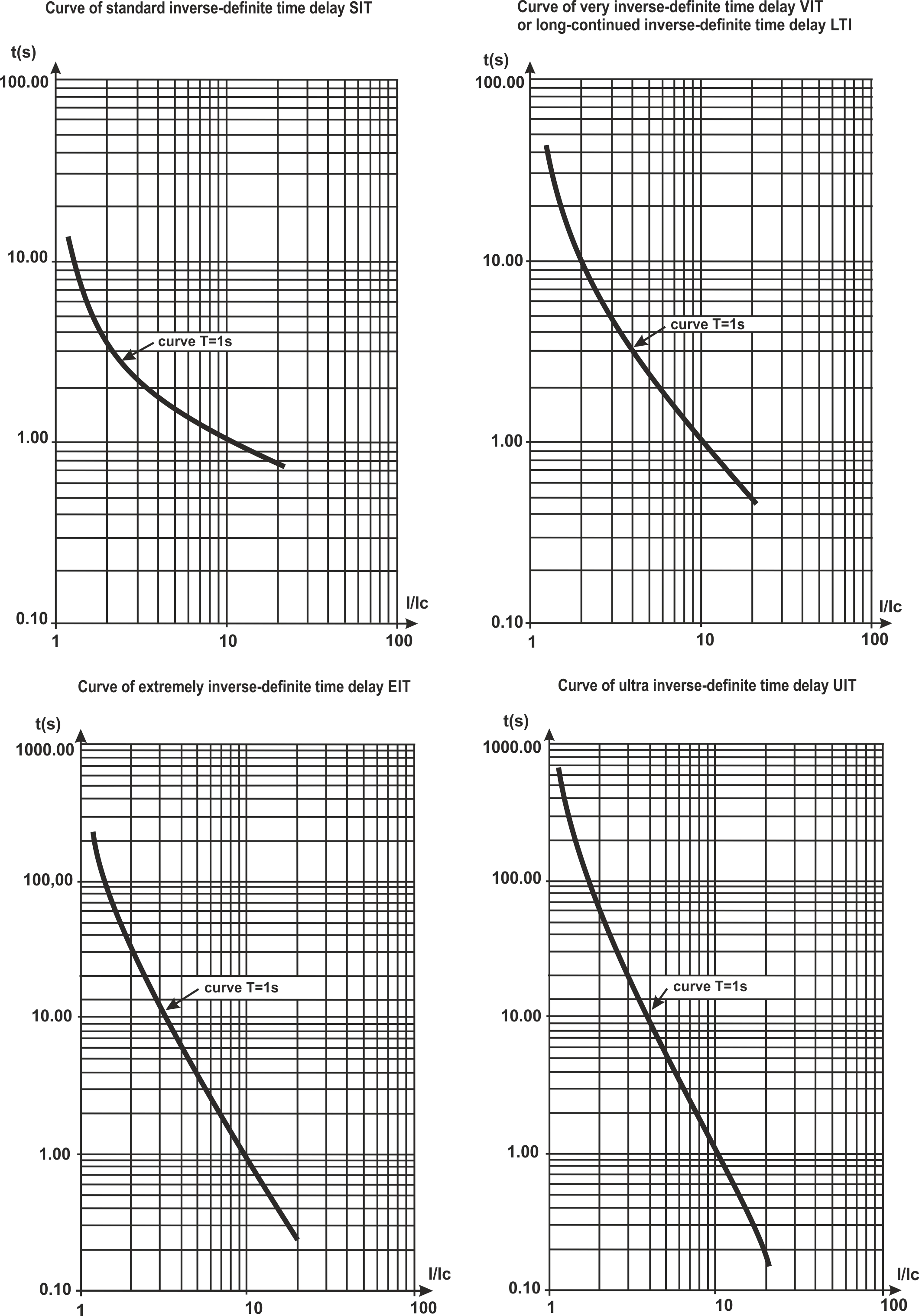
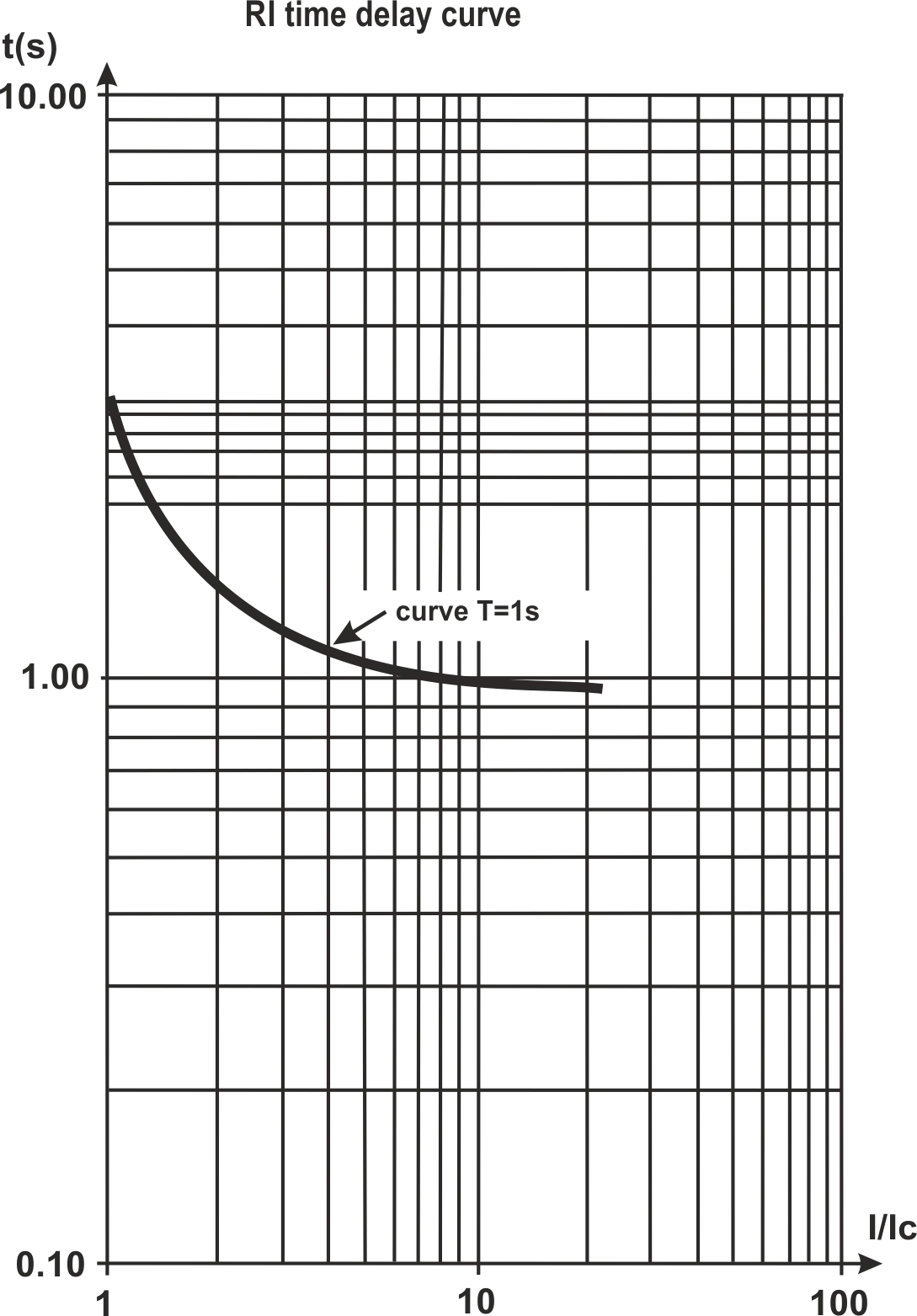
1.2.5.2 Overcurrent ProtectionSection titled “1.2.5.2 Overcurrent Protection”Overcurrent phase protection is of three-phase type. It is activated when one, two, or three current values reach the tripping threshold. The maximum phase current protection is of three-phase type. It is engaged when one, two, or three current values reach the tripping threshold. The protection has a time delay setting. The delay can be independent (constant), or dependent (SIT - reverse dependent; VIT or LTI – very reverse dependent; EIT - extremely reverse dependent; UIT – ultra reverse dependent; RI – delay type). The tripping curves are provided in Appendix A. When independent time delay protection is activated, the motor is de-energized if the current in one of the phases exceeds the threshold value within the T value of time (parameter “
Figure 1.2 – Operation principle of the independent time delay protection Is = “ Example: When Dependent time delay protection operates according to the IEC 60255-3 and BS 142 standards. Appendix A contains diagrams for the protection tripping constant equal to 1 second (the “
Figure 1.3 – Operation principle of the dependent time delay protection In corresponds to the “ 1.2.5.3 Ground Fault ProtectionSection titled “1.2.5.3 Ground Fault Protection”
1.2.5.4 Negative Sequence Current (phase imbalance) ProtectionSection titled “1.2.5.4 Negative Sequence Current (phase imbalance) Protection”Negative Sequence Current (phase imbalance) Protection is activated when the negative sequence component exceeds the threshold setting (the “ If the tripping cause analysis is on ( The voltage (current) negative sequence factor is a characteristic of the three-phase voltage (current) asymmetry. The approximate value of the voltage negative sequence factor can be calculated using the formula: K₂Uᵢ = U₂₍₁₎ᵢ / U₁₍₁₎ᵢ where U₂₍₁₎ᵢ is the negative sequence voltage RMS value of the three-phase voltage system base frequency, at the i-th instance of observation, V; U₁₍₁₎ᵢ is the base frequency positive sequence voltage RMS value at the i-th instance of observation, V. U₂₍₁₎ᵢ is calculated using the approximation formula: U₂₍₁₎ᵢ = 0.62 × (Uнб₍₁₎ᵢ – Uнм₍₁₎ᵢ) where Uнб₍₁₎ᵢ and Uнм₍₁₎ᵢ are the highest and lowest RMS values of the three phase-to-phase base frequency voltages in the i-th instance of observation, V. K₂Iᵢ, the current negative sequence factor is calculated similarly. If the current imbalance has not been caused by a voltage imbalance, the motor malfunction must be determined. To determine the cause of imbalance, calculate the value of the current negative sequence ratio divided by the voltage negative sequence ratio (K₂Iᵢ / K₂Uᵢ). If this value rate exceeds the “ 1.2.5.5 Undercurrent Phase ProtectionSection titled “1.2.5.5 Undercurrent Phase Protection”
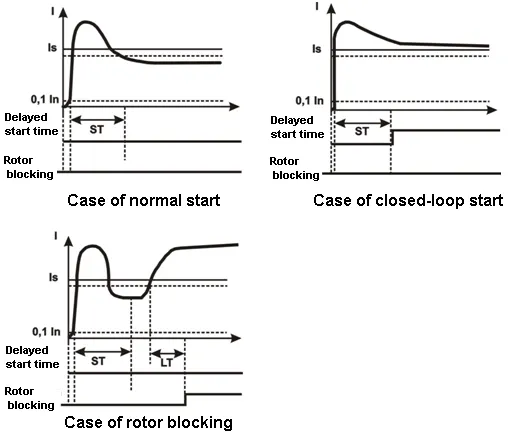
1.2.5.6 Delayed Start and Rotor BlockingSection titled “1.2.5.6 Delayed Start and Rotor Blocking”The operation principle of delayed start and rotor blocking protection is shown in Figure 1.4.
Figure 1.4 – Delayed start and rotor blocking Delayed start: During the motor start, protection is activated when the values of all phase currents exceed the Is threshold setting (the “ Rotor blocking: After the motor start is complete (the starting current is less than 120% of the rated current), UBZ-302M switches to monitoring of possible rotor blocking. Protection is activated when the values of all phase currents exceed the threshold setting during a time longer than the LT time delay value (the “ 1.2.5.7 Thermal Overload ProtectionSection titled “1.2.5.7 Thermal Overload Protection”Thermal overload protection is designed based on the electromotor thermal balance equation, with the following assumptions:
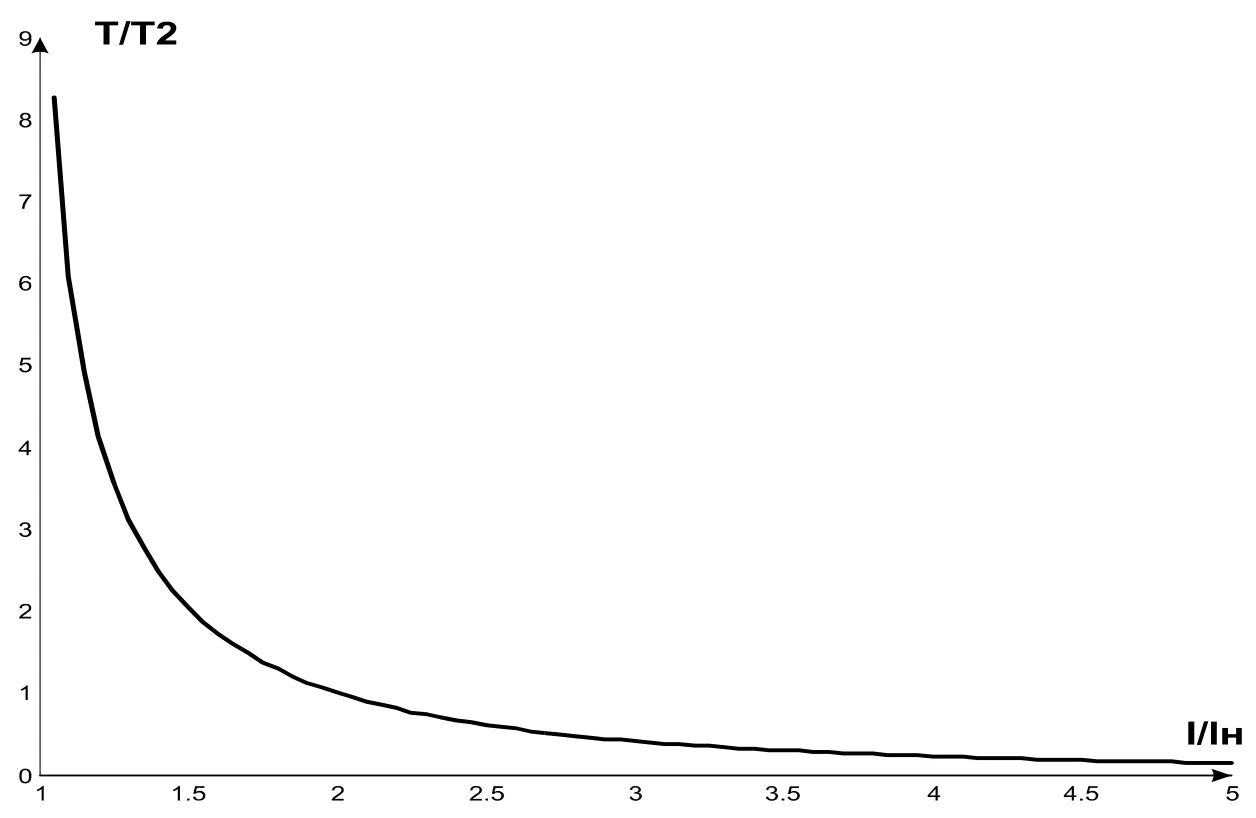
To enable protection, set up the double overload tripping time Т2 (the “ Figure 1.5 shows the current-to-time curve for different T2 values. The current-time dependence for the standard recommended T2 value (60 sec for double overload) is shown in Table 1.6. Table 1.6
For rotary machines, cooling is more effective during operation than during the motor stall, which is why the After the load relay is open due to thermal overload, with automatic reclosing allowed, the relay will re-close after the bigger of the time values:
Through selection of suitable ARC times with regard to thermal hysteresis, the number of starts per time unit can be limited, because the device records the amount of heat released at the motor start when working in the intermittent cycle.
Figure 1.5 – Current-time curve I/Iн – current value divided by rated current; Т/Т2 – actual tripping time divided by T2 (double load tripping time). 1.2.5.8 Coil Overheating ProtectionSection titled “1.2.5.8 Coil Overheating Protection”Depending on the threshold settings selected, protection can use the first input with the following temperature sensors:
At the second input, protection uses temperature sensors type Pt100 (platinum, 100 Ohm at 0 ºС) or Ni100 (Ni120) (nickel, 100 Ohm (120 Ohm) at 0 ºС) corresponding to IEC 60751 and DIN 43760 standards. Protection at the second input:
Protection detects the breakout and short circuit of temperature sensors:
1.2.5.9 Voltage ProtectionSection titled “1.2.5.9 Voltage Protection”In the scope of voltage protection, before the motor is energized, UBZ-302M checks whether the voltage parameters correspond to the user’s settings and, depending on the results, allows or forbids to energize the load. After the load is energized, UBZ-302M continues monitoring the voltage parameters, but any de-energizing decisions are made based on current values. Voltage protection includes:
1.2.5.10 Phase Sequence ProtectionSection titled “1.2.5.10 Phase Sequence Protection”Phase Sequence Protection is activated when the phase sequence order is broken; the motor is de-energized, and its subsequent operation blocked. 1.2.5.11 Motor Coil Insulation Minimal ResistanceSection titled “1.2.5.11 Motor Coil Insulation Minimal Resistance”After the device receives voltage, but before the output relay closes, UBZ-302M checks the level of stator coil insulation relative to the body. This value is also checked when the load relay is closed, but the motor currents are less than 10% of the rated current (in this case, the motor is considered to be off). At 1.2.5.12 Phase Loss ProtectionSection titled “1.2.5.12 Phase Loss Protection”Phase Loss Protection is activated if the current at one of the motor’s phases exceeds 10% of the rated current (“ind”), while in any of the other phases, the current is under 7% of the rated current. 1.2.5.13 Control of external MS working orderSection titled “1.2.5.13 Control of external MS working order”UBZ-302M defines the engine currents presence at deactivated load relay (while load relay is deactivated and functional relay in mode star-delta). In this case the Unit initiates the alarm of external MS which starts the engine until the Unit is switched off or engine currents control is switched off while the load relay is deactivated (parameter 1.3 Packaging ContentsSection titled “1.3 Packaging Contents”The list of contents supplied is provided in Table 1.7. Table 1.7 - Device Contents
*Supplied on agreement with the consumer 1.4 Features and OperationSection titled “1.4 Features and Operation”UBZ-302M is a microprocessor-based digital device that provides a high degree of reliability and accuracy. It requires no additional power supply, as the voltage it monitors is also used to power it. UBZ-302M has three integrated CTs, through which the power phase cables are led. 2 Intended UsageSection titled “2 Intended Usage”2.1 SafetySection titled “2.1 Safety”Do not operate the unit under conditions of high humidity. NEVER ATTEMPT TO OPERATE THE UNIT WITH THE MECHANICAL DAMAGE OF THE HOUSING. DO NOT LET WATER INTO THE UNIT. Do not use the unit in corrosive environments with the air containing acids, alkalis, oils, etc. The unit is not intended for operation under vibrations or shocks. If the temperature of the device after transportation or storage differs from the ambient temperature at which it is supposed to be operated, then before connecting to the mains keep the device under the operating conditions within two hours (because of condensation may be on the device elements). This unit is safe for use in case of compliance with operating rules. 2.2 Device ControlsSection titled “2.2 Device Controls”2.2.1 UBZ-302M has five control modes:Section titled “2.2.1 UBZ-302M has five control modes:”
All work modes allow:
2.2.2 When the keypad is locked, viewing and editing programmable parameters is not possible.Section titled “2.2.2 When the keypad is locked, viewing and editing programmable parameters is not possible.”When the keypad is locked, pressing the SETUP buttons will display the “LOC” message. To unlock the keypad, press SETUP again. The SETUP LED will be lit, and the indicator will show a flashing “0”. Use the UP and DOWN buttons, enter the user password (consisting of numbers 1 to 9) and press the RES/MEM/SEL button. If the password is correct, the keypad will be unlocked. If no button is pressed within 15 seconds of unblocking the keyboard, and the lock setting is not changed by the user, the keypad will be locked again. 2.2.3 When the keypad is unlocked, it is possible to:Section titled “2.2.3 When the keypad is unlocked, it is possible to:”
2.2.3.1 The MMSP mode is meant to simplify the use of UBZ-302M for service personnel. To switch the UBZ-302M into the MMSP mode, set the value of In the MMSP mode, the following parameters are sufficient for the normal operation of UBZ-302M:
The difference between MMSP mode and user mode is that the parameters not included in the MMSP list are set to default factory settings. Parameters not included in the list in this mode are not viewed and not edited. Operations with the parameters included in the MMSP list is the same as in the user-level mode. Adding parameters to the MMSP list and deactivating the MMSP list is only possible at the engineer level. When the MMSP mode is deactivated (setting value of
2.2.3.2 Editing and Viewing User-Level Parameters To view and edit user-level parameters, press SETUP – the SETUP LED will be illuminated. Scroll through the parameters using the DOWN and UP buttons; press SETUP to enter parameter editing mode (the parameter value will start flashing); edit the parameter value using the DOWN and UP buttons; press RES/MEM/SEL to save the parameter value, SETUP to return to the menu without saving, and RES/MEM/SEL to leave the menu. If no button is pressed during 30 seconds, UBZ-302M returns to the initial state. 2.2.3.3 Editing and Viewing Engineer-Level Parameters Entering engineer mode Press the SETUP button and keep pressed for 5 seconds. If engineer mode is password-protected, the indicator will display the “PAS” message. The SETUP LED will be illuminated, and the parameter value indicator will flash “000”. Use UP and DOWN to enter the engineer’s password (three digits from 1 to 9), pressing RES/MEM/SEL after each digit. If the password is wrong, the “PAS” message will be displayed, flashing in the higher digit; 15 seconds later, UBZ-302M will return to the initial state. If the password is correct, the first engineer menu parameter will be displayed. To scroll through the parameters, use DOWN and UP; press SETUP to enter parameter editing mode (the parameter value will start flashing); edit the parameter value using the DOWN and UP buttons; press RES/MEM/SEL to save the parameter value, SETUP to return to the menu without saving, and RES/MEM/SEL to leave the menu. If no button is pressed during 30 seconds, UBZ-302M returns to the initial state. When UBZ-302M is used in engineer mode, the decimal point is displayed in the lower digit of the mnemonic indicator. At the engineer level, access to any user-level parameter can be granted or denied by pressing SETUP and DOWN simultaneously. Denied access is indicated by the decimal point displayed in the middle digit of the mnemonic indicator. At the engineer level, any parameter can be added to the MMSP parameter list. To do that:
To remove a parameter from the MMSP parameter list:
If the parameter is excluded from the MMSP list, the decimal point will be displayed in the higher digit of the mnemonic indicator. 2.2.4 Reset to Factory SettingsSection titled “2.2.4 Reset to Factory Settings”There are two ways of resetting UBZ-302M to default factory settings. Method one. Set the value of Method two. When UBZ-302M is being powered on, press the buttons SETUP and RES/MEM/SEL and keep them pressed for two seconds. All factory settings will be reset, including the engineer password (engineer password set to 123). After resetting to the default factory parameters, UBZ-302M will work in the MMSP mode, with the following list of parameters:
2.2.5 UBZ-302M Alarms Reset on the front panelSection titled “2.2.5 UBZ-302M Alarms Reset on the front panel”The Alarms Reset is to be carried out while the engine is switched off. For carrying out the Alarms Reset on the front panel it is necessary to press simultaneously the buttons RESET and DOWN, thereat:
2.3 Preparing UBZ-302M for OperationSection titled “2.3 Preparing UBZ-302M for Operation”To ensure the reliability of electrical connections the flexible (stranded) wires with insulation for voltage of at least 450 V should be used, the ends of which it is necessary to be striped of insulation for 5±0.5 mm and tightened with bootlaces. It is recommended to use the wire with cross-section of at least 1 mm². Wires fastening should exclude mechanical damage, twisting and abrasion of the wire insulation. IT IS NOT ALLOWED TO LEAVE EXPOSED PORTIONS OF WIRE PROTRUDING BEYOND THE TERMINAL BLOCK. For a reliable contact, tighten the terminal screws with the force indicated in Table 1.1. When reducing the tightening torque, the junction point is heated, the terminal block may be melted and wire can burn. If you increase the tightening torque, it is possible to have thread failure of the terminal block screws or the compression of the connected wire.
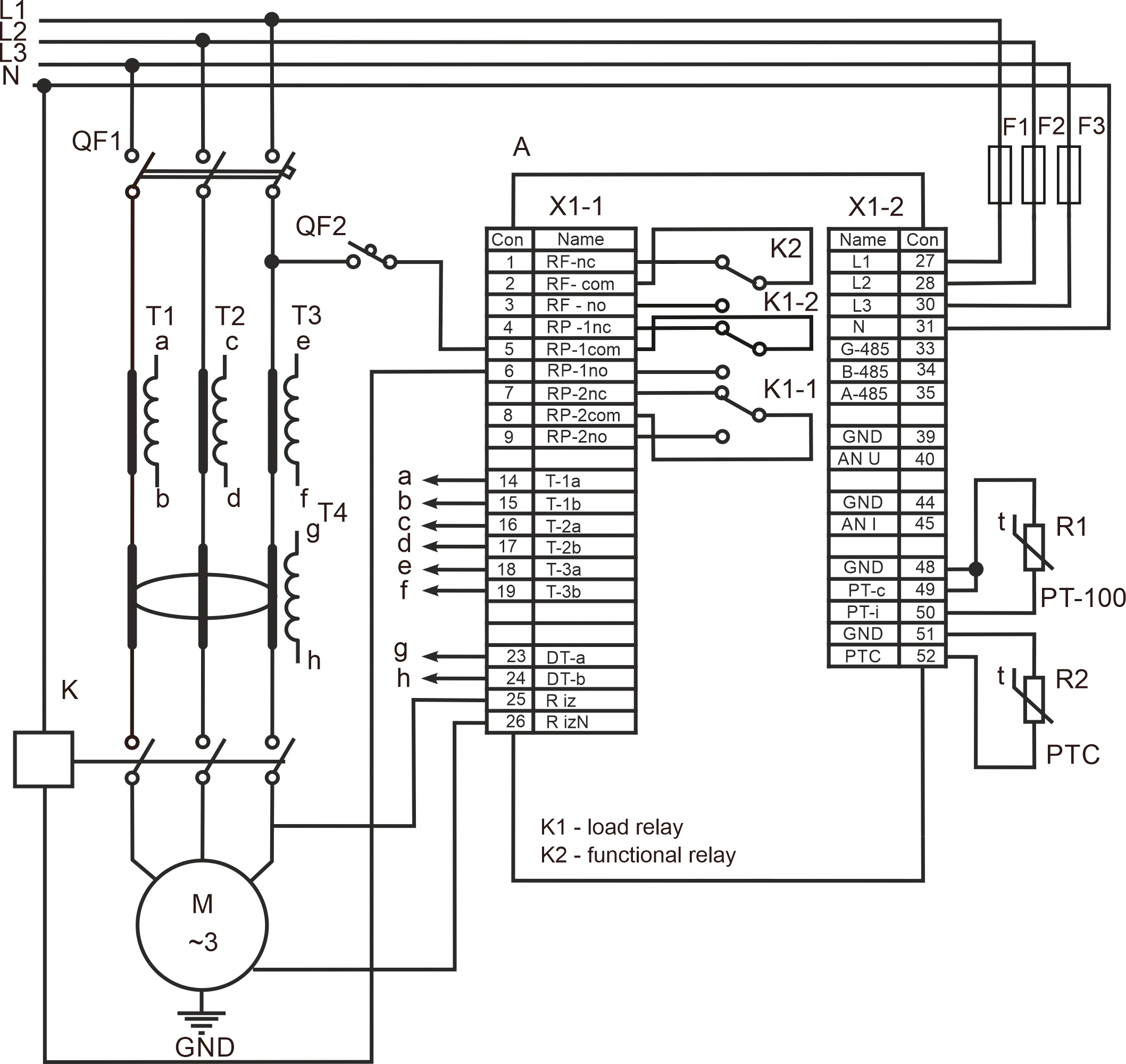
Figure 2.1 – UBZ-302M wiring chart
2.3.1 For electric motors of 2.5 kW to 30 kW capacity, integrated current transformers can be used. The wires to the motor should be led through the openings in the UBZ-302M housing (each phase wire through a separate opening). For motors of other capacity, connect current transformers with 5 A rated output current, as shown in Figure 2.1. 2.3.2 Conduct all three phase wires through the differential current transformer (zero sequence transformer) and connect it to the UBZ-302M. 2.3.3 To monitor and measure the motor insulation, connect the insulation monitoring terminal 25 to one of the MS (magnetic starter) outputs. If the motor housing is not grounded, a circuit with isolated neutral is in use, or no neutral wire is connected to the UBZ-302M terminal – connect the motor housing to terminal 26 electrically. If use a circuit with isolated neutral and the motor housing connect to compensating circuit of potentials that connect the motor housing to terminal 31 (“N”) UBZ-302M electrically. 2.3.4 Connect UBZ-302M to the electric circuit as shown in Figure 2.1. If using a motor with star-delta coil switching, connect as described in Appendix B. 2.3.5 If using the RS-485 interface, connect the communication lines to the UBZ-302M terminals 33 (GND), 34 (RS-485 B line), 35 (RS-485 A line). Set the value of “ 2.3.6 Power UBZ-302M on. The procedure for the load relay closing is determined by the values of 2.3.7 Set the necessary parameter values in the menu. 2.3.8 To operate UBZ-302M via a personal computer using the “UBZ-302M Control Panel” software install the “UBZ-302M Control Panel” software on the PC by running setup_cplubz302(Standart)(x.x).exe, where x.x. is the software version. NOTE:
2.3.9 For the device to work with a PC via the USB interface, you must:
2.3.10 Power UBZ-302M off. 2.3.11 Connect the magnetic starter (MS) as shown in Figure 2.1. NOTE: when the load relay is on, contacts 5-6 and 8-9 are closed, when it is off, the contacts 4-5 and 7-8 are closed. 2.4 Intended UsageSection titled “2.4 Intended Usage”2.4.1 UBZ-302M Operation Before Load Relay ActivationSection titled “2.4.1 UBZ-302M Operation Before Load Relay Activation”2.4.1.1 UBZ-302M Operation After Power On (First Use) After the device is powered on, the mnemonic indicator displays “vEr” for 1-2 seconds. Then, before activating the load relay, UBZ-302M checks:
In case any prohibiting factor is present, the load relay is not activated, the mnemonic indicator displays the appropriate fault code, and the FAULT LED is illuminated. Depending on the value of
If no forbidding factors are present, activation of the load relay is determined by the value of
At the same time as the load relay is activated, the green LOAD LED is illuminated. After the relay activation and before the motor start (the motor start is determined as the load current exceeding 120% of rated current), the voltage quality continues to be monitored, with appropriate decision-making. If any forbidding factors arose during the dead time, the load relay will be deactivated. Describes UBZ-302M operation when remote motor control is allowed via the USB/RS-485 ( 2.4.1.2 UBZ-302M Operation After De-Energizing After Fault. In this case, UBZ-302M operates as during first power-on, but activation of the load relay does not depend on the value of If ACR after fault is not allowed ( 2.4.2 UBZ-302M Operation After Load Relay Activation and Motor EnergizingSection titled “2.4.2 UBZ-302M Operation After Load Relay Activation and Motor Energizing”(currents of over 10% of the motor rated current) UBZ-302M carries out voltage and current control. The load relay is deactivated when any protection type mentioned in Table 2.8 is tripped, except:
The indicator can display the motor phase A current or the value of the user-selected parameter. The value of the user-selected parameter can be displayed constantly ( 2.4.3 Functional Relay OperationSection titled “2.4.3 Functional Relay Operation”The functions carried out by the functional relay are determined by the value of At At At 2.4.4 Using the USB/RS-485 Interface with the MODBUS Protocol, RTU ModeSection titled “2.4.4 Using the USB/RS-485 Interface with the MODBUS Protocol, RTU Mode”UBZ-302M allows exchanging data with an external device using the serial interface. During data exchange via RS-485 or USB, the blue EXCHANGE LED is illuminated. 2.4.4.1 Communication Parameters:
2.4.4.2 UBZ-302M Operation via PC A PC is connected to the UBZ-302M via a serial interface. Each UBZ-302M has a unique communication address that is used by the PC to distinguish between different UBZ-302Ms. UBZ-302M can work in Modbus networks using the RTU mode. 2.4.4.3 Communication Protocol The exchange between PC and UBZ-302M uses MODBUS protocol. The data formats, parameters addresses, command codes, and register maps are given in Appendix C: Modbus Communication. 2.4.5 Fault Status SystemSection titled “2.4.5 Fault Status System”In case of a fault status:
If UBZ-302M detects several types of faults simultaneously, fault codes and their parameter values are displayed sequentially. If ARC is allowed, the indicator displays fault codes and the time to ARC (if the time delay for thermal overload exceeds the ARC delay time, the former is displayed). Table 2.8 - Fault Codes
2.4.6 Fault Status LogSection titled “2.4.6 Fault Status Log”When the load relay is deactivated in case of a fault, the UBZ-302M stores the fault code, the value of the parameter that caused the fault, and the time of the fault (the time passed between the UBZ-302M power on and the fault). The maximum number of fault codes stored simultaneously is five. After subsequent faults, information about the fault overwrites the oldest entry. To view the log, press RES/MEM/SEL. The SETUP LED will be illuminated (flashing), and the UBZ-302M indicators will display the first row from Table 2.9. To scroll through the log, use UP and DOWN. Table 2.9 - Fault log display
To leave the log, press RES/MEM/SEL. Otherwise, the log will be closed automatically, 30 seconds after any button was pressed. Information about the fault is displayed on the UBZ-302M indicators in the format shown in Table 2.9. When UBZ-302M is powered on, 5000000 is written into the registers used to store fault time. In this case, the mnemonic indicator and the value indicator display ”---” and ”–”, respectively. 2.4.7 Controlling the Motor Using the UBZ-302M Front PanelSection titled “2.4.7 Controlling the Motor Using the UBZ-302M Front Panel”Depending on the value of
2.4.8 Controlling the Motor Using the Analog InputsSection titled “2.4.8 Controlling the Motor Using the Analog Inputs”Algorithms for controlling the motor using the analog inputs 0-20 mA and 0-10 V are provided in Table 1.5. After motor de-energizing through a fault value, ARC countdown will only start after the parameter value leaves the fault range. If, after motor de-energizing through a fault value, the value remains between the motor energizing and de-energizing levels (the FAULT indicator is not illuminated, but the mnemonic indicator displays the fault code), early motor start is possible, using the front panel buttons or remote control. 3 Technical MaintenanceSection titled “3 Technical Maintenance”3.1 Safety PrecautionsSection titled “3.1 Safety Precautions”Do not use abrasives or organic compounds for cleaning (spirit, gasoline, solvents, etc.). Installation, adjustment and maintenance of the unit should only be provided by the qualified personnel, having reviewed this Operating manual. 3.2 Technical Maintenance ProcedureSection titled “3.2 Technical Maintenance Procedure”Technical maintenance is recommended to make every 6 months. Technical maintenance entails a visual examination, including checking that the wires are properly connected to the UBZ-302M terminals, and the housing is free of cracks and chips. 4 Transportation and StorageSection titled “4 Transportation and Storage”UBZ-302M in the manufacturer’s package should be carefully stored in dry places with ambient temperature from -50 to +60 °C and relative air humidity not more than 80%. Air should not contain any chemically aggressive vapors. When transporting customer should provide suitable packing that would protect the UBZ-302M from any mechanical damages, serious drops and vibrations that may affect the device integrity. 5 Life Cycle and Manufacturer WarrantySection titled “5 Life Cycle and Manufacturer Warranty”5.1 Device life cycle – 10 years. When expired, contact manufacturer. 5.2 Storage term – 3 years. 5.3 Warranty period of device maintenance is 5 years from sale day. During maintenance warranty period (if device failure occurs) manufacturer repairs device for free. 5.4 Warranty service is performed on purchasing place or by manufacturer. 5.5 Post warranty service of device is performed by manufacturer on acting tariffs. 5.6 Before device is sent for repair, it shall be packed into original or other packing preventing mechanical damage. With questions and comments, please contact manufacturer at the following address: “Novatek-Electro” Ltd. 59, Mykhailo Boltenko (Admiral Lazarev) str., Odesa, Ukraine, 65007 Tel: +38 (067) 565 37 68; +38 (050) 359 39 11; +38 (063) 301 30 40 AppendicesSection titled “Appendices”
|
| Novatek-Electro UBZ-302M Documentation | |||||||||||||||||||||||||||||||||||||||||||||||||||||||||||||||||||||||||||||||||||||||||||||||||||||||||||||||||||||||||||||||||||||||||||||||||||||||||||||||||||||||||||||||||||||||||||||||||||||||||||||||||||||||||||||||||||||||||||||||||||||||||||||||||||||||||||||||||||||||||||||||||||||||||||||||||||||||||||||||||||||||||||||||||||||||||||||||||||||||||||||||||||||||||||||||||||||||||||||||||||||||||||||||||||||||||||||||||||||||||||||||||||||||||||||||||||||||||||||||||||||||||||||||||||||||||||||||||||||||||||||||||||||||||||||||||||||||||||||||||||||||||||||||||||||||||||||||||||||||||||||||||||||||||||||||||||||||||||||||||||||||||||||||||||||||||||||||||||||||||||||||||||||||||||||||||||||||||||||||||||||||||||||||||||||||||||||||||||||||||||||||||||||||||||||||||||||||||||||||||||||||||||||||||||||||||||||||||||||||||||||||||||||||||||||||||||||||||||||||||||||||||||||||||||||||||||||||||||||||||||||||||||||||||||||||||||||||||||||||||||||||||||||||||||||||||||||||||||||||
|---|---|---|---|---|---|---|---|---|---|---|---|---|---|---|---|---|---|---|---|---|---|---|---|---|---|---|---|---|---|---|---|---|---|---|---|---|---|---|---|---|---|---|---|---|---|---|---|---|---|---|---|---|---|---|---|---|---|---|---|---|---|---|---|---|---|---|---|---|---|---|---|---|---|---|---|---|---|---|---|---|---|---|---|---|---|---|---|---|---|---|---|---|---|---|---|---|---|---|---|---|---|---|---|---|---|---|---|---|---|---|---|---|---|---|---|---|---|---|---|---|---|---|---|---|---|---|---|---|---|---|---|---|---|---|---|---|---|---|---|---|---|---|---|---|---|---|---|---|---|---|---|---|---|---|---|---|---|---|---|---|---|---|---|---|---|---|---|---|---|---|---|---|---|---|---|---|---|---|---|---|---|---|---|---|---|---|---|---|---|---|---|---|---|---|---|---|---|---|---|---|---|---|---|---|---|---|---|---|---|---|---|---|---|---|---|---|---|---|---|---|---|---|---|---|---|---|---|---|---|---|---|---|---|---|---|---|---|---|---|---|---|---|---|---|---|---|---|---|---|---|---|---|---|---|---|---|---|---|---|---|---|---|---|---|---|---|---|---|---|---|---|---|---|---|---|---|---|---|---|---|---|---|---|---|---|---|---|---|---|---|---|---|---|---|---|---|---|---|---|---|---|---|---|---|---|---|---|---|---|---|---|---|---|---|---|---|---|---|---|---|---|---|---|---|---|---|---|---|---|---|---|---|---|---|---|---|---|---|---|---|---|---|---|---|---|---|---|---|---|---|---|---|---|---|---|---|---|---|---|---|---|---|---|---|---|---|---|---|---|---|---|---|---|---|---|---|---|---|---|---|---|---|---|---|---|---|---|---|---|---|---|---|---|---|---|---|---|---|---|---|---|---|---|---|---|---|---|---|---|---|---|---|---|---|---|---|---|---|---|---|---|---|---|---|---|---|---|---|---|---|---|---|---|---|---|---|---|---|---|---|---|---|---|---|---|---|---|---|---|---|---|---|---|---|---|---|---|---|---|---|---|---|---|---|---|---|---|---|---|---|---|---|---|---|---|---|---|---|---|---|---|---|---|---|---|---|---|---|---|---|---|---|---|---|---|---|---|---|---|---|---|---|---|---|---|---|---|---|---|---|---|---|---|---|---|---|---|---|---|---|---|---|---|---|---|---|---|---|---|---|---|---|---|---|---|---|---|---|---|---|---|---|---|---|---|---|---|---|---|---|---|---|---|---|---|---|---|---|---|---|---|---|---|---|---|---|---|---|---|---|---|---|---|---|---|---|---|---|---|---|---|---|---|---|---|---|---|---|---|---|---|---|---|---|---|---|---|---|---|---|---|---|---|---|---|---|---|---|---|---|---|---|---|---|---|---|---|---|---|---|---|---|---|---|---|---|---|---|---|---|---|---|---|---|---|---|---|---|---|---|---|---|---|---|---|---|---|---|---|---|---|---|---|---|---|---|---|---|---|---|---|---|---|---|---|---|---|---|---|---|---|---|---|---|---|---|---|---|---|---|---|---|---|---|---|---|---|---|---|---|---|---|---|---|---|---|---|---|---|---|---|---|---|---|---|---|---|---|---|---|---|---|---|---|---|---|---|---|---|---|---|---|---|---|---|---|---|---|---|---|---|---|---|---|---|---|---|---|---|---|---|---|---|---|---|---|---|---|---|---|---|---|---|---|---|---|---|---|---|---|---|---|---|---|---|---|---|---|---|---|---|---|---|---|---|---|---|---|---|---|---|---|---|---|---|---|---|---|---|---|---|---|---|---|---|---|---|---|---|---|---|---|---|---|---|---|---|---|---|---|---|---|---|---|---|---|---|---|---|---|---|---|---|---|---|---|---|---|---|---|---|---|---|---|---|---|---|---|---|---|---|---|---|---|---|---|---|---|---|---|---|---|---|---|---|---|---|---|---|---|---|---|---|---|---|---|---|---|---|---|---|---|---|---|---|---|---|---|---|---|---|---|---|---|---|---|---|---|---|---|---|---|---|---|---|---|---|---|---|---|---|---|---|---|---|---|---|---|---|---|---|---|---|---|---|---|---|---|---|---|---|---|---|---|---|---|---|---|---|---|---|---|---|---|---|---|---|---|---|---|---|---|---|---|---|---|---|---|---|---|---|---|---|---|---|---|---|---|---|---|---|---|---|---|---|---|---|---|---|---|---|---|---|---|---|---|---|---|---|---|---|---|---|---|---|---|---|---|---|---|---|---|---|---|---|---|---|---|---|
Appendix C: Modbus CommunicationCommunication ProtocolSection titled “Communication Protocol”Data exchange between a PC and the UBZ-302M is done in MODBUS RTU packets. The data packet format is described in Table 2.1. Table 2.1 - Data packet format
Communication ParametersSection titled “Communication Parameters”
MODBUS Interface Command Codes (FUNCTION and DATA)Section titled “MODBUS Interface Command Codes (FUNCTION and DATA)”The format of data character depends on command codes.
Command code 0x03, reading n wordsSection titled “Command code 0x03, reading n words”Example: reading 2 words continuously starting from the address 100 (0x0064) in the UBZ-302M with communication address 0x01.
Command code 0x06, writing one wordSection titled “Command code 0x06, writing one word”Data can only be written using the addresses of programmable parameters (see Table 1.5), except the parameters listed in Table 2.3. Table 2.3 - Parameters that cannot be written via MODBUS
The parameter is written regardless of any engineer protection set (writing via the communication line has a higher priority). When a new value is written into a MMSP-protected cell, the parameter is automatically excluded from the MMSP mode. The parameters being written must be a multiple of the interval specified in Table 1.5. Example: writing the entry 1000 (0x03E8) into the register at the address 160 (0x00A0), in the UBZ-302M with the communication address 0x01.
Command code 0x08 – diagnosticsSection titled “Command code 0x08 – diagnostics”The 0x08 function provides for a number of tests used to check the communication between the PC and the UBZ-302M, and to check the UBZ-302M operational state. The function uses the sub-function field to elaborate the action (test). Sub-function 0x00 – return query dataSection titled “Sub-function 0x00 – return query data”The data sent in the data field of the query must be returned in the data field of the response. Example: sub function 0x00 request and response in UBZ-302M with communication address 0x01.
Sub-function 0x01 – restart communication optionsSection titled “Sub-function 0x01 – restart communication options”While performing the command only the change of communication speed is carried out in UBZ-302M. For total change of communication parameters it is necessary to initiate the command “UBZ RESTART” (“RESTART”) (see Command Register). Example: sub function 0x01 request (response is not returned) for UBZ-302M with communication address 0x01.
CRC – Cyclic Redundancy CheckSection titled “CRC – Cyclic Redundancy Check”The checksum (CRC16) is a cyclical checking code based on the 0xA001 polynomial. The transmitter creates a checksum for all bytes of the transmitted message. The receiver creates the checksum for all bytes of the received message and compares it to the checksum received from the transmitted. If the created and received checksums are not the same, an error message is generated. The checksum field occupies two bytes. In a message, the checksum is transmitted least significant byte first. The following algorithm is used to create the checksum:
An example of CRC generating code in C. The function receives two arguments:
The function returns the CRC value as (unsigned int). Communication Error ProcessingSection titled “Communication Error Processing”In case of an error during frame reception (parity error, frame error, checksum error), UBZ-302M returns no response. In case of an error in format or value of transmitted data (unsupported function code, etc.), UBZ-302M accepts the query frame and creates a response containing the error indication code. The error indication is the 1 in the higher bit of the function field. A separate field is reserved for the error code in the response. Example: function 0x30 error response (illegal function) from UBZ-302M with communication address 0x01.
Table 2.6 - Error codes
Measured Parameters (Input Registers, Table 1.4)Section titled “Measured Parameters (Input Registers, Table 1.4)”Current ParametersSection titled “Current Parameters”
Voltage ParametersSection titled “Voltage Parameters”
Temperature and Analog InputsSection titled “Temperature and Analog Inputs”
Temperature sensor status codes:
Miscellaneous ParametersSection titled “Miscellaneous Parameters”
Power ParametersSection titled “Power Parameters”
Programmable Parameters (Table 1.5)Section titled “Programmable Parameters (Table 1.5)”Current Transformer SettingsSection titled “Current Transformer Settings”
Overcurrent ProtectionSection titled “Overcurrent Protection”
Ground Fault ProtectionSection titled “Ground Fault Protection”
Negative Sequence Current ProtectionSection titled “Negative Sequence Current Protection”
Thermal Overload ProtectionSection titled “Thermal Overload Protection”
Undercurrent ProtectionSection titled “Undercurrent Protection”
Delayed Start / Rotor Blocking ProtectionSection titled “Delayed Start / Rotor Blocking Protection”
Voltage ProtectionSection titled “Voltage Protection”
ARC (Automatic Reclosing) SettingsSection titled “ARC (Automatic Reclosing) Settings”
Temperature ControlSection titled “Temperature Control”
Insulation MonitoringSection titled “Insulation Monitoring”
Insulation Protection Settings:
Display and Mode SettingsSection titled “Display and Mode Settings”
Operation CountersSection titled “Operation Counters”
Security SettingsSection titled “Security Settings”
Serial Interface ParametersSection titled “Serial Interface Parameters”
Link Loss Reaction (
Star-Delta ModeSection titled “Star-Delta Mode”
Phase Loss ProtectionSection titled “Phase Loss Protection”
Remote ControlSection titled “Remote Control”
Analog Input Control (0-20mA)Section titled “Analog Input Control (0-20mA)”
Analog Input Control (0-10V)Section titled “Analog Input Control (0-10V)”
External ContactSection titled “External Contact”
Remote Motor Control and Command RegisterSection titled “Remote Motor Control and Command Register”Remote control of the UBZ-302M is determined by the value of At At At The value of R_COMMAND is taken into consideration by the UBZ-302M operation algorithm at At After emergency de-energizing of the motor by simultaneous pressing of UP and DOWN (at Table 2.7 - Command codes
De-energize the motor commandSection titled “De-energize the motor command”If the motor is on, writing the 1 to R_COMMAND will de-energize it. If the motor is off, it will not be energized until a remote energize command (1 or 2) is given. Regular device operation commandSection titled “Regular device operation command”If the motor was de-energized by a remote command, or by simultaneous pressing of UP and DOWN (at Early motor re-energizing commandSection titled “Early motor re-energizing command”Writing 2 into R_COMMAND results in:
Command “UBZ ALARMS RESET”Section titled “Command “UBZ ALARMS RESET””The command “UBZ ALARMS RESET” is to be initiated after entering the command code 55 in command register (Table 2.7) by interface USB/RS-485. While initiating the command:
Command “UBZ RESTART” (“RESTART”)Section titled “Command “UBZ RESTART” (“RESTART”)”The command “UBZ RESTART” is used for initiating the changed communication parameters. The command “UBZ RESTART” is to be initiated after entering the command code 88 in command register (Table 2.7) by interface USB/RS-485. After receiving the command “UBZ RESTART” UBZ-302M does not return the confirmation of received command. Status and Fault RegistersSection titled “Status and Fault Registers”Device Status Register (Address 240)Section titled “Device Status Register (Address 240)”
Fault RegistersSection titled “Fault Registers”
Fault LogSection titled “Fault Log”
Fault Codes (Table 2.8)Section titled “Fault Codes (Table 2.8)”
Resetting of the UBZ-302M factory settings via MODBUS interfaceSection titled “Resetting of the UBZ-302M factory settings via MODBUS interface”For initiation of this operation it is necessary to set the parameter |
| Novatek-Electro UBZ-302M Documentation |
|---|
Appendix A: Current Protections with Different Time-Dependent Delay
|
| Novatek-Electro UBZ-302M Documentation | ||||||||||||||||||||
|---|---|---|---|---|---|---|---|---|---|---|---|---|---|---|---|---|---|---|---|---|
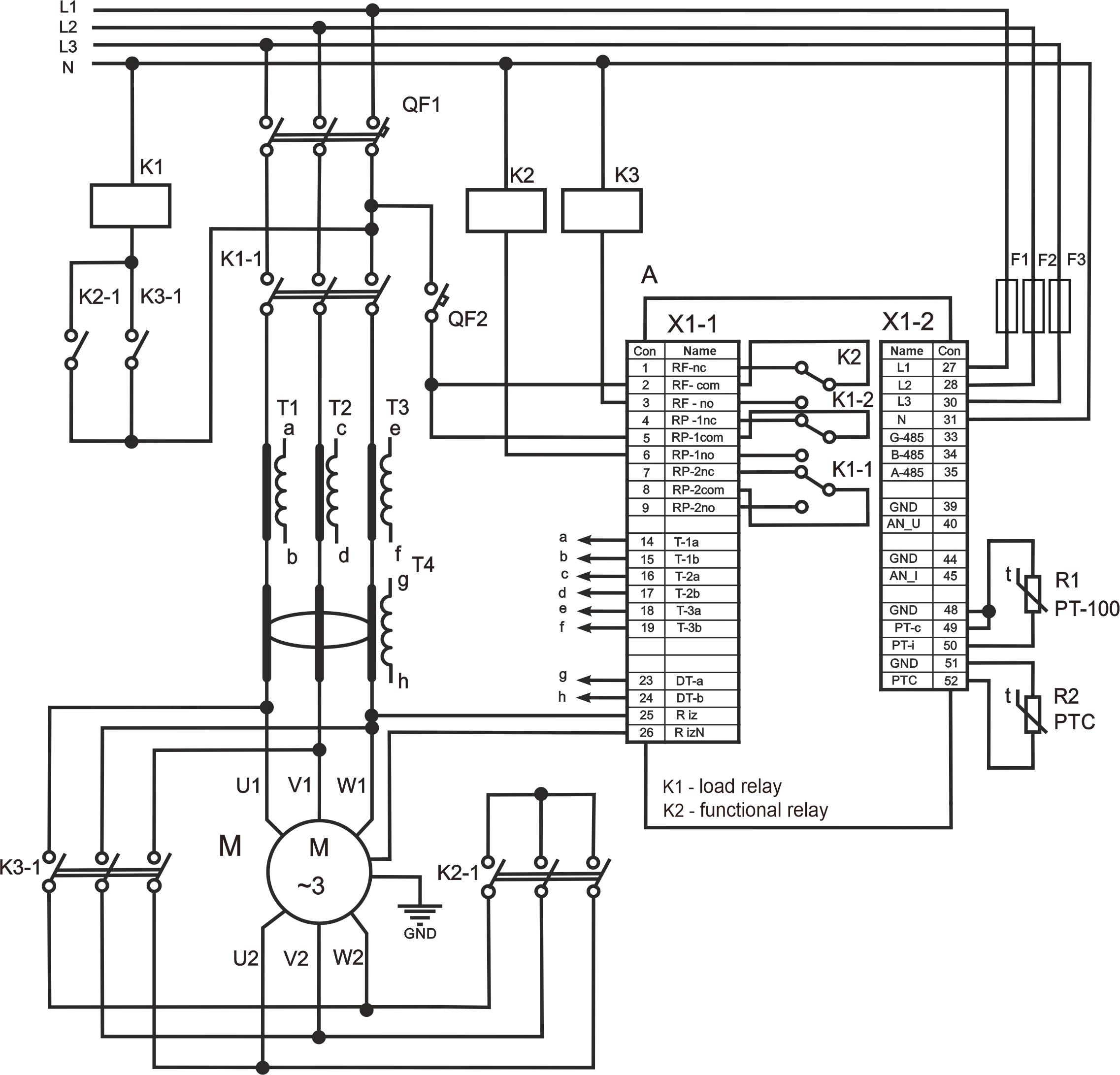
Appendix B: UBZ-302M Operation with Motor in Star/Delta Switching ModeConnect the UBZ-302M to motor operation in the star/delta switching mode according to the simplified scheme shown on Figure B.1 below. When working in the star/delta switching mode the motor could be controlled in several ways:
Figure B.1 – Wiring diagram for the UBZ-302M for star/delta mode of operation |